How to Use AI in Coding: The Complete Developer Guide for 2026
Learning how to use AI in coding is now one of the most valuable skills a developer can build. From writing cleaner functions to automating entire workflows, using AI in coding has reshaped how software gets built. Whether you are just starting out or scaling a production app, this guide covers everything you need: tools, techniques, prompting strategies, and real-world workflows. If you want to go deeper on the broader shift, check out our guide on AI-augmented software development.
According to recent industry data, 41% of all code written today is AI-generated or AI-assisted. That number is only growing. The developers who adapt now will move faster, write better code, and stay ahead.
What Does “Using AI in Coding” Actually Mean?
Before diving into the how, it helps to understand the what. Using AI in coding is not about replacing your judgment. Instead, it is about offloading the repetitive, error-prone, and time-consuming parts of development to a machine. All the while, you can focus on architecture, logic, and decisions that require real expertise.
Think of it like this: AI is a highly knowledgeable intern. It knows every programming language, every framework, and every design pattern. However, it lacks context about your specific project, your team’s conventions, and your users’ needs. Your job is to supply that context clearly and consistently.
There are three broad levels of how to use AI in coding:
| Level | What It Covers | Example Tools |
| Autocomplete | Line-by-line suggestions as you type | GitHub Copilot, Codeium, Tabnine |
| Chat assistance | Q&A, debugging, explanations, reviews | Claude, ChatGPT, Gemini |
| Agentic coding | Multi-file tasks, autonomous execution | Cursor, Claude Code, Windsurf |
Most developers start at level one and gradually move into levels two and three. Each level requires a different approach and mindset.
Why Every Developer Needs to Know How to Use AI in Coding
The case for using AI in coding is no longer theoretical. The numbers make it clear.
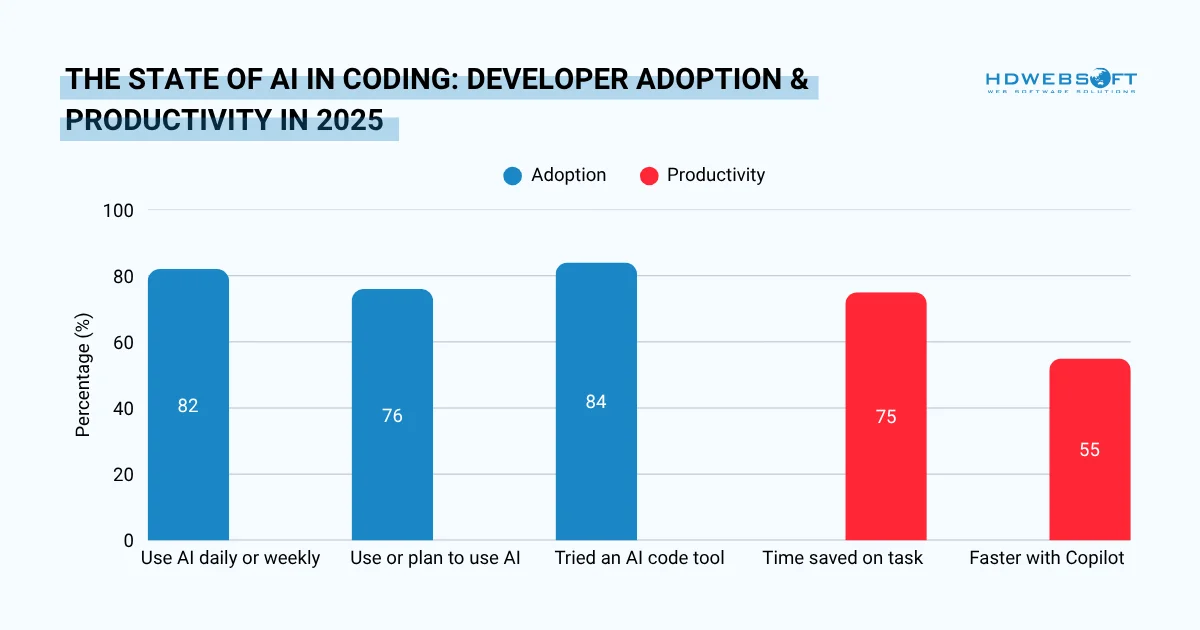
Key statistics on using AI in coding — developer adoption rates, time saved, and productivity gains at a glance.
Developers who use AI coding assistants save between 30% and 75% of their time on coding, debugging, and documentation. In a controlled study with 4,800 developers, GitHub Copilot users completed tasks up to 55% faster than those coding manually. Meanwhile, 76% of professional developers either already use AI tools or plan to adopt them soon.
Beyond speed, AI improves code quality. It catches bugs in real time, suggests best practices, and flags security vulnerabilities that humans easily miss. For teams, it reduces review cycles and helps enforce consistent standards across a codebase.
The bottom line: knowing how to use AI in coding is no longer optional. It is a core professional skill.
How to Use AI in Coding: A Step-by-Step Workflow
The most effective approach to how to use AI in coding is not random. It follows a deliberate, repeatable workflow. Below are the key steps: drawn from real developer experience across forums, open-source communities, and professional teams.
Step 1: Plan the Architecture Before Writing Code
Many developers make the mistake of jumping straight into code generation. A smarter approach starts with planning. Before asking AI to write anything, use it to think through your architecture first.
Ask your AI assistant to outline the folder structure, identify dependencies, and map out how different components will interact. This early step prevents you from generating code that conflicts with itself later. It also gives AI a clearer mental model of your project, which leads to better output throughout.
How to prompt for architecture planning
Use prompts like:
- “I’m building a REST API with Node.js and PostgreSQL. What’s a clean folder structure for this?”
- “Think step-by-step: what are the main components I need for a user authentication system?”
Adding “think step-by-step” to your prompt activates chain-of-thought reasoning. As a result, you get a more thorough breakdown instead of a rushed answer.
Step 2: Set Up Your Project Context
One of the most overlooked aspects of how to use AI in coding is context setup. AI has no memory of your previous sessions. Therefore, you need to feed it the right context every time or build a system that does it automatically.
The most effective method is creating a dedicated project in your AI tool of choice and loading it with your codebase’s key details: dependencies, deployment environment, file structure, and any coding conventions your team follows.
What to include in your context setup
- Stack and versions: e.g., “React 18, TypeScript, Tailwind CSS, Supabase”
- Conventions: e.g., “We use camelCase for variables and snake_case for database fields”
- Constraints: e.g., “No third-party libraries unless approved”
- File structure: a brief map of where things live
This upfront investment saves enormous time. AI stops asking clarifying questions and starts producing output that actually fits your project.
Step 3: How to Prompt AI for Coding Effectively
Knowing how to prompt AI for coding is arguably the most important skill in this entire “how to use AI in coding” workflow. The quality of your prompt directly determines the quality of the output. A vague prompt produces vague code. A precise prompt produces precise code.
Treat your prompt like a mini-specification. Include the desired functionality, input and output types, edge cases, error handling expectations, and any UI behavior if relevant. The more specific you are, the less back-and-forth you need.
Prompting principles that actually work
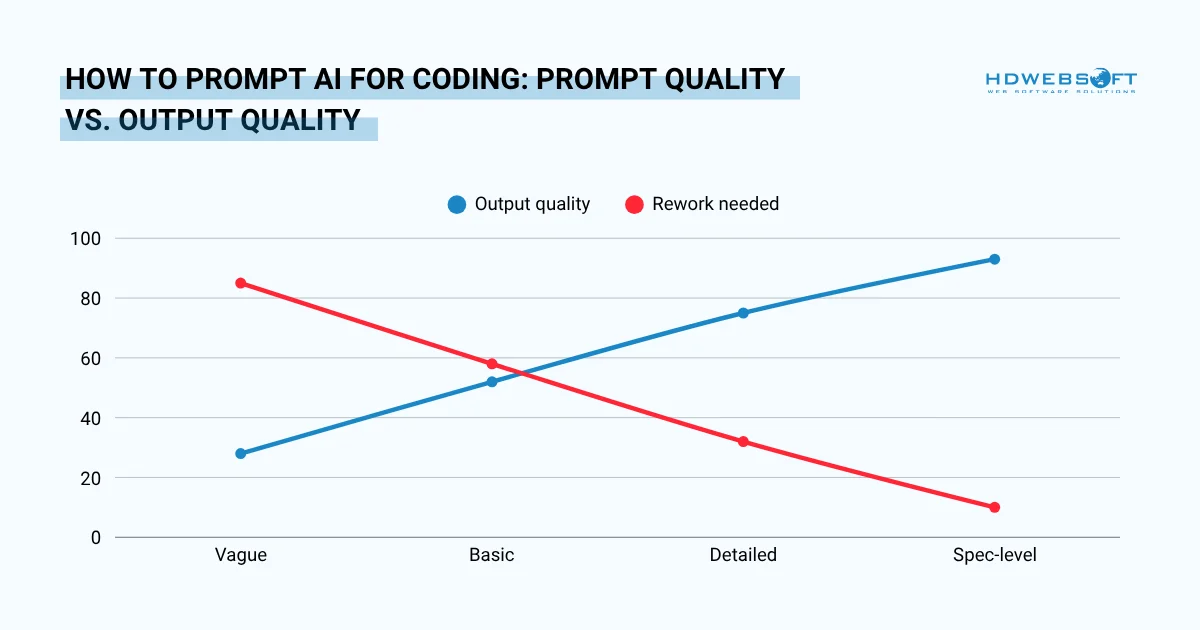
How to prompt AI for coding more effectively. The more specific your prompt, the higher the output quality and the less rework needed.
- Be explicit about what you want: Instead of “write a login function,” try “write a login function in TypeScript that accepts email and password, validates both fields, returns a JWT token on success, and throws a typed error on failure.”
- Specify the output format: Tell AI whether you want just the function, the full file, inline comments, or a test alongside it.
- One task per session: Do not mix unrelated requests in a single conversation. Each new task should start a fresh session in order to keep the context clean and the output more focused.
- Use iterative prompting: Start broad, then narrow. First ask for the structure, then ask for each piece. This “tree of thought” approach mirrors how experienced developers actually build things.
Step 4: Break Complex Tasks Into Smaller Components
One noteworthy point in how to use AI in coding: Large, complex prompts overwhelm AI and produce messy output. Instead, decompose your task into smaller, manageable pieces. This mirrors good software engineering practice and it works for the same reason.
For example, rather than asking AI to “build me a full e-commerce checkout flow,” break it down:
- First, ask for the cart data model
- Then, generate the API endpoint for creating an order
- Next, build the payment integration stub
- Finally, wire up the UI components one by one
Furthermore, smaller tasks let you verify each piece before moving on. You catch errors early, before they compound into a mess that is hard to untangle.
Step 5: Use AI as a Code Reviewer
Here is where AI pair programming starts to show its real value. AI is not just a code generator, it is also an excellent reviewer. After generating code, ask AI to critique its own output.
AI pair programming for review works best with prompts like:
- “Review this code for bugs, edge cases, and security issues.”
- “Does this follow best practices for Rails/TypeScript/Python?”
- “Does this match the conventions in the rest of the codebase?”
A particularly effective trick: use a second AI model as an independent checker. Open a separate chat in a different tool and paste the same code. Ask it the same questions. Disagreements between models often reveal genuine issues.
When to use AI for code review
| Scenario | What to Ask |
| After generating a new function | “Any bugs or edge cases I’m missing?” |
| Before a pull request | “Does this follow clean code principles?” |
| After a refactor | “Did I introduce any regressions here?” |
| On database queries | “Is this SQL query optimized and safe from injection?” |
Step 6: Always Verify and Test the Output
No matter how good your prompt is, AI makes mistakes. Sometimes it hallucinates functions that do not exist. Other times it produces code that looks correct but has subtle logic errors. Accordingly, verification is non-negotiable when you learn how to use AI in coding responsibly.
Write test cases for every significant piece of AI-generated code. Review the output as if a junior developer on your team wrote it. This is because in practice, that is the right level of trust. Ask yourself: do I understand what every line does? If the answer is no, ask AI to explain it line by line before using it.
This step is also how using AI in coding keeps your skills sharp rather than letting them atrophy. By engaging with the code critically, you learn from it. You stay in control of your own codebase.
A simple verification checklist
Before merging any AI-generated code, run through these checks:
- Functionality: does it do exactly what was asked?
- Edge cases: what happens with empty inputs, nulls, or unexpected types?
- Security: are there any injection risks or exposed credentials?
- Performance: is anything unnecessarily slow or memory-heavy?
- Readability: would a teammate understand this without asking you?
This checklist on how to use AI in coding properly takes two minutes. It prevents hours of debugging later.
The Best AI Tools for Coding in 2026
Knowing how to use AI in coding also means knowing which tools to reach for. The landscape has matured significantly. Different tools serve different purposes, and the best developers combine them strategically.
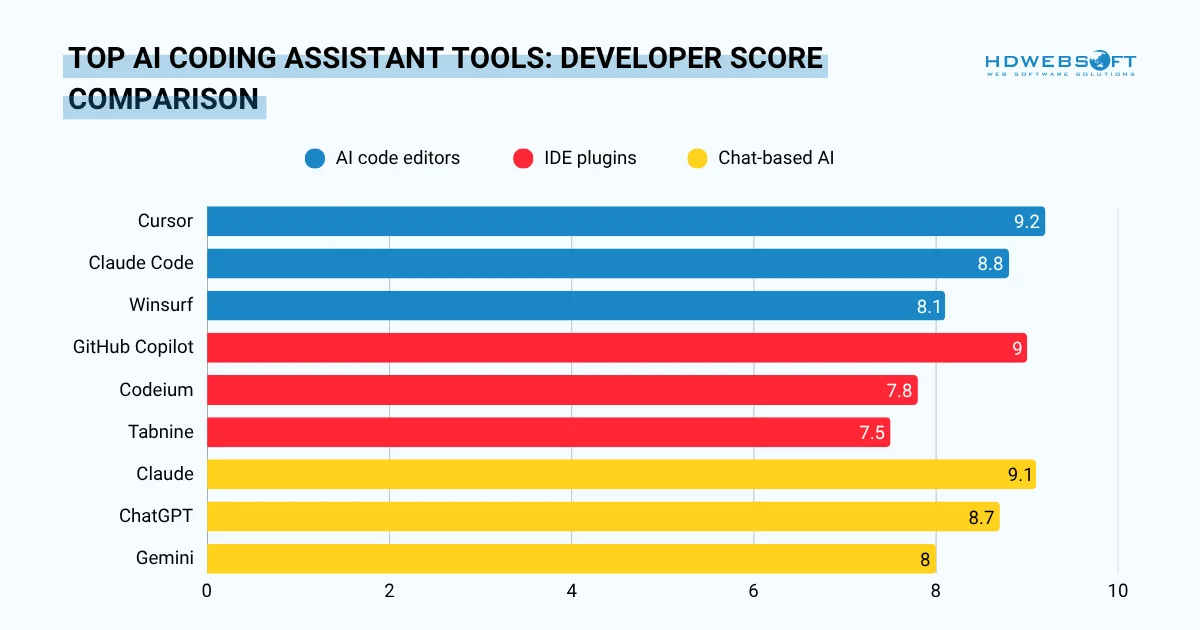
A comparison of the top AI coding assistant tools by developer score, covering editors, IDE plugins, and chat-based AI for coding.
AI-Powered Code Editors
These are full development environments built around AI. They are ideal for complex, multi-file tasks and represent the most immersive form of AI pair programming.
| Tool | Best For | Standout Feature |
| Cursor | Multi-file refactoring and context-aware editing | Deep codebase understanding, in-place edits |
| Claude Code | Terminal-based agentic workflows | Autonomous multi-step task execution |
| Windsurf | Collaborative team coding with AI | IDE designed for human-AI collaboration |
AI Coding Assistants (IDE Plugins)
These plug into your existing editor and offer inline suggestions without switching tools. They are the easiest entry point for how to use AI in coding.
- GitHub Copilot: the most widely adopted; strong autocomplete and chat
- Codeium: generous free tier; excellent for individuals and small teams
- Tabnine: privacy-first; adapts to your personal coding style over time
Chat-Based AI for Coding
Sometimes you do not need code generated immediately. You need to think through a problem, debug an error, or plan an approach. This is where chat-based AI tools excel.
- Claude: particularly strong for architecture discussions and long-context reasoning
- ChatGPT: versatile; great for explaining concepts and quick code snippets
- Gemini: well-integrated with Google Cloud and Android development workflows
How to Use AI in Coding at Every Experience Level
The right approach to how to use AI in coding shifts depending on where you are in your development journey. What works for a senior engineer is different from what helps a beginner. Here is a practical breakdown.
For Beginners
Starting out, the priority is learning and not just shipping code. Therefore, use AI as a tutor, not a ghostwriter. When AI generates a function you asked for, do not just copy it. Ask it to explain every line. Ask why it chose that approach over another.
This habit builds intuition fast. Using AI in coding this way accelerates your understanding of patterns, syntax, and logic in ways that reading documentation alone cannot match. Focus on chat-based tools at this stage and only save the agentic editors for when you have a stronger foundation.
For Intermediate Developers
At this level, you already write functional code. The goal now is speed and quality. AI pair programming fits naturally here as you can use it to handle boilerplate, generate tests, and review your code before pushing. You have enough context to catch AI mistakes, which makes you the ideal driver.
Start experimenting with tools like Cursor or GitHub Copilot directly in your editor while paying attention to how context affects output quality. The more you tune your prompts and project setup, the faster your workflow becomes.
For Senior Developers
Senior developers benefit most from AI. It’s not because they need help writing code, but because they know exactly what to delegate. How to use AI in coding at this level means using it for the repetitive and time-consuming: boilerplate, migrations, test coverage, documentation, and database queries.
Meanwhile, architecture decisions, code reviews, and system design remain firmly in human hands. In fact, AI pair programming here is less about generating code and more about pressure-testing ideas. Paste a design proposal and ask AI to challenge it. The result is often a more robust solution than you started with.

Advanced Tips from HDWEBSOFT Developers Who’ve Been Doing This a While
Beyond how to use AI in coding at the level-specific advice above, HDWEBSOFT’s seasoned developers have picked up a handful of habits that consistently improve results. These are the things that rarely show up in beginner guides, but make a noticeable difference in practice.
Stick to popular, well-documented stacks
AI models are trained on public code. The more widely used your framework, the better the suggestions you will get. Tools like Next.js, Supabase, Tailwind, and PostgreSQL are well-represented in training data. Niche or proprietary frameworks, on the other hand, produce noticeably weaker output.
Keep a “conventions” file AI can reference
Create a short markdown file that documents your team’s coding rules, naming conventions, folder structure, and architectural decisions. Remember to reference it at the start of every session. This single habit eliminates a huge amount of back-and-forth and keeps AI output consistent across your codebase.
Use AI for database schemas, SQL, and regex
These are areas where small mistakes cause big problems and where how to use AI in coding workflow genuinely excels. Rather than hand-writing complex queries or regular expressions, let AI draft them. Then review carefully.That way, it’s fast, reliable, and saves significant mental energy for more creative work.
Ask for docs alongside the code
Whenever AI generates a function, component, or API endpoint, ask it to produce the corresponding README section or inline documentation at the same time. Getting docs written while context is fresh is far easier than going back later and AI makes it nearly effortless.
Common Mistakes When Using AI for Coding
Even experienced developers fall into these traps. Avoiding them will dramatically improve your results when learning how to use AI in coding.
- Mistake 1: Pasting code without understanding it. This is the most dangerous habit. If something breaks in production, you need to know what your code does. Hence, always read before you paste.
- Mistake 2: Giving too much context. Counterintuitively, overloading AI with context causes it to hallucinate or lose focus. Provide what is relevant to the current task and nothing more.
- Mistake 3: Treating AI output as final. AI-generated code is a starting point. You must edit it, test it, review it, and most importantly, treat it like a first draft from a smart but fallible colleague.
- Mistake 4: Using one tool for everything. Different tools have different strengths. Use an editor like Cursor for implementation, Claude or ChatGPT for architecture discussions, and a linter or reviewer like Qodo for quality enforcement.
- Mistake 5: Skipping version control. Applying how to use AI in coding workflow is good, but always commit before letting it make significant changes to your codebase. AI can overwrite things it was not asked to touch. Git is your safety net.
FAQs: How to Use AI in Coding

What is the best way to prompt AI for coding?
The best way to prompt AI for coding follows a few clear principles:
- Be specific: include input/output types, error handling, and edge cases
- One task per session: avoid mixing unrelated requests in the same chat
- Add context: tell AI your stack, conventions, and constraints upfront
- Use step-by-step prompting: break complex tasks into sequential smaller prompts
- Specify the format: tell AI whether you want a function, full file, test, or explanation
The more precisely you frame what you need, the better the output. Think of it as writing a spec, not asking a question.
What is the best AI tool for coding beginners?
For beginners learning how to use AI in coding, GitHub Copilot or Codeium are the easiest starting points. Both integrate directly into VS Code and provide inline suggestions without requiring you to change your workflow.
For understanding code and asking questions, Claude or ChatGPT in chat mode are highly approachable. Start with one tool and learn it well before adding others.
Can AI write code from scratch?
Yes, but with important caveats. AI pair coding can generate complete functions, components, APIs, and even full application scaffolding from a detailed prompt.
However, the quality depends heavily on the clarity of your instructions and the specificity of your context. AI is best used iteratively: generate, review, refine, and test rather than expecting perfect output in one shot.
Does using AI in coding make you a worse programmer?
Only if you let it. The risk is real, which means copy-pasting code without understanding it does weaken your skills over time. However, how to use AI in coding actively and critically requires more skills. Asking it to explain its output, questioning its choices, and writing tests will actually accelerate learning.
Senior developers report that AI has made them more productive precisely because their existing knowledge helps them direct it effectively.
Is AI-generated code safe to use in production?
It can be, with the right process. AI-generated code should always go through the same review, testing, and security checks as human-written code.
Never deploy AI output directly without verification. Pay particular attention to authentication logic, database queries, and any code that handles user input. These are areas where subtle AI errors can create real vulnerabilities.
Final Thoughts
Understanding how to use AI in coding is no longer a nice-to-have. It is a foundational skill for modern development. The developers who thrive in 2026 and beyond will not be the ones who avoid AI. They will be the ones who know exactly how to direct it, verify it, and integrate it into a workflow that produces reliable, high-quality software.
Start with one tool. Master your prompting. Stay curious. And always keep your hand on the wheel.