Mobile application design and development is one of the most critical investments a business can make in today’s digital-first world.
Consumers spend over four hours a day on their phones. They expect apps to be fast, intuitive, and reliable. If your app fails to meet those expectations, users leave and they rarely come back. However, building a great mobile app requires more than good intentions. It demands a clear understanding of the entire process, from the first design wireframe to post-launch maintenance.
This guide covers everything you need to know. Whether you are a business owner exploring your options or a product manager planning your next release, you will find actionable insights here. By the end, you will understand the full lifecycle, the key decisions at each stage, and how to avoid the most common mistakes teams make.
What Is Mobile Application Design and Development?
Before diving into processes and frameworks, it helps to define the discipline clearly. Many people use these terms interchangeably, but they represent distinct, yet deeply connected, activities.
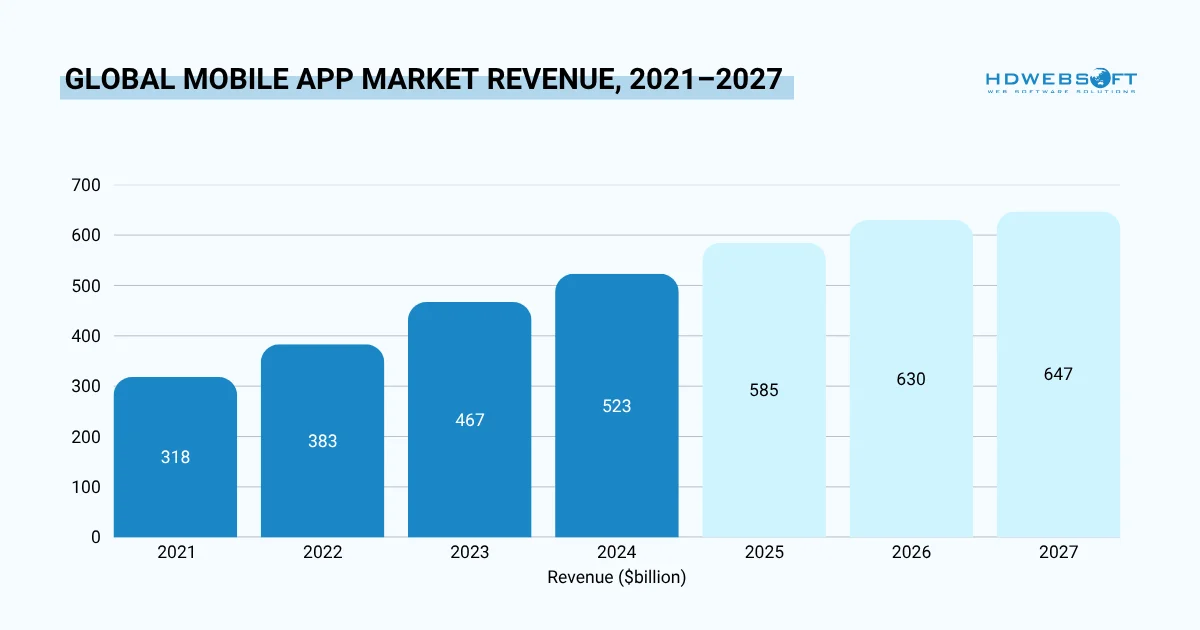
The mobile app economy has nearly doubled in six years, from $318B in 2021 to a projected $674B by 2027. For businesses investing in mobile application design and development today, they are entering a market that adds tens of billions in new revenue every single year, with no slowdown in sight.
Defining the Two Disciplines
Design focuses on the user experience, visual interface, and overall feel of the product. It answers the question: how will users interact with this app?
Development, on the other hand, focuses on building functional software. It answers the question: how does the app actually work?
Together, mobile application design and development describes the complete process of conceptualizing, designing, building, testing, and launching a mobile product.
Why Both Must Work Together
A common mistake is treating design and development as sequential phases. Teams design everything first, then hand it to developers. In practice, this leads to interfaces that look great but are technically impossible to build, or at least very expensive.
Instead, modern teams run design and development in parallel. Designers and developers collaborate from day one. This shortens timelines and reduces costly rework.
Furthermore, this integrated approach leads to better products. When developers understand design intent, they make smarter technical decisions. When designers understand technical constraints, they create more realistic and buildable interfaces.
The Mobile App Design Process
A structured mobile app design process is what separates successful products from failed ones. Without a clear process, teams waste time, miss user needs, and ship products that require expensive redesigns.
The mobile application design and development process typically moves through several stages. Each stage builds on the previous one and feeds into the next.
Stage 1: Discovery and Research
Every great app starts with deep research. Before any design begins, teams must develop a thorough understanding of the target users, their pain points, their existing behaviors, and the competitive landscape.
This stage typically includes in-depth user interviews, surveys, competitive audits, and market analysis. The goal is to build a clear, evidence-based picture of what the app needs to accomplish and for whom. Hence, teams often emerge from this stage with user personas: detailed profiles of the different types of people who will use the product.
Common mistake
Good discovery research also examines existing solutions. What do users currently do to solve this problem? What do they like or dislike about existing tools? Where are the gaps that your product can fill? These questions guide every design and development decision that follows.
Skipping this stage in the mobile application design and development process is one of the most expensive mistakes a team can make. Without solid research, every design decision becomes educated guesswork. Therefore, teams build features users do not want and miss the features they actually need. The cost of this misalignment compounds at every subsequent phase.
Stage 2: Wireframing and Information Architecture
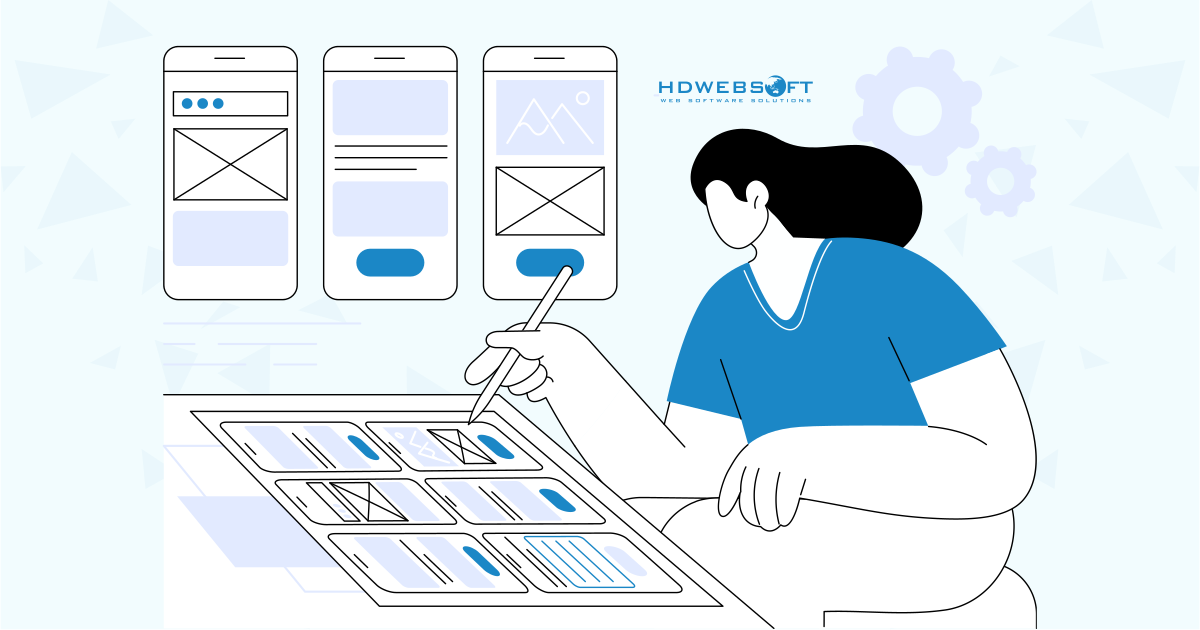
Once research is complete, designers begin mapping out the app’s structure. Wireframes are low-fidelity sketches, stripped of color, typography, and visual style, that show how screens connect and how users will navigate through the app.
At this stage, the focus is on logic, not aesthetics. Teams map user journeys: the step-by-step paths users take to accomplish their goals. They define the information hierarchy, as in what content and functionality appears at what level of the app. Moreover, they identify potential dead ends and confusing navigation patterns before a single pixel of visual design has been created.
Information architecture decisions in mobile application design and development process made here have lasting consequences. An app with clear, logical structure feels intuitive to use. On the contrary, an app with muddled architecture requires users to think too hard and thinking is friction. Consequently, friction leads to abandonment.
This is where the core mobile app design process takes shape, and it is worth investing significant time and attention before moving forward.
Stage 3: Visual Design and Prototyping
With the structure established and validated, designers add visual polish. This includes selecting typography that matches the brand and enhances readability, building a color palette that communicates the right emotional tone, designing iconography that is clear and consistent, and establishing spacing and layout rules that create visual rhythm.
Tools like Figma and Adobe XD are the industry standard at this stage. They allow designers to create high-fidelity mockups that look and feel like the finished product. Meanwhile, they maintain the flexibility to make rapid changes in mobile application design and development response to feedback.
Interactive Prototyping for Early Experience Validation
Alongside visual design, teams build interactive prototypes. These are clickable simulations of the app experience. Users can tap buttons, navigate between screens, and interact with the interface without a single line of code having been written. Resultantly, prototypes allow stakeholders to evaluate the product experience and provide meaningful feedback long before development begins.
The combination of high-fidelity visual design and interactive prototyping is one of the most powerful risk-reduction tools in the mobile app design process. It surfaces major experience problems early, when they are still relatively cheap to fix.
Stage 4: Usability Testing
Testing the prototype with real users reveals friction points that the mobile application design and development team has become blind to. After weeks of working on a product, designers and product managers have a mental model of how it works.
Notably, real users do not share that mental model. Watching them interact with your prototype by struggling with navigation, missing calls to action, misunderstanding labels is humbling and invaluable.
Different Testing Methods
Teams use a range of methods at this stage: moderated usability sessions in which a researcher watches a participant complete specific tasks, unmoderated remote testing in which participants record themselves using the prototype, A/B tests that compare two design variations, and heatmap tools that visualize where users tap and where they get stuck.
Insights from usability testing feed directly back into the design. This creates an iterative loop of test, learn, revise, test again that tightens the design until it is genuinely intuitive. Naturally, the cost of a round of usability testing is a fraction of the cost of redesigning a feature after development has been completed.
Stage 5: Design Handoff
The final mobile application design and development phase is preparing polished assets and detailed specifications for the development team. A thorough handoff document covers every interaction state along with exact spacing values, color codes, typography specifications, and downloadable assets.
Typically they are: What does a button look like when pressed? What happens when a form field has an error? What does the empty state of a screen look like?
Modern tools like Figma include dedicated handoff features that allow developers to inspect design properties directly, download assets in the correct formats and resolutions, and reference exact spacing values without needing to ask designers. Resultantly, a clean, well-documented handoff dramatically reduces back-and-forth during mobile application design and development and allows developers to work with greater speed and confidence.
The table below summarizes the key outputs at each design stage:
| Design Stage | Primary Output | Key Tool |
|---|---|---|
| Discovery & Research | User personas, research report | Interviews, surveys |
| Wireframing & IA | Wireframes, user flow diagrams | Figma, Miro |
| Visual Design & Prototyping | High-fidelity mockups, prototype | Figma, Adobe XD |
| Usability Testing | Test report, prioritized fixes | UserTesting, Maze |
| Design Handoff | Asset library, component specs | Figma, Zeplin |
Application Development Design: Bridging Design and Code
The concept of application development design sits at the intersection of UX decisions and software architecture. It refers to the structural decisions that shape how an app is built, not just how it looks.
Understanding this concept is essential for any team building a mobile product. Decisions made at this stage have long-term consequences for performance, scalability, and cost.
What Application Development Design Covers
At its core, mobile application design and development covers three major areas: system architecture, API design, and component design.
System architecture defines how the app is structured at a high level. Will it be a monolith or a microservices-based system? Will data be processed on-device or server-side? These decisions shape everything that follows.
While API design determines how the mobile frontend communicates with the backend. A poorly designed API leads to slow load times, high data usage, and difficult debugging.
On the other hand, component design focuses on building reusable UI and logic modules. Well-designed components speed up development and make future updates much easier.
Why Architecture Decisions Matter Early
Architecture is not just a developer concern since design decisions directly influence technical architecture. Namely, a design with heavy real-time features like live chat or notifications requires a backend capable of handling persistent connections.
Similarly, an app designed for offline use requires local data storage, sync logic, and conflict resolution strategies. These are significant technical requirements in mobile application design and development that must be planned from the start.
Consequently, the best teams involve developers in design reviews. This ensures that visual decisions align with what is technically feasible and cost-effective.
Design Systems and Component Libraries
One of the most powerful outputs of good application development design is a design system. It’s a collection of reusable components, guidelines, and standards that keep the product consistent across screens and platforms.
For larger products, a design system becomes a critical asset. It speeds up both design and development, reduces inconsistencies, and makes onboarding new team members much faster.
Popular examples include Google’s Material Design and Apple’s Human Interface Guidelines. Many organizations also build custom internal design systems tailored to their brand.
The 8 Phases of Mobile App Development Lifecycle
Understanding the 8 phases of mobile app development lifecycle gives teams a shared framework for planning, executing, and measuring their work. Each phase has specific goals, deliverables, and stakeholders.
Below is a detailed breakdown of each mobile application design and development phase:
| Phase | Name | Key Activities | Output |
|---|---|---|---|
| 1 | Ideation & Market Research | Concept validation, competitor analysis, user research | Validated concept, research report |
| 2 | Requirements & Scope | Feature prioritization, user stories, technical requirements | PRD, project scope document |
| 3 | UX/UI Design | Wireframes, visual design, prototype, usability testing | Approved design files, prototype |
| 4 | Architecture Planning | Tech stack selection, system design, API planning | Architecture diagram, tech spec |
| 5 | Development | Frontend and backend coding, API integration | Working build (sprint releases) |
| 6 | Testing & QA | Functional, performance, security, and UX testing | QA report, bug fixes |
| 7 | Deployment & Launch | App store submission, staging, release | Live app on App Store / Google Play |
| 8 | Maintenance & Iteration | Bug fixes, performance monitoring, feature updates | Updated app, performance reports |
Phase 1: Ideation and Market Research
Every successful app begins with a validated idea. Before writing a single line of code, mobile application design and development teams must confirm that a real problem exists, that users want a solution to that problem. And most importantly, the proposed solution is meaningfully better than what already exists.
Market research at this stage involves analyzing competitors, studying user behavior in adjacent categories, and identifying gaps in the market. It is tempting to assume you understand what users want. The reality is that user behavior is almost always more nuanced than our assumptions. The goal of this phase is not to confirm your existing idea as it’s to stress-test it against reality.
Moreover, structured validation techniques can reveal whether your idea has genuine merit before significant resources are committed. For example, customer discovery interviews, landing page tests, and concierge MVPs (where the product experience is delivered manually, before any software is built.)
Phase 2: Requirements and Scope Definition
Clarity on scope prevents one of the most common and destructive mobile application design and development project killers: scope creep. When requirements are vague, every stakeholder fills in the gaps with their own assumptions and those assumptions rarely align. The result is a project that expands continuously without a clear definition of done.
During this phase, teams define precisely what the app will and will not include in its first version. Every feature must be explicitly prioritized. User stories, short descriptions of what a user needs to accomplish and why, are the primary tool for capturing requirements. In a way, that keeps the team focused on user value rather than technical features.
Product requirements documents (PRDs) created during this phase become the foundation for every subsequent decision in the 8 phases of mobile app development lifecycle. A strong PRD is not just a list of features. It is a statement of intent that aligns the entire team around the same goals.
Phase 3: UX/UI Design
This phase is where the mobile application design and development process described in detail above comes into full focus. Designers create wireframes that define the app’s structure, build high-fidelity visual designs. They also develop interactive prototypes that allow the full product experience to be evaluated and tested.
User testing occurs in this phase as well. Feedback from real users is incorporated before development begins. They can be gathered through usability sessions, remote testing, and prototype reviews. By catching UX problems here, when changes require only design adjustments rather than code rewrites, saves significant time and budget.
This is also when the design system starts to take shape. Consequently, establishing a consistent component library, color system, and typography scale in this phase sets the development team up for efficient, consistent implementation.
Phase 4: Architecture Planning
Technical architects and senior developers make the foundational structural decisions in this phase of mobile application design and development. Which technology stack? Native iOS and Android, a cross-platform framework, or a hybrid approach? How will the database be structured? How will authentication and authorization work? How will the app handle offline use, if at all?
These decisions directly impact the app’s long-term performance, scalability, and maintenance costs. Poor architectural choices made here create technical debt that compounds over time. Features become harder to add, performance degrades as the user base grows, and security vulnerabilities become more difficult to address.
Therefore, getting architecture right at this stage is far cheaper than refactoring it after launch.
Native vs. Cross-Platform Architecture
Native development means building a separate codebase for iOS and Android. It offers the best performance and deepest platform integration. However, it requires two development teams.
On the contrary, cross-platform frameworks like React Native and Flutter allow teams to share a single codebase across both platforms. This reduces cost and mobile application design and development time. Plus, their performance has improved dramatically in recent years.
The right choice depends on your budget, timeline, and performance requirements. Teams that need maximum performance for complex apps often choose native. Teams with tighter budgets often prefer cross-platform.
Further reading: PWA or Native App? Which is the Right Choice?
Tech Stack Considerations
Beyond the frontend choice, backend technology also matters. Node.js, Python, and Ruby on Rails are popular for mobile backends. Cloud platforms like AWS, Google Cloud, and Azure provide scalable infrastructure.
Database choice also plays a major role. Real-time apps often use Firebase or similar real-time databases. Apps with complex relational data typically use PostgreSQL or MySQL.
Phase 5: Development
This is where the actual coding happens. Modern development teams work in agile sprints, typically two weeks long. Each sprint delivers a working, testable increment of the app.
In mobile application design and development, front-end developers build the user-facing screens while back-end developers build the APIs, databases, and server logic. Both sides must coordinate closely to ensure seamless integration. Misalignment between front-end expectations and back-end implementation is one of the most common sources of delays in mobile development projects.
Furthermore, code quality practices, code reviews, automated testing, continuous integration, are not optional extras. They are the foundation of a codebase that can be maintained and extended over time without becoming an increasingly fragile and expensive burden.
Phase 6: Testing and Quality Assurance
Testing is not a single activity as it is an ongoing process throughout the 8 phases of mobile app development lifecycle. However, this dedicated phase ensures comprehensive coverage before launch.
Quality assurance for mobile application design and development covers:
- Functional testing (does the app do what it should?)
- Performance testing (does it run fast enough?)
- Security testing (is user data protected?)
- UX testing (is the experience smooth?)
Mobile Testing Challenges
Device fragmentation is undoubtedly a particular challenge for mobile QA. Your app needs to work correctly across dozens of device sizes, screen resolutions, operating system versions, and hardware configurations. Tools that enable automated testing across a wide device matrix are essential for catching device-specific bugs before they reach production, especially when teams already understand the key challenges in mobile test automation.
In addition, testing is the phase that teams most often cut when timelines slip. This is a false economy that almost always costs more than it saves. Bugs caught in QA are significantly cheaper to fix than bugs discovered in production. While production bugs carry the additional cost of damaged user trust and negative app store reviews that can take months to recover from.
Phase 7: Deployment and Launch
After the mobile application design and development project is done, launching a mobile app involves submitting it to the Apple App Store and Google Play Store. Both platforms have review processes that can take several days.
A staged rollout is often recommended. This means releasing to a small percentage of users first, monitoring for issues, and then gradually expanding the rollout. This way, the approach limits the blast radius of any unexpected bugs.
Phase 8: Maintenance and Iteration
Launch is not the finish line but the starting line. Post-launch maintenance ensures the app stays performant, secure, and compatible with new operating system versions.
More importantly, real user data collected after launch drives the next iteration. Teams analyze crash reports, session recordings, and user feedback to prioritize the next round of improvements.
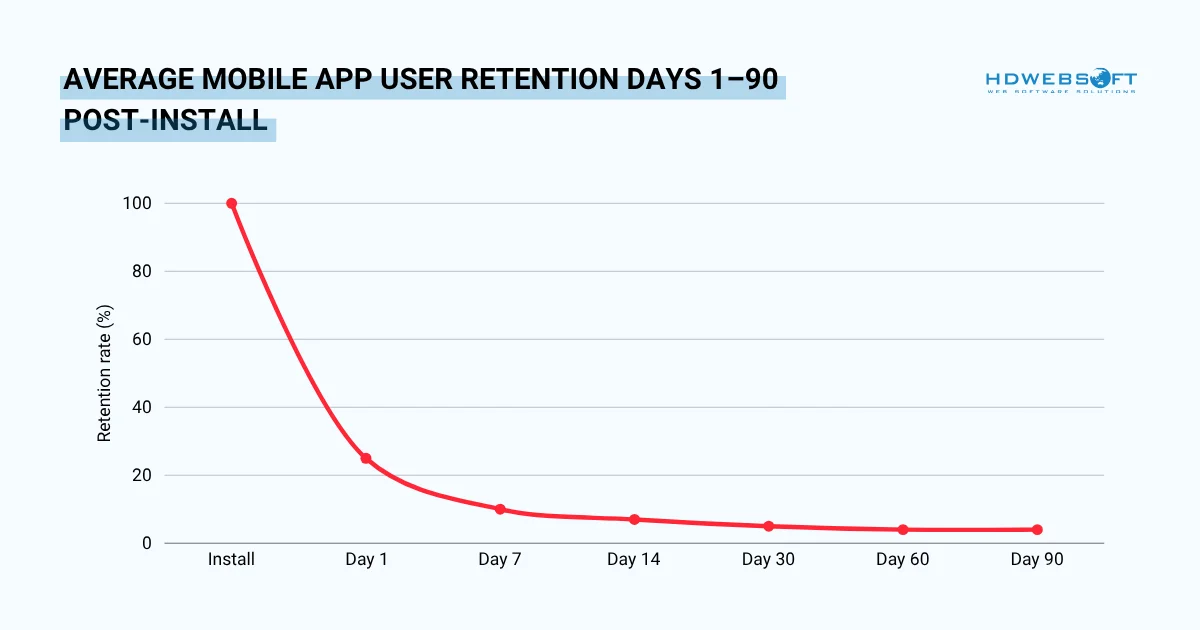
71% of all app users churn within 90 days of installing an app. That number isn’t a reason to panic at launch; it’s the argument for why the 8 phases of mobile app development lifecycle must continue long after go-live. The apps that survive the drop-off are the ones whose teams treat post-launch iteration as their most important phase, not their last.
Key Design Principles for Mobile Applications
Good mobile application design and development is guided by principles that go beyond aesthetics. These principles ensure the app is functional, accessible, and enjoyable for all users.
Mobile-First Thinking
Designing for mobile first means starting with the smallest screen and working up. This forces designers to prioritize the most essential features and content.
Additionally, mobile-first design aligns with how users actually consume digital content. Over 60% of global web traffic now comes from mobile devices. As a result, apps built with mobile at the core simply perform better for real users.
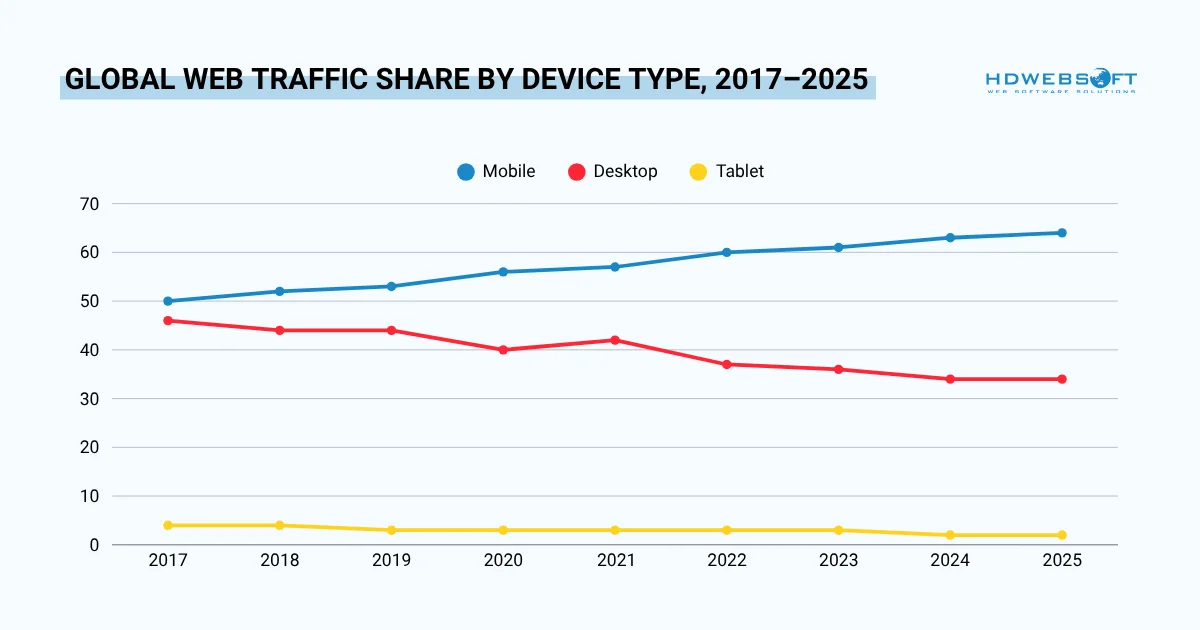
Mobile crossed 50% back in 2017 and has never looked back. By mid-2025 it commanded 64% of all global web traffic. It means that a mobile app design process that treats mobile as secondary is already designed for the minority, not the majority. Desktop, once nearly universal, now sits below 35%.
Accessibility Standards
Accessibility is not optional; it is both an ethical responsibility and a legal one in many markets. Mobile apps should comply with WCAG 2.1 guidelines at a minimum.
Practically, this means adequate color contrast, support for screen readers, scalable text sizes, and touch targets large enough for users with motor impairments. Building accessibility in from the start is far easier than retrofitting it later.
Performance-Driven Design
Every mobile application design and development decision carries a performance cost. Things like heavy animations, large images, and complex transitions all consume device resources and increase load times.
Therefore, designers must consider performance from the very beginning. Compressing images, using vector assets, and keeping animation complexity low all contribute to a faster, more responsive app.
Platform-Specific Guidelines
iOS and Android users have different expectations. iOS users are accustomed to Apple’s Human Interface Guidelines. Android users expect Material Design patterns.
Ignoring these conventions frustrates users. An app that feels native to its platform always outperforms one that ignores platform norms. Successful application development design respects the conventions of each platform.
Choosing the Right Mobile App Development Approach
One of the most consequential decisions in mobile application design and development is choosing your development approach. This decision affects your budget, timeline, team size, and long-term maintenance strategy.
Below is a comparison of the three main approaches:
| Approach | Best For | Pros | Cons |
|---|---|---|---|
| Native (iOS & Android) | High-performance apps, complex integrations | Best performance, full platform access | Two codebases, higher cost |
| Cross-Platform (React Native, Flutter) | Budget-conscious teams, faster timelines | Single codebase, cost-effective | Some platform limitations |
| Hybrid (Ionic, Cordova) | Simple apps, rapid MVPs | Fastest to build, web tech stack | Poorest performance, limited native feel |
When to Choose Native Development
Native development is the right choice when performance is non-negotiable. For instance, gaming apps, augmented reality experiences, and apps with heavy media processing all benefit from native code.
Similarly, if your app requires deep hardware integration such as Bluetooth, NFC, camera processing, or GPS, native development gives you the most direct access to device capabilities.
When to Choose Cross-Platform Development
Cross-platform frameworks for mobile application design and development have matured significantly. React Native and Flutter now power many large-scale, high-quality applications. If your app is primarily data-driven like dashboards, e-commerce, or productivity tools, cross-platform is often the smarter financial choice.
Moreover, cross-platform development enables faster iterations. Shipping a bug fix to both iOS and Android simultaneously, from a single codebase, is a significant operational advantage.
Working with a Mobile App Design and Development Team
Choosing the right team is as important as choosing the right technology. Whether you build in-house, hire a dedicated agency, or work with consulting firms, the team structure will shape your product’s outcome.
In-House Teams vs Agencies and Consulting Firms
Building an internal team gives you the most control. Your team knows your product deeply and can iterate quickly. However, hiring and retaining strong mobile talent is expensive and time-consuming.
- In-house teams work best for companies where mobile is a core part of the business and not just a supporting tool. If your mobile app is central to your revenue model, internal ownership is worth the investment.
- Mobile application design and development agencies offer speed and specialization. A good agency brings experience across many industries, established processes, and a full team from day one.
For companies that need a high-quality app delivered quickly without the overhead of building an internal team, agencies are often the best path. They also bring valuable outside perspectives on UX and market trends.
What to Look for in a Development Partner
Not all agencies are created equal. When evaluating a development partner, look beyond their portfolio. Ask about their mobile app design process, their QA practices, and how they handle post-launch support.
Equally important is communication. A technically excellent mobile application design and development team that communicates poorly will frustrate you throughout the engagement. Prioritize transparency and responsiveness.

Typical Timelines and Budget Ranges
| App Complexity | Estimated Timeline | Estimated Budget Range |
|---|---|---|
| Simple app (MVP, limited features) | 2–4 months | $20,000 – $60,000 |
| Mid-complexity app | 4–8 months | $60,000 – $150,000 |
| Complex app (custom backend, real-time features) | 8–14 months | $150,000 – $500,000+ |
| Enterprise-grade app | 12–24 months | $300,000 – $1,000,000+ |
These figures vary based on geography, team composition, and feature scope. They are estimates, not guarantees. For a deeper budget breakdown, compare them with a dedicated mobile app development cost guide. Always request itemized proposals and build contingency into your budget.
Common Mistakes to Avoid
Even experienced teams make avoidable mistakes during mobile app design and development. Being aware of these pitfalls can save significant time and budget.
Over-Engineering Before Validation
Building too many features before validating the core product is one of the most common and costly mistakes in mobile application design and development. Teams spend months building a comprehensive app, only to discover that users do not want most of it.
Instead, start with a minimum viable product. Launch quickly, gather real feedback, and build the next version based on what users actually use.
Ignoring Platform-Specific UX Conventions
As mentioned earlier, iOS and Android users have different expectations. A navigation pattern that feels natural on Android may feel foreign to iOS users.
Respecting these conventions is not about limiting creativity. It is about reducing the cognitive load on users. Overall, familiar patterns help users focus on your app’s value, not on how to use it.
Skipping Testing Phases
Testing is often the first thing cut when timelines slip. This is a false economy. Bugs discovered in production are exponentially more expensive to fix than bugs caught during QA.
Additionally, a buggy launch can permanently damage your brand reputation. App store reviews are unforgiving, and poor early ratings are difficult to recover from.
Treating Launch as the Finish Line
Launching an app is an achievement, though it is only the beginning. Users who download your app and encounter a poor experience will uninstall it and leave a negative review.
A successful mobile application project is a continuous process. The teams that win are the ones that treat iteration as a core competency, not an afterthought.
Frequently Asked Questions
Below are answers to the most common questions about mobile application design and development.
What is the mobile app design and development process?
The mobile app design process typically moves through discovery, wireframing, visual design, prototyping, and handoff. Development then follows in phases, including architecture planning, coding, QA, and launch. Together, these steps form the 8 phases of mobile app development lifecycle.
How long does it take to design and develop a mobile app?
Timelines vary widely based on complexity. A simple MVP can be built in two to four months. A complex enterprise app can take one to two years. The most important factor is the clarity of your requirements at the start.
What is the difference between mobile app design and development?
Design focuses on how an app looks and feels. Development focuses on how it works. The best results come when both disciplines work together throughout the project. This integrated approach is the foundation of strong application development design.
What are the phases of mobile app development?
The 8 phases of mobile app development lifecycle are: ideation and market research, requirements and scope definition, UX/UI design, architecture planning, development, testing and QA, deployment and launch, and ongoing maintenance.
How much does mobile application design and development cost?
Costs range from $20,000 for a simple MVP to over $1,000,000 for an enterprise-grade product. The main cost drivers are feature complexity, team location, development approach (native vs. cross-platform), and ongoing maintenance requirements.
What languages are used in mobile app development?
For native iOS development, Swift is the primary language. For native Android, Kotlin is standard. Cross-platform apps commonly use JavaScript (React Native) or Dart (Flutter). Backend services are typically built with Node.js, Python, Java, or Go.
Conclusion
Successful mobile application design and development is never the result of chance. It comes from following a clear process, making informed architectural decisions, and working with a team equally committed to quality design and clean code. Every phase plays a critical role. Skip a step, and you pay for it later. Follow the 8 phases of mobile app development lifecycle with discipline, and you dramatically increase your odds of shipping a product users love.
Ready to bring your app idea to life? HDWEBSOFT’s Mobile App Development Services cover the full spectrum. With over a decade of experience and a track record of 250+ completed mobile projects, HDWEBSOFT has the expertise to take your product from concept to launch. Start the conversation today.