7 Salesforce Data Management Best Practices Every Business Needs
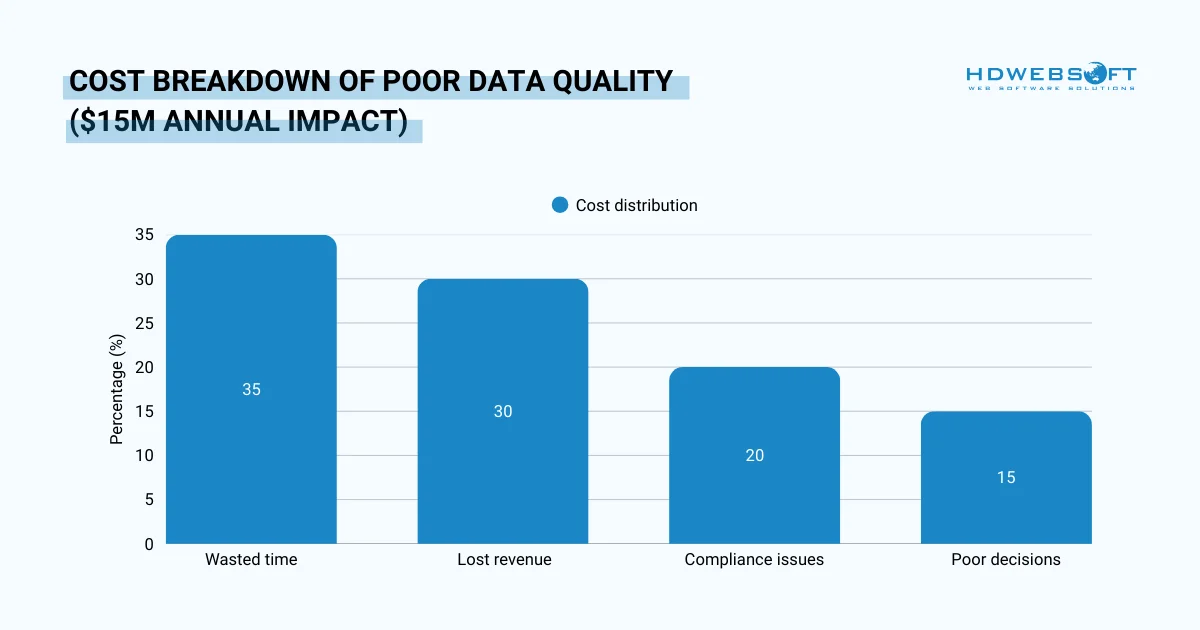
Salesforce data management is the foundation of a high-performing CRM system. Poor data quality costs businesses an average of $12.9 million annually, according to recent studies. When your Salesforce instance is cluttered with duplicates, outdated records, or inconsistent information, your team wastes valuable time. More importantly, you risk making critical business decisions based on faulty data. Hence, understanding SFDC in Salesforce and its data architecture is the first step toward building a robust data management framework.
This comprehensive guide will walk you through everything you need to know. We’ll cover best practices, explore essential data management tools, and provide actionable strategies. By the end, you’ll have a clear roadmap for transforming your Salesforce data from chaotic to controlled.
What Is Data Management in Salesforce?
Data management in Salesforce refers to the processes, policies, and practices that ensure your CRM data remains accurate, accessible, and secure. It’s not just about storing information. It’s about maintaining data integrity throughout its entire lifecycle. From initial entry to ongoing updates and eventual archiving, every stage requires careful attention.
Several core components make up comprehensive Salesforce data management:
Data Quality and Accuracy
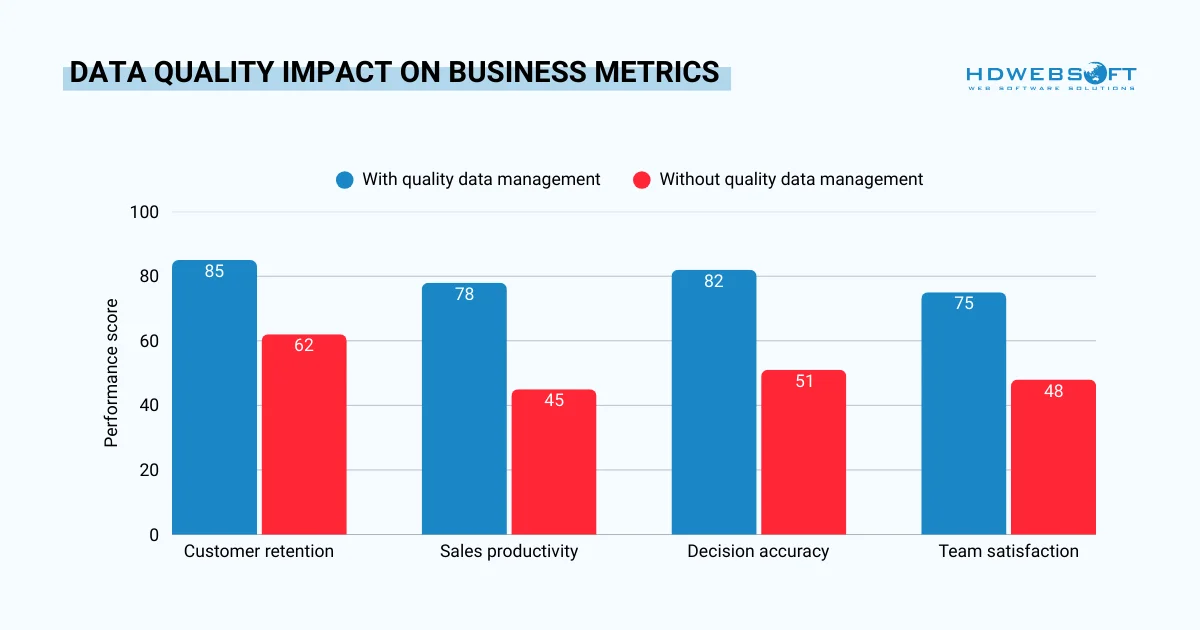
Quality begins at the point of entry. When users input information consistently and completely, your entire database benefits. However, data quality extends beyond initial entry. Regular audits, validation rules, and duplicate checks all contribute to maintaining high standards. In fact, organizations that rely on data are 23 times better at customer acquisition, six times better at retention, and 19 times more likely to see increased profits.
Data Organization and Structure
Structure determines how easily your team can find and use information. As a matter of fact, Salesforce offers custom objects, fields, and relationships to organize data logically. As a result, proper organization means sales reps spend less time searching and more time selling. Additionally, well-structured data makes reporting and analytics far more effective.
Data Security and Governance
Security protects your most valuable business asset: customer information. Salesforce provides robust security features including role hierarchies, field-level permissions, and sharing rules. Meanwhile, governance establishes who owns data, who can modify it, and how changes are tracked. Together, these elements create accountability and compliance in the Salesforce data management process.
Data Integration and Migration
Modern businesses rarely operate in isolation. Your Salesforce data likely needs to connect with marketing automation platforms, accounting systems, and customer service tools. Integration ensures information flows smoothly between systems. Migration, on the other hand, involves moving data into or out of Salesforce while maintaining quality and relationships.
The impact of neglecting data management in Salesforce can be severe. For example, duplicate records frustrate users and skew analytics, or outdated contact information leads to missed opportunities. Consequently, businesses that prioritize data management see improved productivity, better customer experiences, and more accurate forecasting.
Salesforce Data Management Best Practices
Implementing proven Salesforce data management best practices transforms your CRM from a data dumping ground into a strategic asset. These practices form the foundation of sustainable data excellence. Let’s explore the most critical approaches that leading organizations use.
Establish Comprehensive Data Governance
Strong governance starts with clear ownership. Every data element in your Salesforce instance should have a designated owner responsible for its accuracy. This person doesn’t necessarily maintain every record, but they set standards and resolve conflicts.
Define Data Standards
First and foremost, creating documentation is essential for consistency. Your data standards should cover naming conventions, required fields, and acceptable values. For example, establish whether you’ll use “St.” or “Street” in addresses, or decide if phone numbers include country codes. These seemingly small decisions prevent major headaches later.
Furthermore, implement validation rules to enforce your standards automatically. Validation rules can require specific formats, prevent incomplete entries, or ensure logical data relationships. When users can’t save incorrect data, quality improves dramatically.
Assign Clear Accountability
Establish a data governance committee that meets regularly when conducting Salesforce data management. This group should include representatives from sales, marketing, customer service, and IT. Together, they review data quality metrics, discuss challenges, and approve policy changes. Moreover, regular meetings keep data management visible and prioritized.
Maintain Rigorous Data Quality Standards
Quality isn’t a one-time achievement; it requires continuous effort. Regular maintenance prevents small issues from becoming major problems.
Conduct Regular Data Audits
Schedule quarterly data quality reviews. During these audits, examine duplicate rates, incomplete records, and outdated information. Use Salesforce reports to identify patterns and problem areas. For instance, if marketing leads consistently have missing phone numbers, address the root cause.
Moreover, don’t forget to establish KPIs for your data quality. Track metrics like duplicate percentage, data completeness rates, and time-to-update records. When you measure quality, you can improve it systematically.
Implement Duplicate Prevention
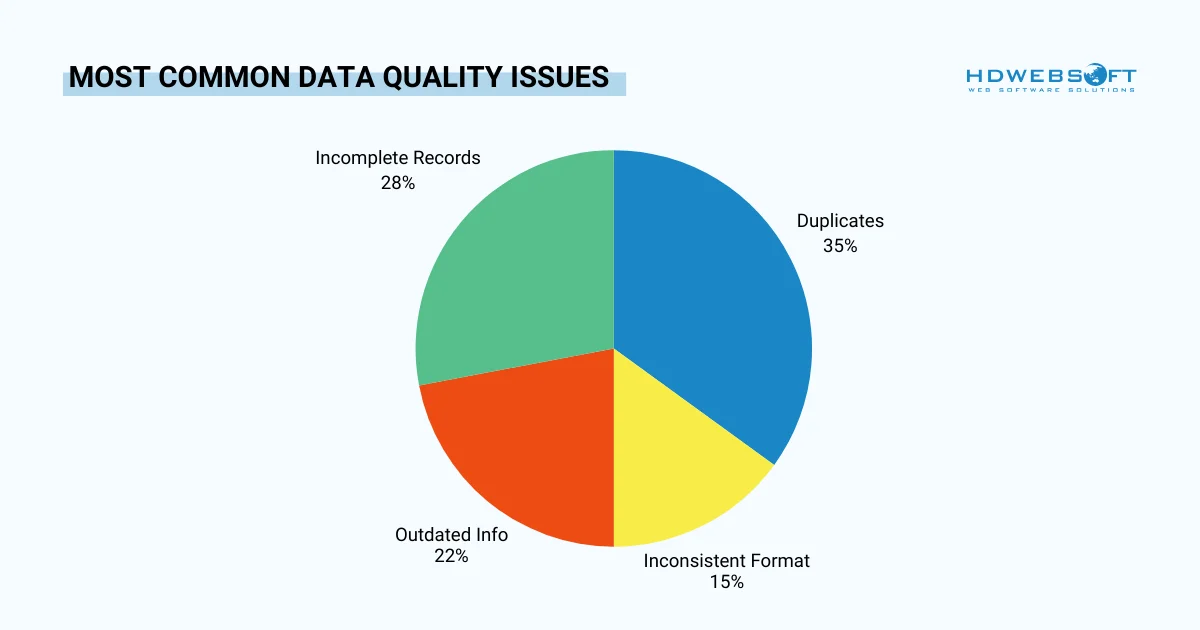
Duplicates are among the most common data quality issues. Fortunately, Salesforce provides native duplicate management tools. In Salesforce data management best practices, they configure matching rules that identify potential duplicates based on name, email, or other criteria. Then create duplicate rules that either block or warn users during data entry.
Additionally, run regular duplicate checks on existing records. When you find duplicates, merge them carefully to preserve all important information. Hence, it’s important to document your merging decisions to maintain an audit trail.
Enrich Data Proactively
Data enrichment adds valuable information to existing records. This might include demographic data, company information, or social media profiles. Consequently, enriched data provides context that helps sales and marketing teams personalize their approach.
Consider using data enrichment services that automatically append information to your records. However, always verify enriched data before relying on it for critical decisions. Remember: automated enrichment saves time but isn’t always 100% accurate.
Implement Robust Security and Access Controls
Security and Salesforce data management go hand-in-hand. Protecting data isn’t just about preventing breaches. It’s also about ensuring users see only what they need.
Design Role Hierarchies Carefully
Role hierarchies determine what records users can access, and a well-designed hierarchy mirrors your organizational structure. Sales managers should see their team’s data, while individual reps see only their own records by default.
However, it’s best to avoid making hierarchies too complex since overly complicated role structures become difficult to maintain and troubleshoot. Keep it simple while meeting your business requirements.
Configure Field-Level Security
Not every user needs access to every field. Field-level security restricts visibility of sensitive information like contract values or personal contact details. Finance users might see pricing information that sales reps cannot access while marketing might view lead sources that customer service doesn’t need.
Thus, you should review field-level security settings quarterly. As your organization evolves, access requirements change. Regular reviews ensure security keeps pace with business needs is one of the most recommended Salesforce data management best practices.
Establish Sharing Rules Appropriately
Sharing rules extend access beyond role hierarchies when needed. For example, you might create a sharing rule that lets the support team see all accounts, regardless of ownership. Alternatively, sharing rules can give cross-functional teams access to specific record types.
Hence, document all must share rules clearly. Especially, when troubleshooting access issues, understanding your sharing model is crucial. Notably, undocumented rules create confusion and potential security gaps.
Plan Strategic Data Integration
Integration connects Salesforce with your broader technology ecosystem. Thoughtful planning prevents data silos and ensures consistency across platforms.
Evaluate API Options
Salesforce offers multiple API options for integration:
- REST APIs work well for real-time, lightweight transactions.
- Bulk APIs handle large data volumes efficiently.
- Streaming APIs enable near-real-time updates based on data changes.
It’s vital for businesses to choose the right API for each integration scenario in Salesforce data management. Consequently, using the wrong API can lead to performance issues or rate limit problems. Additionally, monitor API usage regularly to avoid hitting limits during critical business periods.
Design Integration Architecture
Map data flows between systems before beginning integration work. Identify which system serves as the “source of truth” for each data element. This is because customer addresses might originate in Salesforce, while product information comes from your ERP system.
Furthermore, decide on integration frequency. Some data needs real-time synchronization, while other information can update nightly. Therefore, frequency should be matched to business needs to prevent unnecessary system load.
Handle Errors Gracefully
Integration errors will happen eventually. So, build error handling into your integration processes from the start. Create automated alerts when synchronization fails and maintain error logs that help diagnose issues quickly.
Most importantly, establish rollback procedures for failed integrations. When a large data sync fails midway, you need a plan to restore consistency without manual intervention in Salesforce data management.
How to Manage Data on Salesforce: A Step-by-Step Approach
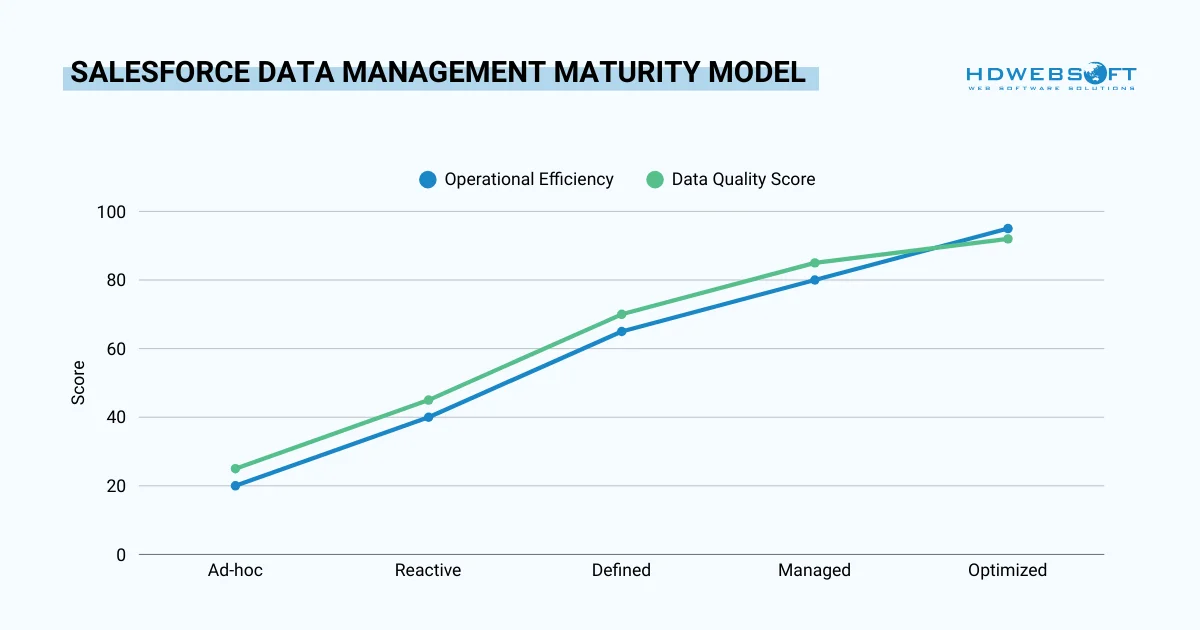
Knowing best practices is valuable, but implementation requires a structured approach. This step-by-step process helps you establish effective data management in Salesforce regardless of your starting point.
Step 1: Conduct a Comprehensive Data Audit
Begin by understanding your current state. Export key data sets and analyze them for common issues. Make note to look for duplicate records, incomplete fields, and outdated information. Moreover, calculate your data quality baseline across multiple dimensions.
Use Salesforce reports to identify patterns. Which fields are frequently left blank? Where do duplicates occur most often? Which data ages fastest? These insights reveal where to focus your improvement efforts.
Furthermore, don’t forget to document your findings in a detailed audit report. This report becomes your roadmap for improvement as it provides a baseline for measuring future progress.
Step 2: Develop a Data Management Strategy
Transforming audit findings into actionable strategy is the second step in Salesforce data management. Define specific, measurable goals for data quality improvement. For example, you might aim to reduce duplicates by 50% within six months. Alternatively, target 95% completeness for critical fields.
Your strategy should address governance, quality, security, and integration. So, identify quick wins that build momentum alongside longer-term initiatives. Furthermore, assign owners to each strategic element to ensure accountability.
Equally important, create a timeline with milestones. Breaking your strategy into phases makes implementation less overwhelming, then celebrate achievements at each milestone to maintain team engagement.
Step 3: Implement Data Entry Protocols
As a matter of fact, prevention is more effective than correction. Therefore, establish clear protocols for how data enters your system and create documentation that covers every common data entry scenario.
Train all users on these protocols thoroughly. Don’t assume people will read documentation on their own. Hands-on training sessions with real-world examples drive adoption far better than written Salesforce data management guides alone.
Moreover, configure Salesforce to enforce protocols automatically. Validation rules, required fields, and page layouts all guide users toward correct data entry. When the system prevents mistakes, quality improves without relying on user diligence.
Step 4: Configure Automation for Consistency
You may have known, automation removes human error from repetitive tasks. Thus, consider using workflow rules or Process Builder to standardize data updates. For instance, automatically capitalize names, format phone numbers, or set default values.
Simultaneously, set up duplicate management rules that prevent bad data from entering your system. Configure these rules will either block duplicate creation or alert users to potential matches. As a result, the right approach depends on your business processes.
Additionally, automate data enrichment where possible. Tools that automatically append company information or social profiles save significant time. However, always include manual review for critical records.
Step 5: Monitor, Measure, and Maintain
Salesforce data management never truly ends; it requires ongoing attention. So, create dashboards that display data quality metrics in real-time, monitor duplicate rates, completeness percentages, and record ages.
Schedule regular data cleansing activities because monthly or quarterly cleanup sessions keep your database healthy. During these sessions, address duplicates, update outdated records, and archive inactive data.
Last but not least, review and update your data management processes quarterly. As your business evolves, your data needs change. Regular reviews ensure your data management in Salesforce practices remain relevant and effective.
Essential Salesforce Data Management Tools
The right data management tools dramatically simplify data maintenance and improvement. Salesforce offers native tools, while third-party solutions provide specialized capabilities. Hence, understanding when to use each tool will help you maximize efficiency.
Native Salesforce Data Management Tools
Salesforce includes several built-in tools for managing data. These Salesforce data management tools require no additional cost and integrate seamlessly with your instance.
Data Import Wizard
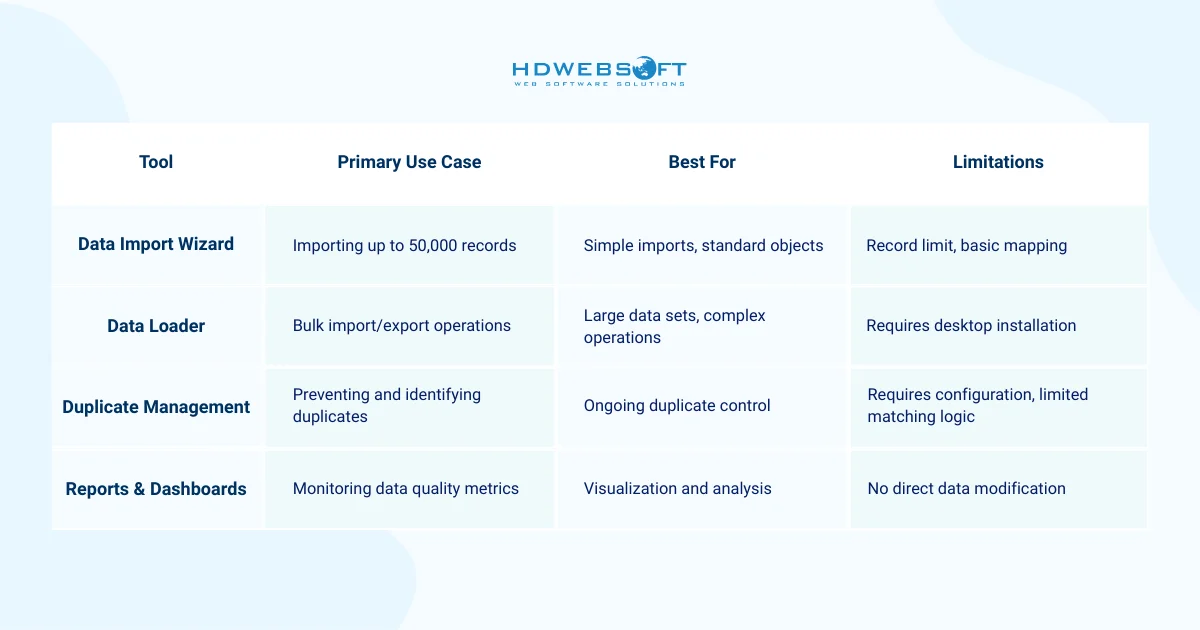
The Data Import Wizard offers a user-friendly interface for importing data. It works well for occasional imports of accounts, contacts, leads, and custom objects. Moreover, the wizard guides you through field mapping step-by-step.
However, limitations exist. You can import only 50,000 records at once. Complex relationships require multiple import rounds. For simple needs, though, the wizard is perfectly adequate.
Data Loader
This tool handles larger volumes and more complex operations. It supports insert, update, upsert, delete, and export operations. Unlike the Import Wizard, Data Loader can handle millions of records.
Additionally, it can be scheduled to run automatically. This capability makes it excellent for regular data synchronization tasks. However, it requires desktop installation and more technical expertise.
Duplicate Management
This native duplicate Salesforce data management tool has improved significantly in recent releases. You can create matching rules based on fuzzy matching algorithms. Duplicate rules then either block or alert users when potential duplicates are detected.
Configure multiple matching rules for different scenarios. For example, match contacts on email address but accounts on name and website. This flexibility helps catch duplicates without creating excessive false positives.
Third-Party Salesforce Data Management Tools
While native tools handle basic needs, third-party solutions offer advanced capabilities. These tools for data management in Salesforce provide specialized functionality for complex environments.
DemandTools
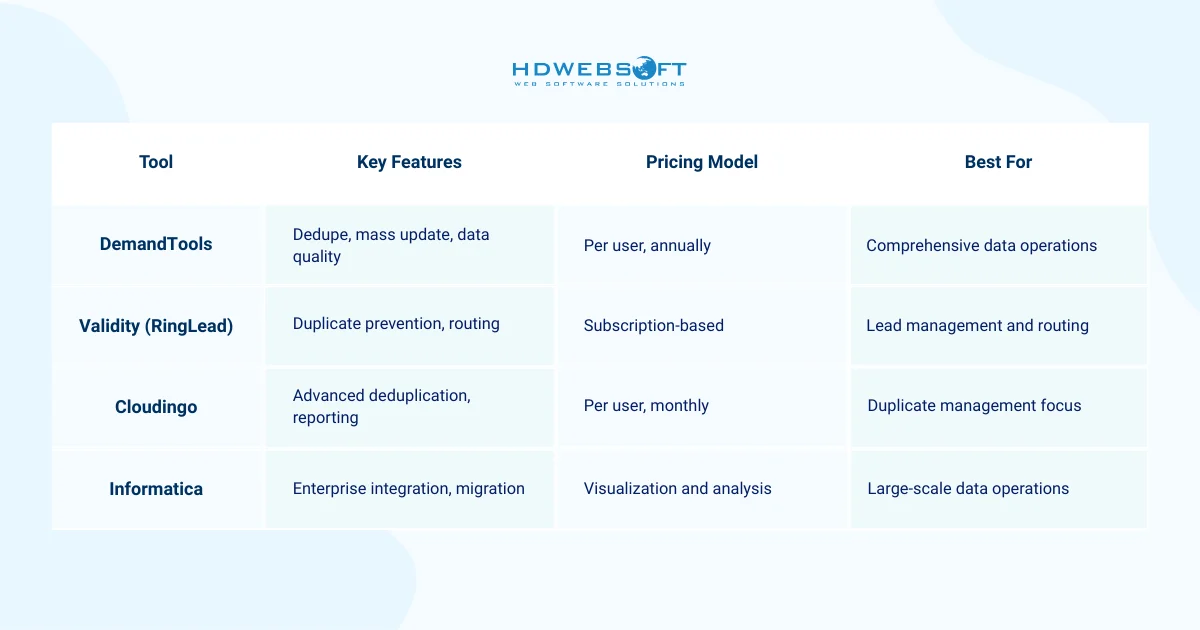
First, DemandTools offers comprehensive data quality management. Its deduplication capabilities exceed Salesforce native tools significantly. The tool identifies duplicates using sophisticated matching algorithms and merges them while preserving all important data.
Beyond deduplication, DemandTools includes mass update, delete, and find/replace functionality. These features dramatically speed up large-scale data cleanup projects. However, the tool requires training to use effectively when implementing Salesforce data management best practices.
Validity (formerly RingLead)
Secondly, Validity focuses on preventing duplicates at the point of entry. It can route leads intelligently based on territory rules and other criteria. Additionally, it enriches records automatically with company and contact information.
In fact, the tool excels in high-volume environments where leads pour in from multiple sources. Real-time duplicate checking prevents bad data from entering your system. Thus, this proactive approach reduces cleanup needs significantly.
Cloudingo
Thirdly, Cloudingo specializes in duplicate management with an emphasis on usability. Its interface is intuitive, requiring less training than some alternatives as it provides detailed reporting on data quality metrics.
Moreover, Cloudingo offers flexible deployment options including fully native operation within Salesforce. This native integration provides better performance and easier administration. For organizations focused primarily on duplicates, Cloudingo offers excellent value.
Informatica
Finally, Informatica serves enterprise needs with powerful integration and Salesforce data management capabilities. It handles complex transformations, large-scale migrations, multi-system integration, and supports batch and real-time data movement.
However, Informatica represents significant investment in both licensing and implementation. Small to medium businesses often find it overkill for their needs. Meanwhile, large enterprises with complex requirements benefit most from Informatica’s capabilities.
Choosing the Right Tool for Your Needs
Selecting appropriate tools for data management in Salesforce depends on several factors. The table below helps you match tools to your organization’s specific needs:
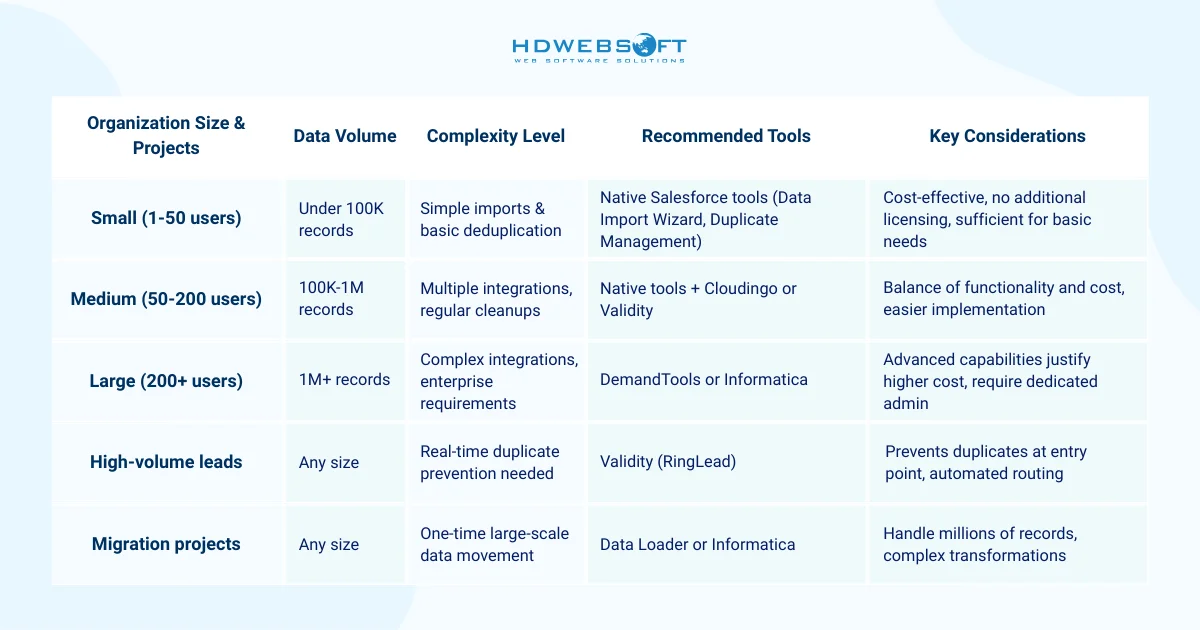
When evaluating tools, focus on specific use cases rather than feature lists. A tool with hundreds of features you don’t need provides less value than a focused solution that solves your primary challenges. Furthermore, consider implementation and training requirements. At the end of the day, the best tool is one your team will actually use.
Common Salesforce Data Management Challenges and Practical Solutions
Even with best practices and tools in place, Salesforce data management presents ongoing challenges. Understanding common obstacles and their solutions helps you navigate difficulties more effectively.
Persistent Duplicate Records
Duplicates continue plaguing organizations despite prevention efforts. They occur when users create records offline, when integrations fail to check for existing records, or when matching criteria are too loose.
Solution: Implement multi-layered duplicate prevention. Start with automated matching rules that block obvious duplicates, then add periodic batch processing to find duplicates that slip through. Also, train users on how to search before creating records. Additionally, make duplicate checking part of your data quality KPIs to maintain visibility.
Data Decay and Obsolescence
Contact information changes constantly. People switch jobs, companies relocate, and phone numbers get reassigned. This data decay erodes your database quality gradually but significantly.
Solution: Establish regular data verification workflows. Email marketing returns provide valuable signals about outdated addresses, while phone disconnect messages indicate obsolete numbers. Create processes that flag these signals and route records for review when conducting Salesforce data management. Furthermore, consider data verification services that validate contact information automatically.
Low User Adoption of Data Standards
Even the best standards fail if users don’t follow them. Busy sales reps often take shortcuts, entering minimal information just to create records. This behavior undermines data quality efforts.
Solution: Make following standards easier than ignoring them. To support this, use page layouts that present required fields prominently and implement helpful field descriptions and examples. Finally, provide quick reference guides accessible within Salesforce. Most importantly, explain why data quality matters to each user’s daily work. When people understand the value, compliance improves dramatically.
Complex Integration Requirements
Modern businesses use dozens of applications that need data from Salesforce. Managing these integrations while maintaining data consistency proves challenging, especially as the number of connected systems grows.
Solution: Adopt a hub-and-spoke architecture with Salesforce as your central hub. From there, establish clear data-flow patterns and naming conventions across systems when conducting Salesforce data management. Next, document which system owns each data element. For more complex needs, use middleware platforms to handle intricate integration scenarios. Regular audits of integration health prevent small issues from cascading into major problems.
Compliance and Regulatory Requirements
Data privacy regulations like GDPR and CCPA impose strict requirements on how you collect, store, and process customer data. Non-compliance brings significant legal and financial risks.
Solution: Build compliance into your data management in Salesforce practices from the start. To begin, implement field-level encryption for sensitive data. Then, create processes for responding to data access and deletion requests. In addition, maintain detailed audit trails of data access and changes. At the same time, train all users on compliance requirements relevant to their roles. Ultimately, consider consulting with legal experts to ensure your practices meet regulatory standards.
Conclusion
Effective Salesforce data management separates high-performing organizations from those struggling with their CRM investment. Remember that data management is an ongoing journey rather than a destination. Start with a comprehensive audit, implement one or two high-impact practices first, and build momentum through quick wins before tackling more complex initiatives.
Implementing comprehensive data management in Salesforce can be complex, especially for organizations with large datasets or intricate business requirements. HDWEBSOFT’s Salesforce development services specializes in data migration, integration, and quality optimization. Our experts can help you establish robust governance frameworks, configure advanced automation, and implement best-in-class data management practices tailored to your unique needs. Contact us today to discuss how we can elevate your Salesforce data management strategy.