Salesforce implementation guide starts with understanding that proper planning determines whether your CRM investment delivers exceptional returns or becomes another failed technology project. Companies invest heavily in Salesforce licenses, yet research shows that up to 70% of CRM implementations fail to meet their objectives. Understanding SFDC in Salesforce and following proven implementation methodologies dramatically improves your chances of success.
Throughout this comprehensive guide, we’ll explore realistic timelines and actual costs by business size. More importantly, we’ll provide actionable Salesforce implementation best practices that ensure your project delivers measurable ROI.
What is Salesforce Implementation?
Beyond simply activating software licenses, a proper Salesforce implementation guide addresses the complete transformation of how organizations manage customer relationships. Implementation encompasses multiple critical phases including:
- Discovery and planning
- System design and configuration
- Data migration
- Integration with existing systems
- Customization of workflows
- Comprehensive user training
- Ongoing optimization.
The Business Transformation Perspective
Organizations often make the mistake of treating Salesforce deployment as a pure technology project. In reality, successful implementation requires redesigning business processes, establishing new workflows, and fundamentally changing how teams collaborate. Sales representatives need to adjust how they track opportunities. Service teams must adapt to new case management protocols. And marketing departments require training on campaign automation tools.
Moreover, implementation connects your entire technology ecosystem. Your Salesforce integration with accounting systems ensures invoice data flows automatically, while connections to marketing platforms enable seamless lead nurturing. The platform’s dual nature as both SaaS and PaaS provides ready-to-use applications alongside powerful customization capabilities.
Critical Components of Implementation
Every successful Salesforce implementation guide includes several non-negotiable components. Discovery involves gathering requirements from all stakeholders who will interact with the system, understanding current pain points, and defining measurable success criteria. Configuration means setting up custom fields, objects, page layouts, and automation rules that match your business processes. Data migration requires cleaning existing customer information, mapping it to Salesforce’s structure, and executing careful transfer to prevent data loss.
Additionally, integration connects Salesforce with your ERP system, marketing automation platform, customer support tools, and other business-critical applications. Training ensures every user understands not just how to use features but why the new system benefits their specific role. Finally, change management addresses resistance, communicates value consistently, and maintains momentum through the transition period.
How Long Does It Take to Implement Salesforce?
Timeline expectations vary dramatically based on organizational complexity, customization requirements, and internal readiness. Businesses frequently underestimate the time required, leading to rushed implementations that compromise adoption and effectiveness.
Timeline in Salesforce Implementation Guide by Business Size
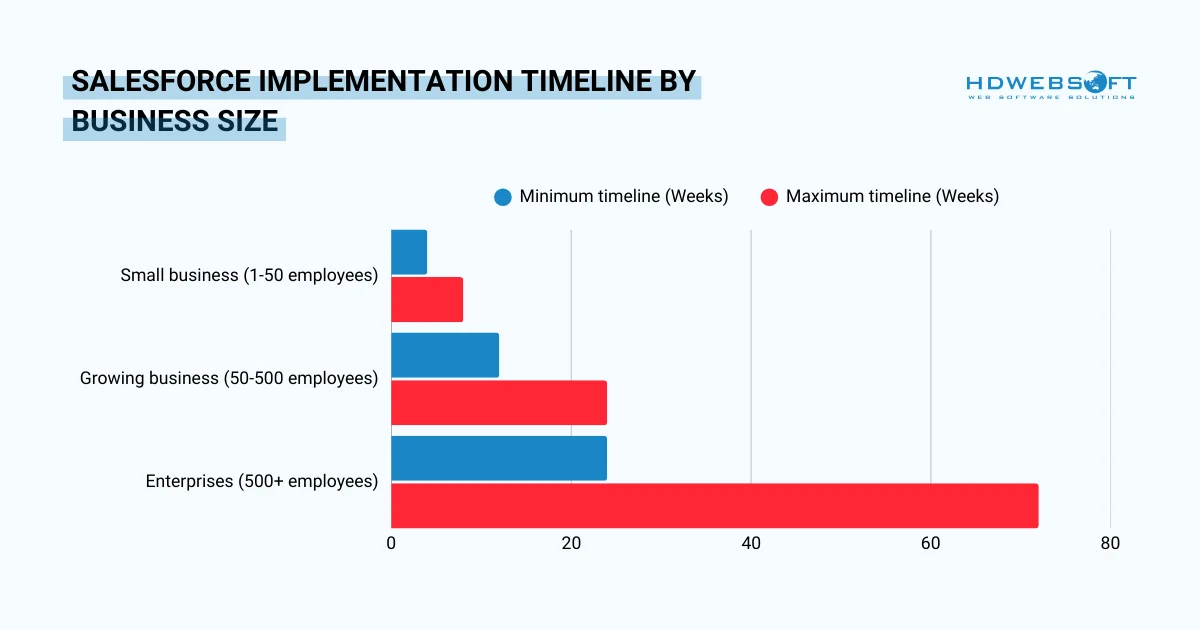
Small Business Implementation (1-50 employees): 4-8 weeks
Salesforce implementation guide best practices show that organizations with straightforward processes can complete basic Sales Cloud implementations relatively quickly. These projects typically involve minimal customization, one or two integrations with tools like QuickBooks or Mailchimp. In addition, standard automation workflows and limited data migration from spreadsheets or basic CRM systems can be implemented pretty fast.
Overall, the accelerated timeline works when requirements are clear and teams commit to rapid decision-making.
Growing Business Implementation (50-500 employees): 3-6 months
Mid-market organizations face increased complexity requiring longer timelines. These Salesforce implementation best practices often involve deploying multiple clouds, such as Sales Cloud plus Service Cloud. Additionally, teams typically establish 5–10 system integrations with marketing automation and ERP platforms while building sophisticated workflow automations across departments. Finally, they migrate substantial data volumes with a strong focus on data quality and implement comprehensive change-management programs.
On the bright side, the extended duration allows for proper testing and gradual user onboarding.
Enterprise Implementation (500+ employees): 6-18 months
Large organizations require extensive planning and phased rollouts. Enterprise Salesforce implementation guide projects often require complex multi-cloud deployments across global regions. Additionally, they typically include 15–20+ system integrations involving legacy platforms and extensive custom development using Apex code and Lightning components.
Ultimately, these projects demand the migration of millions of records with complex relationships and enterprise-wide change-management efforts spanning multiple departments and geographies. Phased approaches minimize disruption while allowing teams to learn iteratively.
Factors That Impact Your Timeline
Several variables beyond company size influence implementation duration. Data quality significantly affects speed. In fact, organizations with clean, well-organized customer data save 2-4 weeks compared to those requiring extensive cleanup.
Moreover, customization scope extends timelines by 40-60% when heavy modifications replace standard features. Each major integration typically adds 2-4 weeks to the schedule, particularly when connecting to complex systems with unique data structures.
Furthermore, internal resource availability determines pace. Teams with dedicated project members move faster than those juggling implementation alongside regular responsibilities. Salesforce implementation guide principles state that clear requirements documented upfront prevent costly delays from scope changes mid-project. Therefore, organizations should plan realistic buffers of 20% beyond initial estimates to accommodate inevitable challenges.
How Much Does It Cost to Implement Salesforce?
Understanding true Salesforce implementation costs requires examining all expense categories rather than focusing solely on license fees. Hidden costs frequently surprise organizations unprepared for the complete investment.
Cost Components Breakdown
Total investment includes multiple categories that vary by implementation approach:
- Salesforce licenses represent ongoing annual costs that scale with user count and edition choice.
- Implementation services encompass consulting fees for system design, configuration, and deployment guidance.
- Meanwhile, data migration expenses cover cleanup, mapping, and transfer of existing customer information into Salesforce.
- Additionally, training and change management costs ensure users adopt the system effectively rather than working around it.
- Integration expenses connect Salesforce with other business systems, whether through pre-built AppExchange connectors or custom development.
- Customization investments, as noted in many Salesforce implementation guide resources, enable workflows and features tailored to unique business requirements.
- Ongoing support maintains system health and addresses user questions post-launch.
Salesforce Implementation Costs by Business Size
Small Business Implementation Costs (1-50 employees)
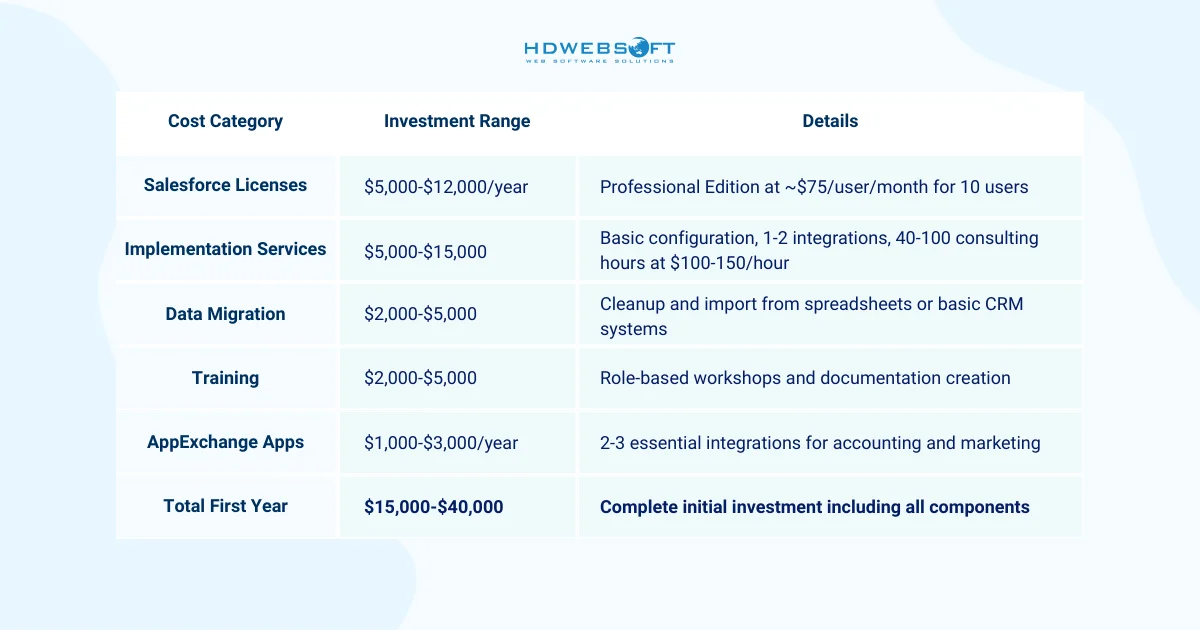
Small businesses can reduce Salesforce implementation costs through self-implementation. In exchange, you’ll sacrifice expert guidance and risk configuration mistakes that require expensive corrections later. Thus, we highly recommend at least basic consulting support to establish a solid foundation.
Mid-Market Implementation Costs (50-500 employees)
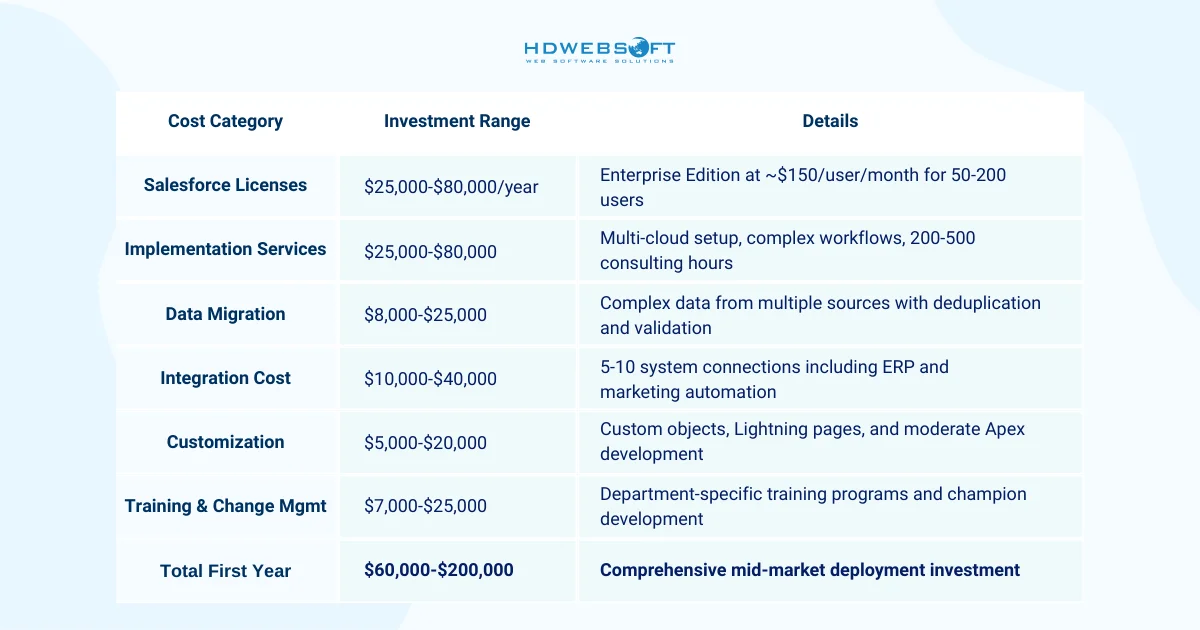
Growing businesses benefit most from partnering with certified consultants who bring Salesforce implementation best practices from similar organizations. The investment in expertise typically pays for itself through faster deployment and higher adoption rates.
Enterprise Implementation Costs (500+ employees)
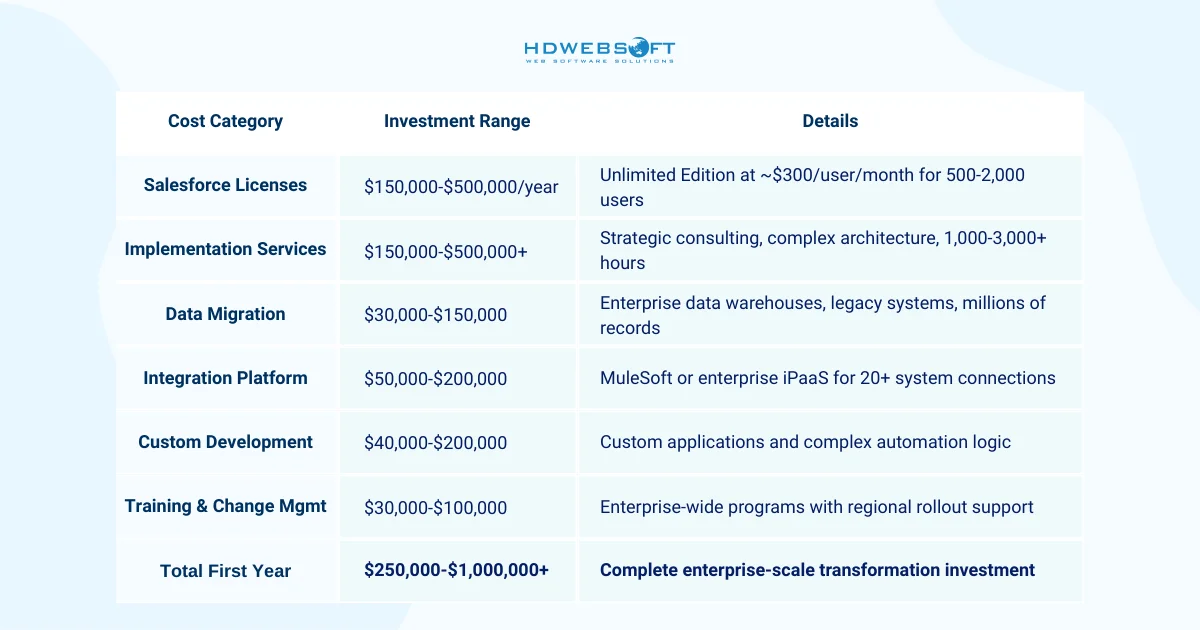
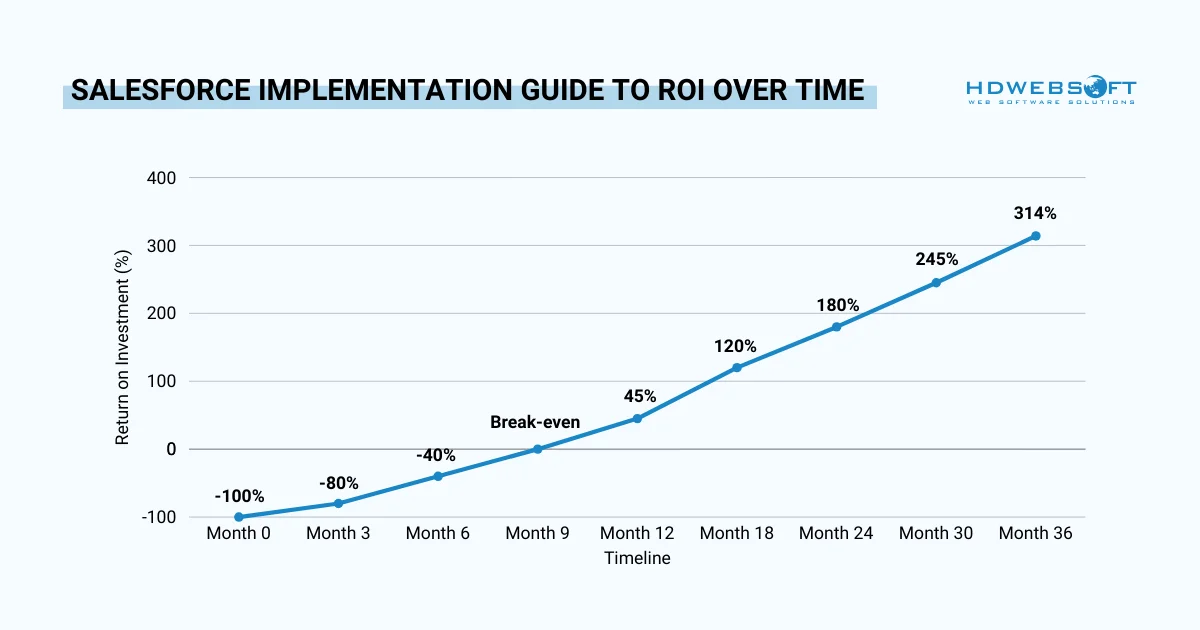
Despite substantial upfront investment, research shows companies achieve 314% average ROI from properly implemented Salesforce deployments. Manufacturers have documented 354% ROI with $27.17M net present value in studied implementations.
Hidden Salesforce Implementation Costs to Budget For
According to most Salesforce implementation guide recommendations, organizations frequently overlook several ongoing expenses that impact total cost of ownership. Planning for these expenses prevents budget surprises that force compromises in system capability.
- Internal administrator time typically requires 20-40% of a full-time employee for ongoing maintenance, user support, and continuous improvement.
- Annual license increases should be budgeted at 5-10% as teams grow and require additional features.
- Post-implementation optimization often requires $10,000-$50,000 annually to refine processes and leverage new features.
- AppExchange application renewals can grow 20-30% yearly as organizations add functionality.
While these hidden Salesforce implementation costs may seem daunting, organizations that invest appropriately in comprehensive implementation achieve substantial returns.
Salesforce Implementation Best Practices
Following a structured approach dramatically increases implementation success rates while reducing costs and timelines. This proven methodology for Salesforce implementation best practices was drawn from HDWEBSOFT’s successful deployments.
Phase 1: Discovery & Planning (Weeks 1-2)
Beginning with crystal-clear objectives prevents scope creep that derails projects. Make note to define specific, measurable business problems you’re solving rather than vague goals like “improve efficiency.”
Proven in the Salesforce implementation guide, quantify success metrics such as reducing sales cycle length by 20%. Consequently, lead conversion rates increase by 30%, or improve customer satisfaction scores by 15 points.
See more examples here.
Requirements Gathering Strategy
First, conduct structured interviews with stakeholders from every affected department including sales, service, marketing, operations, and executive leadership. Document current processes even when they’re inefficient. It’s because they will help you understand why processes exist and help identify improvement opportunities. More importantly, distinguish “must-have” requirements critical to operations from “nice-to-have” features that can wait for future phases.
Strategic Team Building
Secondly, building an implementation team requires strategic role assignments. Executive sponsors provide budget approval and organizational credibility, actively championing the initiative rather than passively endorsing it. Meanwhile, project managers coordinate timelines, manage dependencies, and escalate risks before they become blockers. Simultaneously, business analysts translate requirements into technical specifications that developers can implement.
Additionally, following our Salesforce implementation guide, technical leads make architecture decisions about customization approaches and integration strategies. Department champions serve as user representatives, providing feedback and facilitating adoption within their teams.
Finally, consider partnering with experienced consultants who bring Salesforce implementation best practices from similar projects, accelerating deployment and avoiding common pitfalls.
Phase 2: Design & Configuration (Weeks 3-6)
Translating business requirements into system architecture requires balancing standard functionality with customization. Map business processes to Salesforce’s data model, identifying where standard objects suffice versus requiring custom objects for industry-specific needs.
Architecture Design Principles
Most importantly, create comprehensive data models showing object relationships, field types, and validation rules that maintain data quality. Plan automation strategy using Flow Builder rather than outdated Workflow Rules or Process Builder. These modern automation tools provide greater flexibility and performance. Also, define security models including user roles, profiles, permission sets, and sharing rules that balance access with data protection.
Core Configuration Approach
In our Salesforce implementation guide recommendations, configuration begins with core features across relevant clouds. Depending on priority use cases, you can set up necessary SFDC Cloud products. Moreover, create custom fields capturing business-specific information and design page layouts presenting relevant data for each user role.
Build automation implementing business logic such as lead assignment rules, approval processes, and notification workflows. However, resist over-engineering for theoretical future needs and start simple and add complexity eventually based on actual usage patterns.
In all, this approach to Salesforce implementation best practices maintains system agility. All the while, it helps prevent the technical debt that accumulates when organizations guess at requirements.
Phase 3: Data Migration (Weeks 7-8)

Data quality determines long-term system success more than any other factor. Research confirms that poor data quality costs organizations an average $12.9 million annually, making cleanup essential rather than optional.
Data Cleanup Process
Deduplicate records by identifying and merging accounts, contacts, and leads with matching information. In our Salesforce implementation guide, we suggest standardizing formats for addresses, phone numbers, names, and other fields to enable accurate reporting.
It’s best to remove outdated records that no longer provide business value, reducing storage costs and improving system performance. Moreover, you can validate data quality by spot-checking samples and correcting systematic errors before full migration.
Staged Data Migration Process
Execute migration in carefully planned stages is a key note in our Salesforce implementation best practices. Extract data from legacy CRM systems, spreadsheets, and databases using appropriate tools. Then, transform data to match Salesforce’s structure, mapping source fields to destination objects and fields. Load data in correct sequence. Remember, accounts before contacts, contacts before opportunities in order to maintain relationship integrity.
Conduct multiple test migrations in sandbox environments before production:
- Sample testing with 10% of records identifies mapping errors quickly.
- Full volume testing confirms the system handles complete datasets without performance degradation.
- User acceptance testing validates that sales representatives recognize their accounts and service agents can access case histories correctly.
Phase 4: Testing & Validation (Weeks 9-10)
We consider comprehensive testing catches issues before they impact users and customers as a best practice in our Salesforce implementation guide. Functional testing confirms each feature works as designed, validating automation rules, page layouts, and custom functionality. Concurrently, integration testing ensures data flows correctly between Salesforce and connected systems like accounting software and marketing platforms.
Testing Strategy
Performance testing simulates realistic user volumes and data quantities to identify bottlenecks. Meanwhile, user acceptance testing (UAT) involves actual end-users completing real business scenarios to verify the system supports their workflows. Hence, create test cases based on documented business processes, including both standard paths and edge cases that expose hidden issues.
As one of the Salesforce implementation best practices, document all defects in an organized tracking system with severity ratings. Specifically, critical bugs blocking basic functionality must be resolved before launch. Meanwhile, major issues causing significant inconvenience should be fixed or documented with workarounds. Finally, minor usability issues can be prioritized for post-launch optimization.
Phase 5: Training & Change Management (Weeks 9-11)
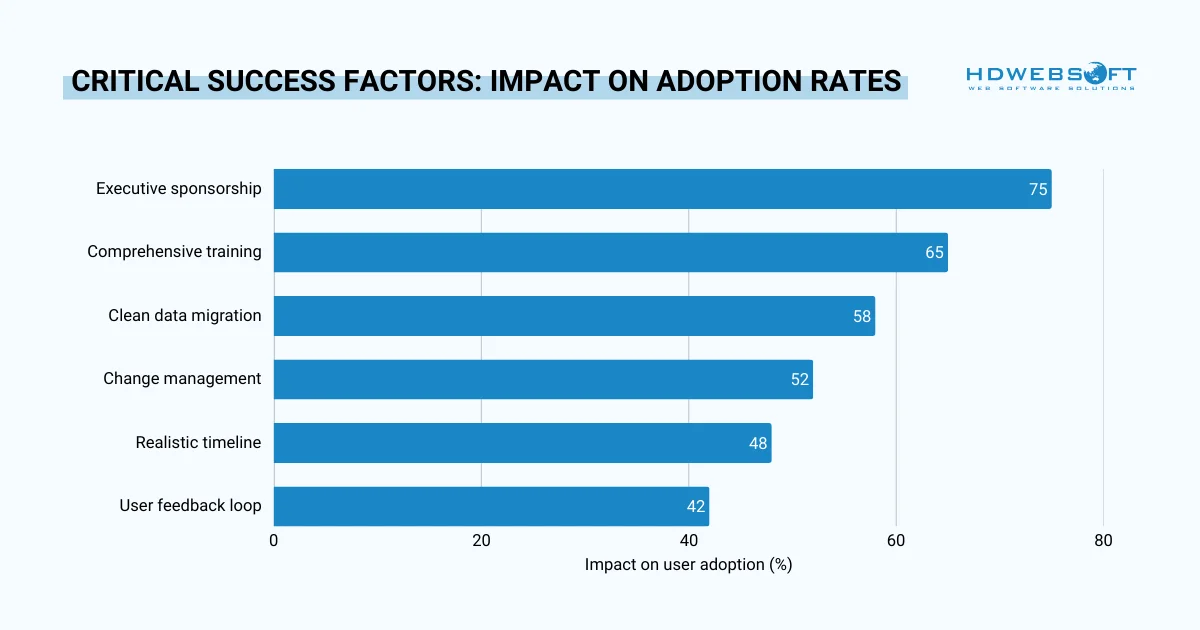
User adoption determines whether your investment delivers returns or becomes abandoned shelfware. Proper training increases adoption rates by 60-80% compared to minimal training approaches in HDWEBSOFT’s Salesforce implementation guide.
Effective Training Approaches
We have a tip for you: develop role-based training programs addressing specific job functions rather than generic overviews. You should conduct hands-on workshops where users practice with realistic scenarios in sandbox environments rather than watching demonstrations passively.
Furthermore, create comprehensive documentation including quick reference guides, video tutorials, and FAQ resources accessible when users need just-in-time help. Establish “train-the-trainer” programs developing internal champions who provide peer support and reinforce best practices. Expectedly, these power users become invaluable resources for ongoing questions and informal coaching.
Lastly, change management addresses emotional resistance that undermines adoption. Communicate the “why” behind changes, explaining how new processes benefit each role rather than simply mandating compliance. Hence, address concerns proactively about data entry burden, performance monitoring, or technology competence. You can celebrate early wins publicly, showcasing users who successfully leverage Salesforce to improve their results.
Phase 6: Go-Live & Hypercare (Week 12+)
Believe it or not, launch strategy significantly impacts initial user experience. According to our Salesforce implementation guide, big-bang approaches switch all users simultaneously, offering faster complete deployment but higher risk. On the other hand, phased rollouts implement department by department or region by region, providing safer validation but longer timelines.
Concurrently, parallel running maintains old and new systems briefly for critical processes, maximizing safety but requiring temporary double data entry.
Launch Day Preparation
Establish a war room with key team members available throughout go-live day to address issues immediately. At the same time, monitor system performance and user adoption actively, identifying patterns in support requests. Also, maintain open communication channels where users can report problems and receive rapid responses. Lastly, have rollback plans ready as a contingency if critical failures occur, though this rarely proves necessary with proper testing.
In addition to our Salesforce implementation guide, hypercare periods spanning 4-8 weeks post-launch provide intensive support during the adjustment period. These are hypercare factors that are included in the Salesforce implementation best practices:
- Dedicate support team members to respond quickly to user questions and technical issues.
- Conduct daily check-ins with power users gathering feedback on pain points and quick wins.
- Track adoption metrics including login frequency, record updates, and feature utilization to identify areas needing additional support.
Common Implementation Mistakes & How to Avoid Them
Learning from common failures helps organizations avoid expensive rework. These Salesforce implementation best practices emerge from analyzing unsuccessful deployments.
Mistake #1: Over-Customization Too Early
Organizations frequently build complex custom solutions before understanding standard capabilities. This creates technical debt, complicates future upgrades, and increases maintenance costs. Instead, start with out-of-the-box features for the first 3-6 months. In our Salesforce implementation guide, customizing should only happen after understanding actual needs versus theoretical requirements.
Mistake #2: Poor Data Quality Migration
“Garbage in, garbage out” applies especially to CRM systems. Migrating dirty data frustrates users, produces inaccurate reports, and undermines adoption. Therefore, invest 2-3 weeks in thorough data cleanup before migration so it’ll prevent months of ongoing frustration and credibility damage.
Mistake #3: Insufficient User Training
Assuming users will “figure it out” contributes heavily to the 70% failure rate for CRM implementations. Therefore, make role-based training mandatory, provide ongoing support resources, and develop champion networks for peer assistance.
Mistake #4: Lack of Executive Sponsorship
Treating Salesforce as an IT project rather than business transformation limits success. Thus, secure C-level sponsorship from executives who actively communicate value, participate in planning, and model system usage visibly.
Mistake #5: Unrealistic Timelines
Promising go-live in 4 weeks for complex implementations forces rushed configuration, skipped testing, and poor user experiences. Consequently, following realistic timelines from this Salesforce implementation guide will add a 20% buffer for unexpected challenges.
Mistake #6: Ignoring Change Management
Focusing only on technology while neglecting people creates resistance, workarounds, and parallel systems. Accordingly, invest significantly in communication, address fears proactively, and celebrate wins consistently.
Mistake #7: Treating Launch as Completion
Viewing go-live as the finish line rather than beginning creates stagnant systems and declining adoption. It’s recommended to plan for continuous improvement with quarterly reviews, feature optimization, and regular user feedback sessions.
DIY vs. Partner-Led Implementation
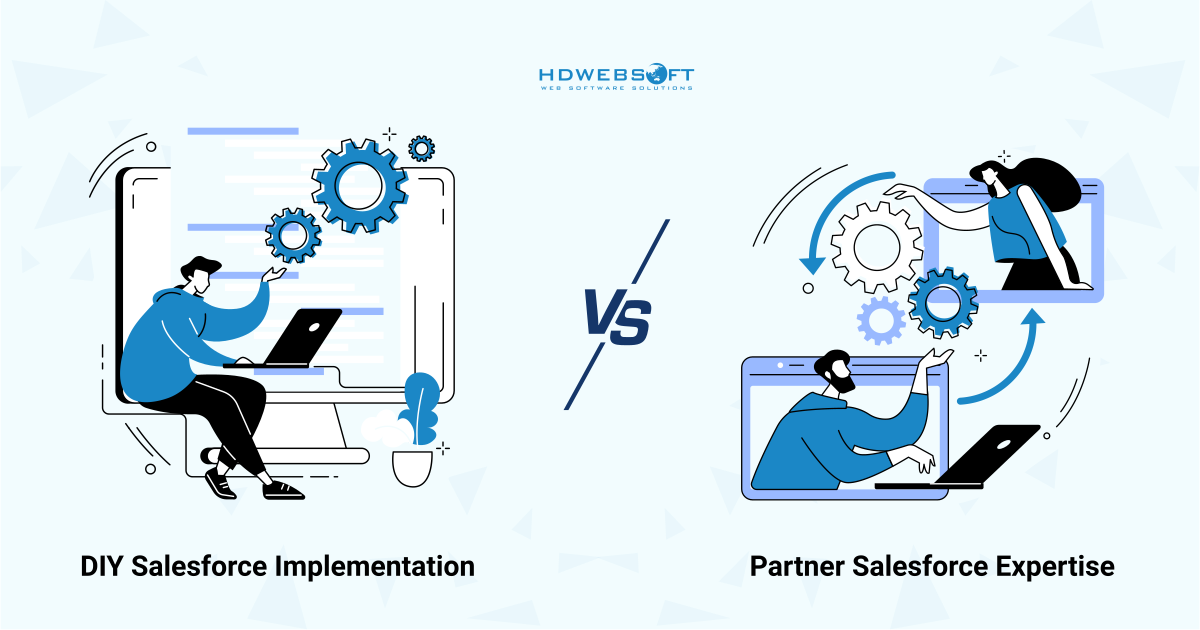
Deciding between self-implementation and hiring consultants depends on organizational capabilities and project complexity.
When DIY Implementation Makes Sense
Self-implementation works for very small businesses under 20 users deploying only Sales Cloud with standard processes. Organizations with existing Salesforce expertise on staff and minimal integration requirements can potentially succeed with DIY approaches. However, even simple implementations benefit from at least consultative guidance to avoid foundational mistakes.
When Partner Expertise is Essential
Mid-market and enterprise organizations virtually always benefit from certified implementation partners. Complex requirements spanning multiple clouds, custom development needs, extensive integrations, large data migrations, and limited internal Salesforce expertise all indicate partnering value. The upfront consulting investment typically delivers faster ROI through accelerated deployment, higher adoption rates, and better architectural decisions.
In Summary…
This Salesforce implementation guide demonstrates that success depends on strategic planning, realistic timelines, and appropriate budgeting . Following proven Salesforce implementation best practices helps organizations achieve 314% average ROI over three years. The difference between success and failure lies in implementation approach: start with clear requirements, prioritize user adoption from day one, and consider expert guidance for complex deployments to avoid expensive rework that costs 2-3x initial investments.
Ready to implement Salesforce correctly the first time? HDWEBSOFT’s certified Salesforce consultants have successfully delivered implementations across industries and company sizes. Our proven methodology ensures your project stays on-time, on-budget, and delivers measurable business results. Schedule a consultation to discuss your Salesforce implementation strategy and transform your CRM investment into competitive advantage.