AWS security issues keep making headlines, and the pattern is remarkably consistent: the cloud platform itself is rarely the root cause. According to Intruder’s 2026 Cloud Security Index, misconfiguration affects 80% to 98% of cloud accounts across providers, and AWS leads in five of six misconfiguration categories. The most common AWS security issues — public S3 buckets, overly permissive IAM, missing MFA, exposed services — are customer-side configuration problems, not AWS platform flaws.
This guide covers the top AWS security issues and how to prevent them — mapping the problems that show up most often in 2025-2026 breach reports and CIS AWS Foundations Benchmark audits, explaining why each one persists, and showing how to prevent each before it becomes a breach. It starts from the AWS Shared Responsibility Model, because that boundary is where most AWS security risks actually begin.
Understanding the AWS Shared Responsibility Model
When discussing AWS security issues, the foundational concept is the AWS Shared Responsibility Model. This model defines who secures what in the AWS ecosystem, and a surprising number of AWS security issues arise not from platform vulnerabilities but from a misunderstanding or misapplication of this boundary.
What is the AWS Shared Responsibility Model
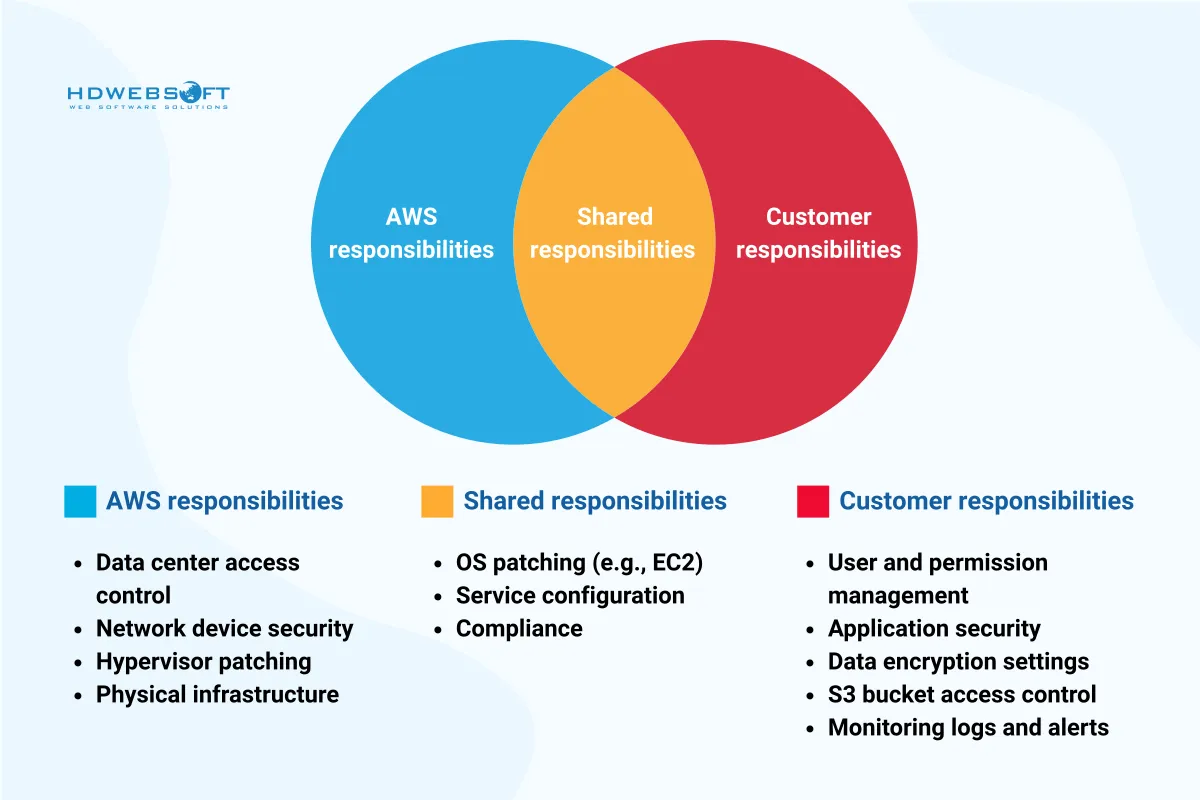
The AWS Shared Responsibility Model clearly outlines which aspects of the environment AWS secures and which fall under the customer’s control:
- AWS is responsible for security OF the cloud — the global cloud infrastructure, physical data centers, networking hardware, hypervisors, and foundational service layers.
- You, the customer, are responsible for security IN the cloud — your applications, data, IAM policies, configurations, access controls, encryption, and patching of anything you deploy or manage.
Although the model seems straightforward, many AWS security issues arise from incorrect assumptions about where AWS’s responsibilities end and the customer’s begin.
AWS’s responsibilities: security OF the cloud
AWS secures the core infrastructure that supports all of its services:
- Physical security of data centers
- Redundant power, networking, and HVAC systems
- Network segmentation and DDoS mitigation
- Hypervisors and foundational service layers
AWS continuously monitors, tests, and audits this infrastructure to maintain compliance certifications including ISO 27001, SOC 1/2/3, and PCI DSS. However, even with this strong foundation, security gaps still occur if the customer’s layer isn’t properly secured.
Customer responsibilities: security IN the cloud
Customers are accountable for securing their cloud applications, data, and configurations:
- Proper configuration of services like S3, EC2, and RDS
- Identity and Access Management (IAM) policies and roles
- Application-level security, such as input validation and secure coding (see our Node.js security best practices and production Node.js security deep dive for application-layer controls that complement your AWS hardening)
- Patching and maintaining operating systems and software stacks
- Protecting sensitive data through encryption at rest and in transit
If you can create, manage, or configure it in AWS, you are likely responsible for securing it. This is where the vast majority of AWS security problems occur. An incorrectly configured S3 bucket that allows public read or write access is not AWS’s fault — it is a customer-side misconfiguration.
The misconception that leads to risk
A significant number of AWS security issues are not caused by sophisticated attacks or zero-day exploits. They are caused by human error and a misunderstanding of the responsibility model. Many organizations still operate under the mistaken belief that AWS “takes care of everything,” which is not true.
Common examples include:
- S3 bucket leaks — public access enabled without controls, exposing sensitive data.
- IAM role abuse — overly permissive policies like
"Action": "*","Resource": "*"opening the door for privilege escalation. - Unpatched EC2 instances — outdated operating systems with known CVEs that attackers exploit within minutes of discovery.
Assuming AWS will handle security at all levels is a dangerous mindset and a direct path to preventable security failures.
A real-world analogy
Think of AWS as a secure apartment building. AWS ensures the locks on the front door work, the fire alarms function, and the building has 24/7 security. Once you rent an apartment (a cloud account or resource), it is your job to lock your windows, close the blinds, and install a safe if needed. Ignoring these responsibilities leads to breaches, just as leaving your front door open invites theft.
Why education is critical
Cloud environments move fast and deployment cycles are short. Without proper training on AWS responsibilities, even well-intentioned engineers can introduce serious AWS security risks by leaving services exposed or improperly configured. AWS introduces new services and features regularly, and failing to adapt often leads to outdated practices — another source of cloud security challenges.
Top AWS security issues in 2025-2026
Despite AWS being one of the most secure cloud platforms available, AWS security risks still occur frequently — not because of platform flaws, but because of how users configure and manage their cloud environments. Below are the most pressing and commonly encountered issues, with real-world implications and preventative strategies.
1. Misconfigured S3 buckets
The most infamous AWS security risk is the misconfiguration of Amazon S3 buckets. These storage resources are powerful but dangerous if not secured properly.
In many breaches, S3 buckets have been unintentionally set to allow public access, meaning anyone with the URL can read, and sometimes write, data. Verizon and Accenture both suffered high-profile data leaks due to this issue.
Important update: Since April 5, 2023, AWS enables S3 Block Public Access and disables ACLs by default for new buckets. However, this default is not retroactive. Buckets created before that date keep their original public-access settings unless you explicitly enable Block Public Access. Pre-2023 buckets remain a common source of S3 data leaks.
Read the Verizon case and the Accenture case.
Why it happens
- Default or inherited permissions on pre-2023 buckets
- Lack of visibility into public access settings
- Overlooking AWS access policy warnings
How to prevent it
- Enable S3 Block Public Access at the account level — this covers all buckets, including pre-2023 ones
- Use AWS Config to monitor for open buckets
- Apply bucket policies that follow the least privilege principle
- Enable default encryption for S3 buckets
2. Overly permissive IAM policies
Another common vector for AWS security issues is the use of broad or permissive IAM policies. Many teams assign policies with "Effect": "Allow", "Action": "*", "Resource": "*" — which effectively grants unrestricted access.
This setup creates a security time bomb, allowing internal or external actors to elevate their privileges or access unintended resources. According to the 2026 Cloud Security Index, IAM Policy Allows Privilege Escalation affects 83% of AWS accounts, and IAM Access Key Not Rotated affects 71%.
Outcomes include
- Full account takeover
- Unauthorized data access
- Lateral movement across services
Best practices
- Implement least privilege access — start with no permissions and add only what is needed
- Regularly audit IAM roles and policies with IAM Access Analyzer
- Use AWS Identity Center (formerly SSO) for centralized human access
- Avoid attaching policies directly to users; use roles instead
3. Missing MFA on root and IAM users
Multi-factor authentication (MFA) is one of the simplest and most effective controls in AWS, yet it remains under-enforced. The 2026 Cloud Security Index found that Root Access Not Centrally Managed affects 72% of AWS accounts.
The AWS root account has full, unrestricted access to every resource in the account. If an attacker compromises root credentials without MFA, the account is effectively lost. The same applies to IAM users with administrative privileges.
How to prevent it
- Enable MFA on the root account immediately and store recovery codes securely
- Enforce MFA for all IAM users, especially those with admin or write access
- Use AWS Identity Center to enforce MFA centrally across the organization
- Disable or remove IAM access keys for the root user — root should use console + MFA only
4. Lack of encryption
Overlooking encryption is a serious AWS security issue. Failing to encrypt data at rest or in transit opens the door to interception, manipulation, and exposure. AWS provides services like KMS (Key Management Service) and TLS for data in transit, but encryption is not always enforced by default.
Where encryption is often skipped
- EBS volumes
- RDS snapshots
- Lambda environment variables
- S3 objects in pre-2023 buckets
Mitigation tips
- Enable default encryption for S3, EBS, and RDS at the account or service level
- Use customer-managed keys (CMKs) for tighter control over key rotation and access
- Regularly rotate encryption keys via KMS
- Enforce TLS in transit for all API calls and database connections
5. Insecure APIs and exposed endpoints
As organizations adopt microservices and serverless architectures, the attack surface for AWS security risks increases. API Gateway and Lambda endpoints are the main ways this surface grows.
Unprotected or poorly authenticated APIs can be discovered and exploited by attackers using automated scanning tools. Once found, they can be used for data extraction, brute-force attacks, or service disruption. The 2026 Cloud Security Index found that 76% of AWS accounts have at least one publicly exposed service.
Contributing factors
- No authentication or weak API key usage
- Lack of rate limiting or throttling
- Overexposed CORS policies
Secure your APIs by
- Enabling Amazon Cognito or IAM-based authentication
- Implementing WAF (Web Application Firewall) rules
- Monitoring with AWS CloudWatch and GuardDuty
- Applying rate limiting and request throttling at the API Gateway level
6. Unpatched EC2 instances and AMIs
Even with AWS handling the physical infrastructure, EC2 instances remain the customer’s responsibility. They represent one of the most common sources of AWS security risks due to poor patch management.
When instances run outdated operating systems or vulnerable software, attackers can exploit known CVEs (Common Vulnerabilities and Exposures). These vulnerabilities are often targeted within minutes of discovery.
Typical causes
- Using old AMIs without updates
- Lack of automation for patching
- Ignoring vendor security bulletins
Fix it by
- Using AWS Systems Manager Patch Manager to automate patching
- Regularly updating and rotating AMIs
- Applying automatic security updates where possible
- Subscribing to AWS Security Bulletins
7. Neglecting the principle of least privilege
Far too often, organizations grant users and services more access than necessary. Whether accidental or malicious, this increases the likelihood of misuse. It is a silent but critical contributor to AWS security risks.
Consequences include
- Privilege escalation by threat actors
- Data leakage from over-scoped roles
- Increased blast radius in case of compromise
To resolve this
- Regularly review IAM permissions with IAM Access Analyzer
- Use permission boundaries and attribute-based access control (ABAC)
- Integrate least privilege enforcement into your CI/CD pipelines
- Adopt a deny-by-default posture and add permissions only when justified
8. Misconfigured security groups and network ACLs
One of the more subtle yet dangerous AWS security risks involves improperly configured Security Groups and Network Access Control Lists (ACLs) within the Amazon VPC.
Many organizations leave ports wide open, especially SSH (port 22), RDP (port 3389), or entire CIDR blocks like 0.0.0.0/0. The 2026 Cloud Security Index found that Permissive Ingress to Sensitive Ports affects 84% of AWS accounts, and VPC Subnet Auto-Assigns Public IP affects 72%.
What often goes wrong
- Overuse of “allow all” rules
- Forgetting to restrict outbound traffic
- Not segmenting internal services properly
- Auto-assigning public IPs to subnets that should be private
Key safeguards
- Apply the default deny approach and only allow necessary ports from known CIDRs
- Use VPC flow logs to audit traffic patterns
- Implement Network Firewalls and PrivateLink for sensitive services
- Disable public IP auto-assignment on private subnets
AWS security best practices
Preventing AWS security risks does not require reinventing the wheel. It requires consistency, visibility, and adherence to proven best practices. By proactively implementing the strategies below, organizations can dramatically reduce the likelihood of misconfigurations and compliance failures.
Enforce the principle of least privilege
A recurring root cause of AWS security risks is excessive access. Always follow the principle of least privilege: users and services should only get the permissions they absolutely need. Use IAM roles, permission boundaries, and fine-grained access controls to limit what each entity can do.
Tip: Use IAM Access Analyzer to detect and fix unintended access.
Enable logging and continuous monitoring
Many organizations suffer from delayed breach detection because they lack proper visibility. Enabling AWS CloudTrail, Amazon GuardDuty, and AWS Config allows you to track activity across your environment, detect anomalies, and maintain compliance with both internal policies and external regulations.
Key benefit: You get real-time alerts about potential AWS security risks before they escalate.
Automate security checks
Manual reviews are not scalable in cloud environments. Using AWS Config Rules, Inspector, and Security Hub can enforce baseline security configurations automatically. These tools detect security misconfigurations like open ports, missing encryption, or publicly accessible resources.
Bonus: Integrate these checks into your CI/CD pipeline for early detection during development.
Encrypt everything — always
Encryption is one of the simplest yet most effective forms of defense. Make sure all data at rest and in transit is encrypted using AWS Key Management Service (KMS) or customer-managed keys. Enable default encryption for services like S3, RDS, and EBS volumes.
Reminder: Lack of encryption is a recurring theme in high-profile AWS security incidents.
Regularly audit and rotate credentials
Stale credentials and unrotated keys increase the risk of compromise. The 2026 Cloud Security Index found that IAM Access Key Not Rotated affects 71% of AWS accounts. Regularly audit IAM users, disable unused accounts, and rotate secrets using AWS Secrets Manager.
For a broader program-level view of how to operationalize these practices, see our guide on cloud security managed services. If you are also building AI workloads on AWS, the LLM security for agentic AI guide covers the additional risks that AI gateways and agents introduce.
Tools and resources to strengthen AWS security
When it comes to minimizing AWS security risks, the right tools make all the difference. AWS provides a robust ecosystem of native services that let you choose the ones that best fit your requirements.
AWS Security Hub
AWS Security Hub aggregates findings from multiple services — GuardDuty, Inspector, and third-party tools — into a single dashboard. It uses industry standards like CIS AWS Foundations Benchmark to evaluate your environment and identify critical AWS security risks.
Core benefits
- Unified visibility across AWS accounts
- Automated compliance checks
- Integration with ticketing systems and SOAR tools
Amazon GuardDuty
This threat detection service uses machine learning to identify unusual activity, including port scans, credential compromise attempts, and access from malicious IP addresses. It is one of the first lines of defense against real-time threats in AWS.
Reasons for using
- Zero impact on performance
- Detects account compromise, EC2 abuse, and more
- Sends actionable alerts via EventBridge
AWS Config and Config Rules
Security misconfigurations can be detected early with AWS Config. The tool tracks changes to your AWS resources and evaluates them against predefined or custom rules. You can identify security issues in near real-time, such as public S3 buckets or unencrypted volumes.
Use cases
- Detecting drifts from baseline configurations
- Auto-remediation using Lambda functions
- Audit trails for governance
IAM Access Analyzer
One of the most common AWS security risks is overly permissive access. IAM Access Analyzer helps you discover resources shared externally or with overly broad permissions.
Top features
- Scans IAM roles, policies, and resource shares
- Flags excessive permissions
- Integrates with AWS Organizations
CloudTrail and CloudWatch
For forensic analysis and activity tracking, CloudTrail logs every API call made in your AWS environment. CloudWatch provides monitoring and alerting capabilities.
Combined, they allow you to
- Detect unauthorized access attempts
- Set up alarms on specific security-related actions
- Meet audit and compliance requirements
AWS Trusted Advisor
AWS Trusted Advisor provides insights based on AWS best practices, including checks on security configurations like exposed ports, MFA on root accounts, and IAM usage.
Its relevance
- Built-in with AWS Business and Enterprise Support plans
- Covers security, cost, fault tolerance, and performance
- Helps prioritize remediation tasks
Real-world examples of AWS security issues
Understanding theory is one thing; seeing the consequences in the real world makes the lessons tangible. These incidents all resulted from AWS security risks that were avoidable with better practices.
Capital One data breach (2019): IAM misconfiguration and SSRF
One of the most infamous AWS security issues in history involved Capital One, where a former AWS employee exploited a vulnerability to access over 100 million customer records.
What went wrong
- An EC2 instance had an overly permissive IAM role, allowing access to sensitive S3 buckets.
- The attacker used server-side request forgery (SSRF) to trick the instance into issuing credentials.
- Logging wasn’t fully centralized, delaying detection.
The takeaway: Always review IAM roles, apply the principle of least privilege, and monitor for abnormal request patterns.
Accenture’s S3 exposure (2017): public buckets expose sensitive data
The global IT consultancy Accenture left multiple S3 buckets publicly accessible, containing internal access keys, API data, and customer credentials. These misconfigurations stemmed from a lack of bucket-level access policies and monitoring.
Remediation: Use S3 bucket policies with strict access controls and leverage AWS Config to detect public exposure in real-time.
Booz Allen Hamilton leak (2017): open S3 bucket with government data
Another major consulting firm, Booz Allen Hamilton, inadvertently leaked classified military files and credentials due to an open S3 bucket. The breach was discovered by security researchers, not internal monitoring tools.
Lesson learned: No resource should be exposed to the internet without a deliberate and audited decision. Default-deny policies and auto-remediation tools can prevent similar AWS security risks.
Supply-chain credential leak (2026): AI gateway exposes AWS credentials
In 2026, threat intelligence firm CloudSEK traced a supply-chain attack through a popular AI gateway library that exposed cloud credentials, SSH keys, and Kubernetes tokens across more than 2,500 organizations and roughly 434,000 CI/CD pipelines. While not an AWS platform flaw, the incident shows how AWS credentials can be leaked through third-party tooling — a reminder that secrets management and credential hygiene matter beyond the AWS console.
Lesson learned: Store AWS credentials in a secrets manager, never in environment files committed to repositories, and rotate keys regularly. Treat third-party libraries with access to your cloud credentials as part of your attack surface.
AWS security checklist
Use this checklist to audit your AWS environment against the most common AWS security risks:
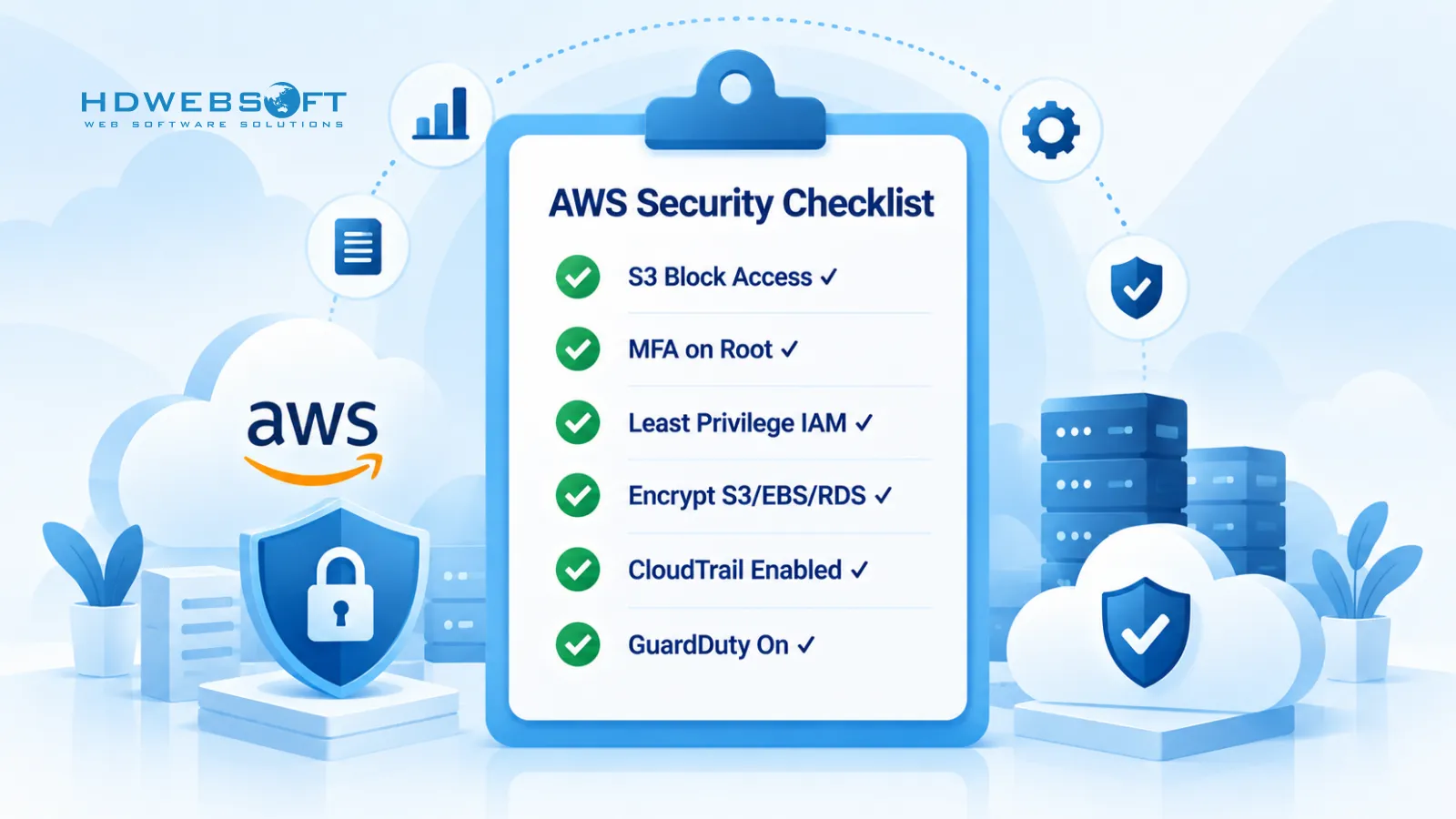
- Enable S3 Block Public Access at the account level (covers pre-2023 buckets too)
- Enforce MFA on the root account and all IAM users with write access
- Apply least privilege IAM — no
"Action": "*", "Resource": "*"policies - Enable default encryption for S3, EBS, and RDS
- Restrict security groups — no
0.0.0.0/0on SSH, RDP, or database ports - Disable public IP auto-assignment on private subnets
- Enable CloudTrail in all regions for API call logging
- Turn on GuardDuty for threat detection
- Enable AWS Config with CIS AWS Foundations Benchmark rules
- Run Security Hub to aggregate findings across accounts
- Rotate IAM access keys at least every 90 days
- Use AWS Secrets Manager for application secrets, not
.envfiles in repos - Patch EC2 instances with Systems Manager Patch Manager
- Subscribe to AWS Security Bulletins and act on critical CVEs
Frequently asked questions
What are the most common AWS security issues?
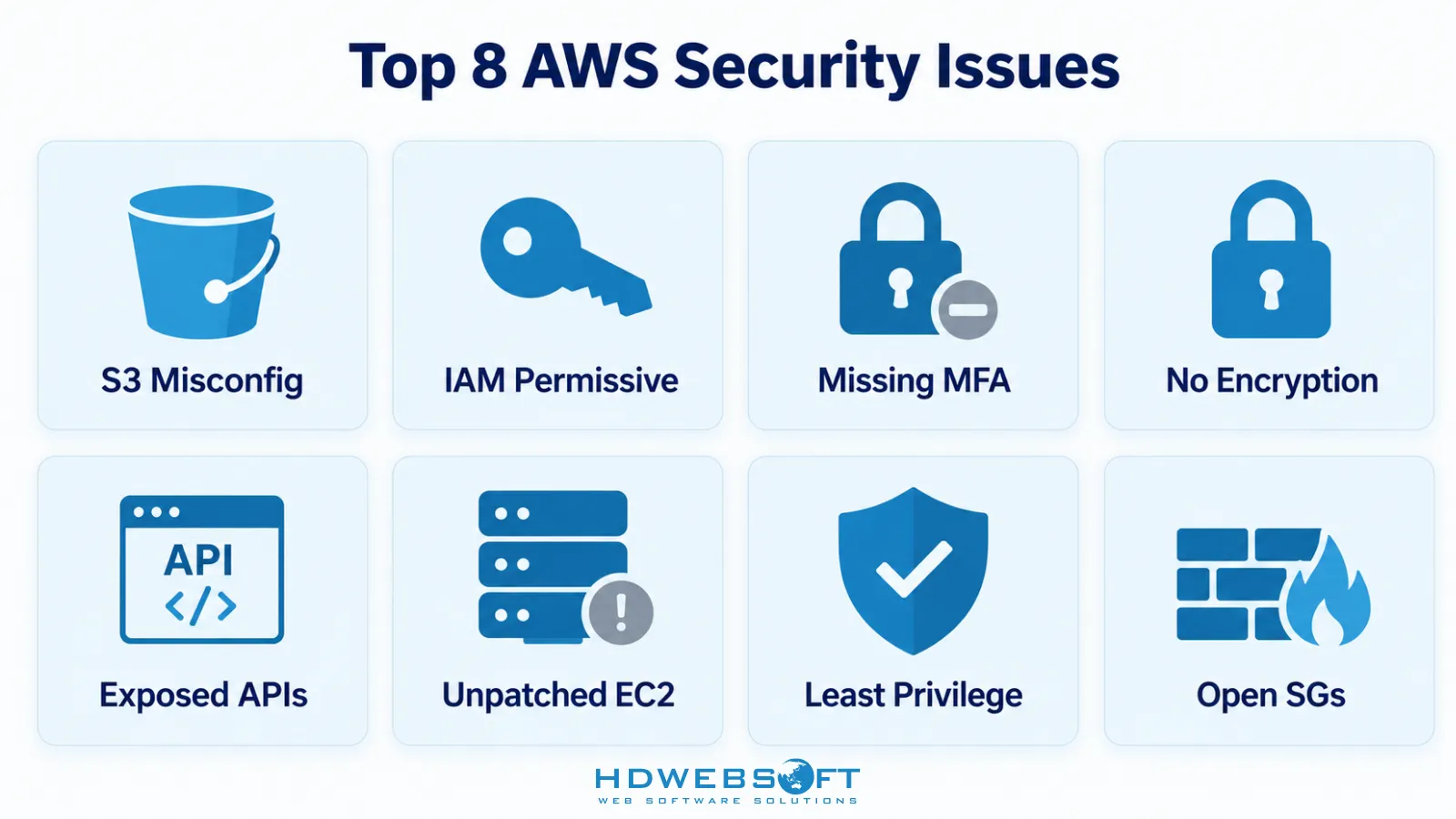
The most common AWS security issues are S3 bucket misconfiguration, overly permissive IAM policies, missing MFA on root and IAM users, unencrypted data at rest and in transit, exposed APIs and endpoints, unpatched EC2 instances, and misconfigured security groups and network ACLs. Most of these stem from customer-side misconfiguration, not AWS platform flaws.
What is the AWS Shared Responsibility Model?
The AWS Shared Responsibility Model defines who secures what: AWS is responsible for security OF the cloud (physical data centers, networking hardware, hypervisors, foundational services), while the customer is responsible for security IN the cloud (applications, data, IAM, configurations, encryption, patching). Most AWS security issues arise from misunderstanding this boundary.
How do you prevent AWS security issues?
Prevent AWS security issues by enforcing least privilege IAM, enabling MFA on all users, enabling S3 Block Public Access at the account level, encrypting data at rest and in transit, continuously monitoring with CloudTrail and GuardDuty, automating security checks with AWS Config and Security Hub, and regularly rotating IAM access keys and secrets.
Is AWS secure by default?
AWS is not insecure by default, but it is not fully secure by default either. AWS secures the underlying infrastructure, but many services — S3 buckets created before April 2023, IAM policies, security groups, and encryption settings — require the customer to apply secure configuration. Default settings have improved, but customer-side misconfiguration remains the leading cause of AWS breaches.
What was the Capital One AWS breach?
The 2019 Capital One breach exposed over 100 million customer records. An attacker exploited a server-side request forgery (SSRF) vulnerability on an EC2 instance with an overly permissive IAM role, then used the instance’s credentials to read sensitive S3 data. The root cause was a combination of SSRF, excessive IAM permissions, and delayed detection — all customer-side AWS security issues.
Does AWS Block Public Access prevent S3 leaks by default?
Since April 5, 2023, AWS enables S3 Block Public Access and disables ACLs by default for new buckets. However, this default is not retroactive — buckets created before that date keep their original public-access settings unless you explicitly enable Block Public Access at the account or bucket level. Pre-2023 buckets remain a common source of S3 data leaks.
Conclusion
Securing an AWS environment requires more than relying on AWS’s built-in protections. As this guide shows, the most common AWS security issues in 2025-2026 — S3 misconfiguration, overly permissive IAM, missing MFA, exposed services, unpatched instances, and weak network controls — are customer-side problems that customer-side discipline can prevent. Start with the AWS Shared Responsibility Model, enforce least privilege, encrypt everything, automate security checks, and treat credentials as part of your attack surface. The checklist above is a practical starting point; run it against your account today.
If you need help hardening your AWS environment or building secure cloud workloads, HDWEBSOFT offers AWS development services and cybersecurity services to help you get there.