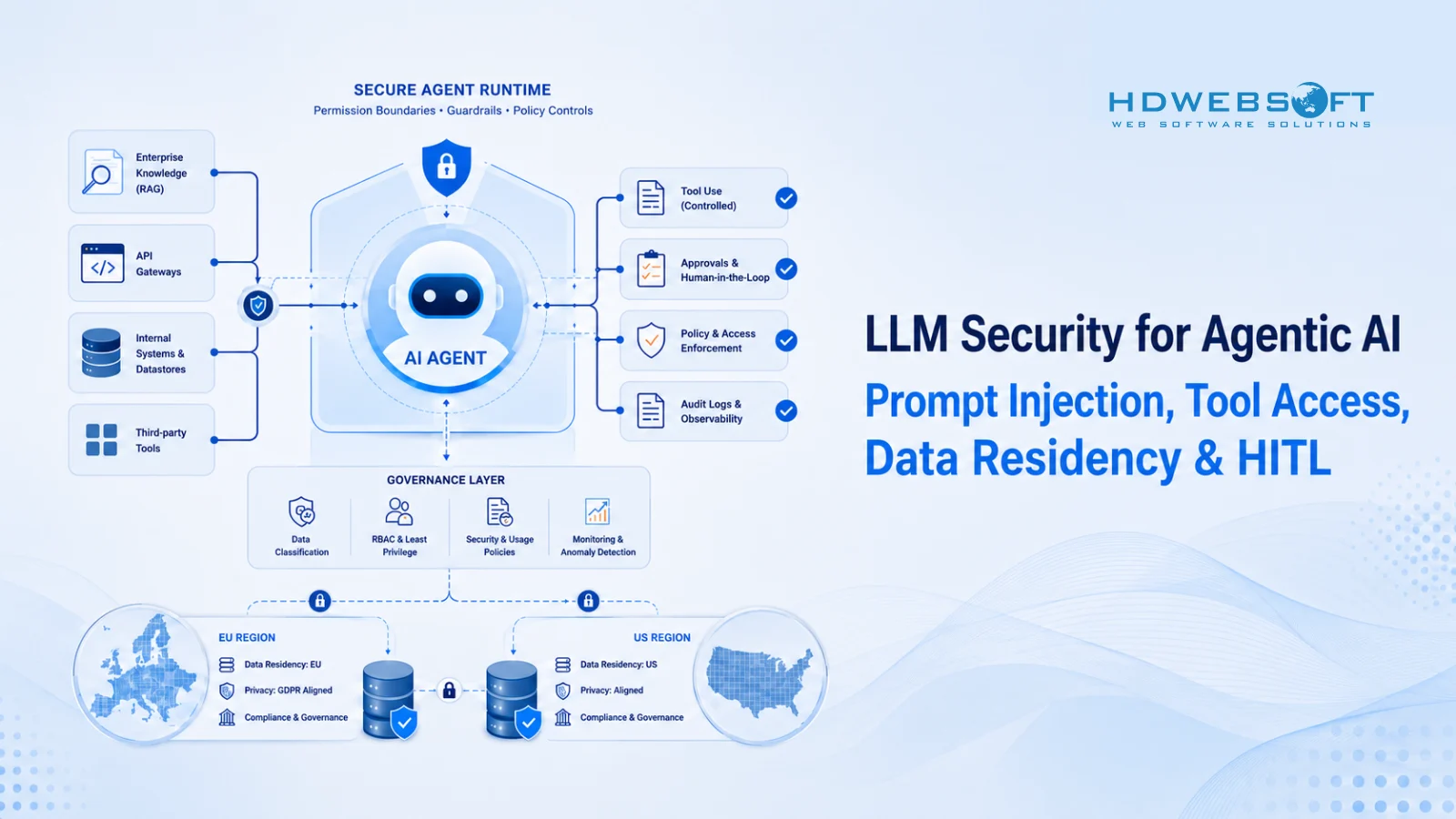
LLM security is no longer just about blocking unsafe prompts. When an LLM becomes part of an agentic workflow, it may retrieve documents, call APIs, update records, or trigger business processes. That changes the security model from “protect the chat” to “protect the system of actions around the model.”
If your team is planning broader agentic AI in production, LLM security should be treated as a release gate, not a final checklist. For EU/US teams, that means thinking about prompt injection, secure tool access, data residency, auditability, human oversight, testing, and production monitoring before launch.
The risk is no longer theoretical. Stanford HAI’s 2025 AI Index reported 233 AI-related incidents in 2024, a record high and a 56.4% increase over 2023. IBM’s 2025 Cost of a Data Breach Report also found that 13% of organizations reported breaches involving AI models or applications; among those compromised, 97% lacked proper AI access controls.
This guide breaks down the practical controls teams need to ship LLM-powered agents safely.
Key Takeaways
- LLM security covers prompts, tools, data, logs, humans, vendors, and monitoring.
- Agentic AI increases security risk because it can take actions, not just generate text.
- Prompt injection needs layered defenses, not a stronger system prompt alone.
- Secure tool calling depends on least privilege, validation, sandboxing, and audit logs.
- Data residency must be designed into the architecture for EU/US deployments.
- HITL controls should be risk-based, auditable, and operationally realistic.
- Testing and monitoring must continue after production release.
What LLM Security Means for Agentic AI
LLM security is broader than prompt safety
LLM security is the practice of protecting LLM-powered systems from data leakage, prompt injection, unauthorized tool use, unsafe outputs, and compliance failures.
For a simple chatbot, security may focus mostly on prompts, outputs, and user data. For an agentic AI system, the scope is wider. The system may include:
- A model or multiple models
- System prompts and policies
- RAG pipelines, agentic RAG systems, and vector databases
- An LLM gateway for multi-provider routing, fallback, and centralized governance
- APIs and business tools
- Memory or session context
- Logs and monitoring systems
- Human approval workflows
- Third-party model or infrastructure vendors
A secure LLM application is not just a safe prompt. It is a secure architecture around the model.
Why agentic systems raise the risk level
Agentic AI changes the risk profile because the model can influence actions. Instead of only answering a question, an agent may:
- Search internal documents
- Call a CRM API
- Update a ticket
- Trigger an email
- Generate code
- Analyze customer records
- Pass data between tools
- Recommend or execute workflow steps
That means a bad instruction, insecure retrieval result, excessive permission, or weak validation layer can create real operational impact. The failure mode is no longer just “the answer was wrong.” It can become “the wrong action was taken.”
Security goals for production LLM agents
For production LLM agents, security goals should be explicit. At minimum, teams should aim to:
- Prevent unauthorized data access
- Prevent sensitive data leakage
- Prevent unsafe or unauthorized tool use
- Maintain audit logs for important actions
- Apply human approval to high-risk workflows
- Detect abnormal behavior early
- Support incident response and rollback
- Keep model, prompt, and tool changes traceable
These goals help security, product, and engineering teams evaluate whether an agent is ready for production.
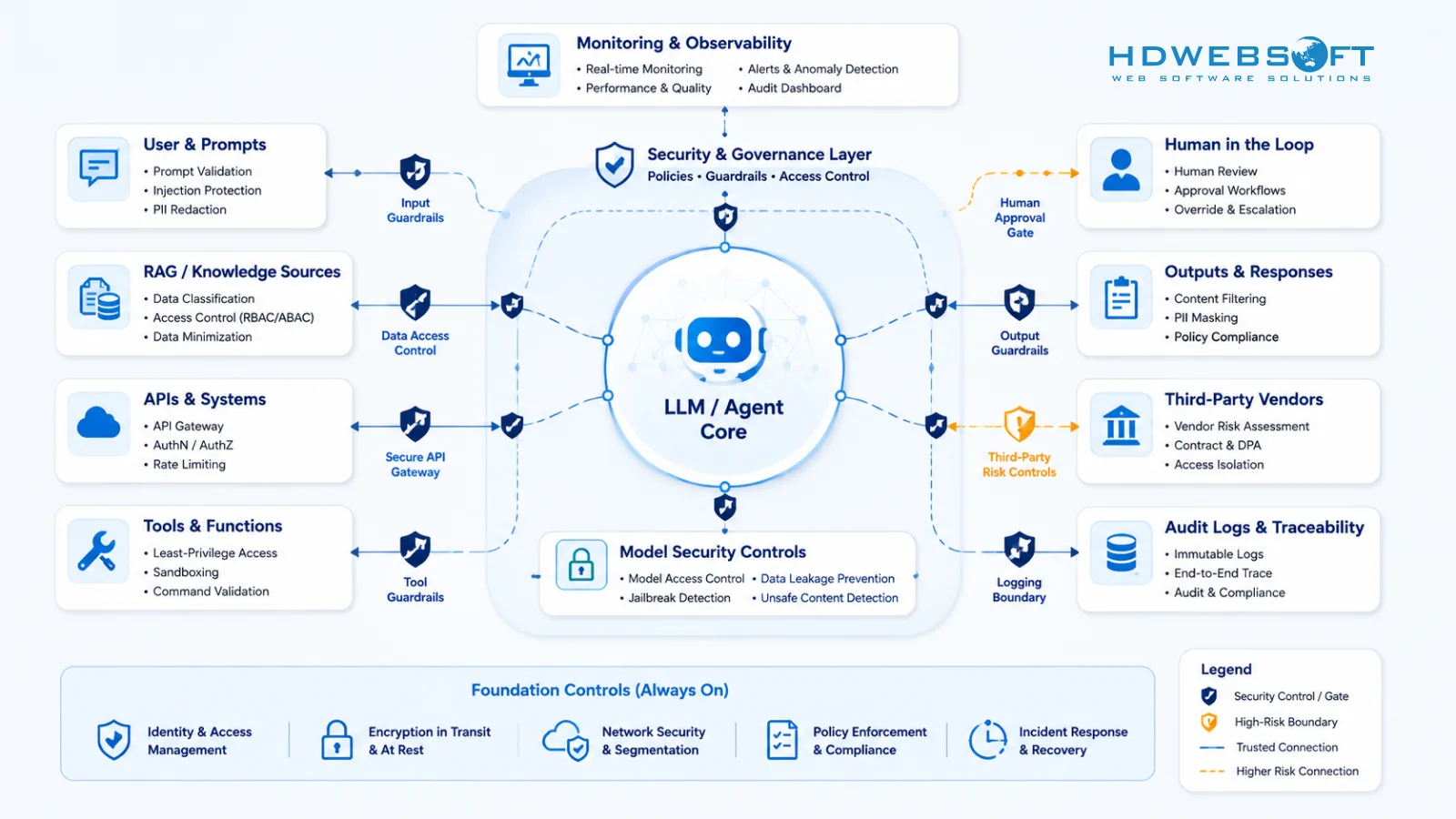
Threat Model: Where LLM Agents Fail in Production
Threat modeling gives teams a practical way to understand how an LLM agent can fail before those failures affect customers, employees, or regulated data.
IBM’s 2025 report found that 60% of AI-related security incidents led to compromised data and 31% caused operational disruption. For agentic AI, those numbers matter because a compromised agent can affect both information exposure and business process continuity.
Confidentiality risks
Confidentiality risks happen when sensitive information is exposed to the wrong user, tool, vendor, log, or downstream system.
Common examples include:
- PII included in prompts unnecessarily
- Secrets or credentials appearing in logs
- RAG retrieval exposing documents a user should not access
- Model outputs revealing hidden system instructions
- Vendor settings retaining sensitive prompts longer than expected
- Internal data sent to external services without clear approval
The practical control starts with data classification. Teams need to know what data the agent can access, where that data is processed, and who can see the output.
Integrity risks
Integrity risks happen when the agent’s behavior, reasoning, or actions are manipulated.
In LLM systems, integrity risk often appears as prompt injection. In agentic systems, it can go further:
- A malicious document tells the agent to ignore prior instructions.
- A tool response contains text that the model treats as a new command.
- A user tricks the agent into calling an unauthorized function.
- The agent modifies a record based on unverified information.
- A RAG result changes the agent’s decision path.
Integrity controls should focus on separating trusted instructions from untrusted content, validating tool calls, and applying policy checks before sensitive actions.
Availability and cost risks
LLM agents can also create availability and cost problems. For example:
- An agent enters a repeated loop.
- Tool calls spike unexpectedly.
- Token usage grows beyond budget.
- A model or vendor outage breaks a workflow.
- A malformed input causes repeated retries.
- A high-latency step blocks a business process.
This is sometimes called “denial of wallet” when excessive model usage creates unexpected cost. Production agents need rate limits, timeouts, retry limits, budget controls, and alerts.
Compliance risks
For EU/US deployments, compliance risk often comes from unclear data handling and weak governance.
Examples include:
- No documented data flow
- Unclear region of processing
- Weak retention settings for prompts and logs
- No audit trail for high-risk actions
- No human oversight for sensitive workflows
- No vendor/subprocessor review
- No incident response plan for AI-related failures
Security and compliance teams should review these risks before launch, not after the agent is already embedded in business workflows.
Prompt Injection and Indirect Injection Controls
Direct prompt injection
Direct prompt injection happens when a user intentionally tries to manipulate the model’s instructions. The user may ask the model to ignore system rules, reveal hidden context, bypass policies, or perform actions outside its allowed scope.
For a basic chatbot, direct injection may result in an unsafe or incorrect answer. For an AI agent, it may lead to tool misuse, data exposure, or unauthorized workflow execution.
OWASP lists Prompt Injection as a top LLM application risk in its OWASP Top 10 for LLM Applications. That is why injection testing should be part of the release process for any LLM workflow that handles sensitive data or business actions.
Indirect prompt injection
Indirect prompt injection happens when malicious instructions are hidden inside content the agent reads. This content may come from:
- Webpages
- Emails
- Uploaded files
- PDFs
- Tickets
- Chat transcripts
- RAG results
- Tool responses
- Shared documents
This is especially important for agentic AI because agents often consume external or semi-trusted content before deciding what to do next.
Why indirect injection is dangerous for agents
Indirect injection is dangerous because the malicious instruction does not come directly from the user. It appears inside data the agent was asked to process.
For example, an agent may read a support ticket that includes hidden instructions telling it to disclose internal policy, change a priority field, or call another tool. If the system treats retrieved content as trusted instruction, the agent may follow it.
The core principle is simple: external content should be treated as data, not authority.
Defensive controls
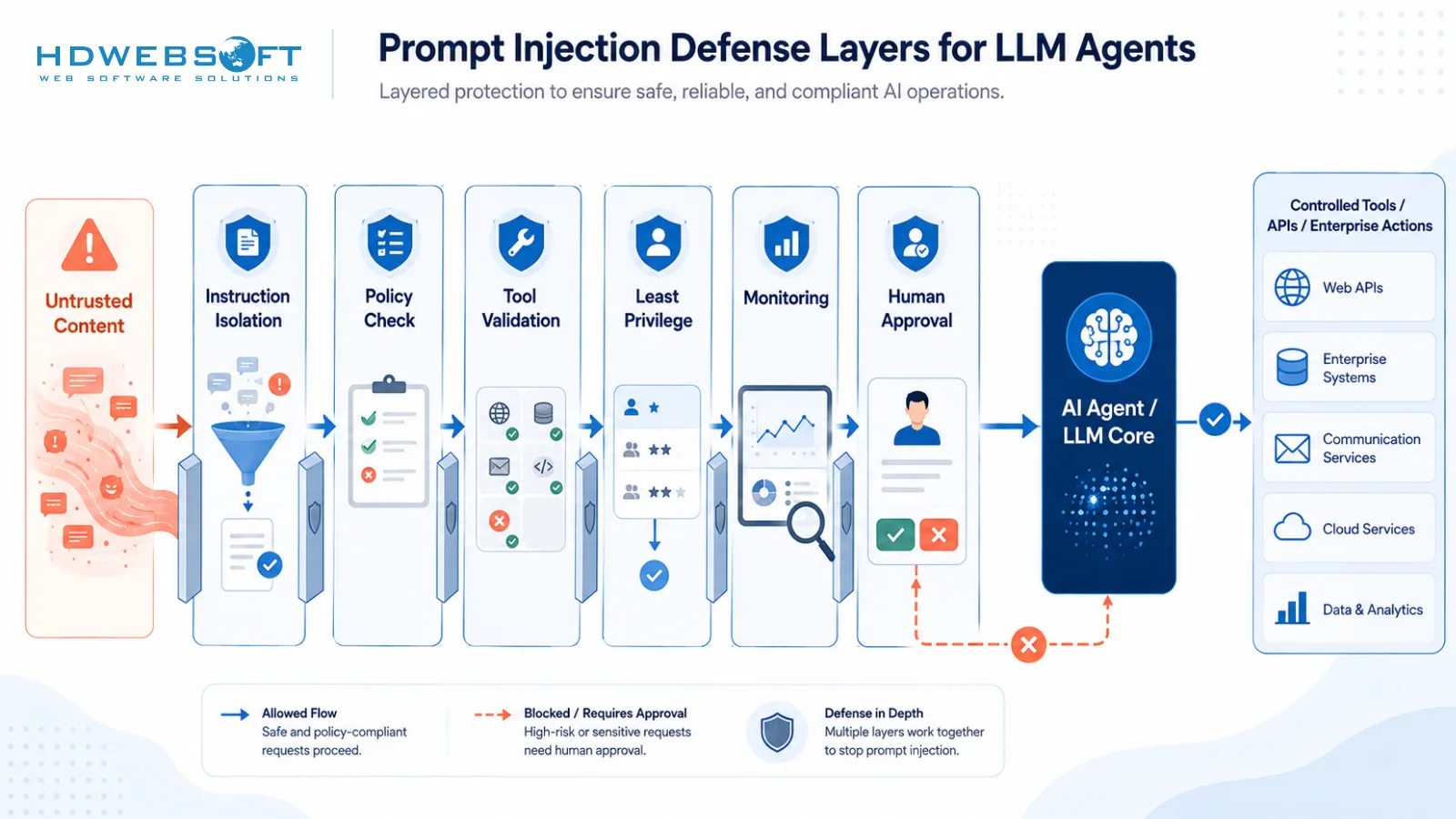
Prompt injection mitigation should use layered controls:
- Separate system instructions from user and tool content.
- Treat retrieved documents as untrusted data.
- Use tool allowlists instead of open-ended tool access.
- Validate tool arguments on the server side.
- Require structured outputs for tool calls.
- Add policy checks before sensitive actions.
- Limit the agent’s permissions by role and workflow.
- Sanitize or isolate external content before use.
- Add approval gates for high-impact actions.
- Monitor suspicious prompt patterns and blocked attempts.
No single control is enough. A strong system prompt helps, but it should not be the only security boundary.
What not to rely on alone
Teams should avoid relying only on:
- A generic “do not break the rules” system prompt
- Keyword filters
- Manual review without logs
- A single model safety setting
- Trusting all RAG content
- Giving the agent broad API permissions
- Assuming users will not try adversarial inputs
LLM security should assume that prompts, retrieved content, and tool outputs can be manipulated.
Secure Tool Calling and Least-Privilege Access
Why tool calling changes the security model
Tool calling is one of the biggest differences between a normal LLM chatbot and an agentic AI system.
A chatbot produces text. An agent with tools can create side effects. It may search a database, send an email, update a CRM field, create a support ticket, run a script, or trigger an internal workflow.
That means model output becomes a possible system action. Security controls need to protect the action layer, not just the text layer.
Common tool-calling risks in production
Common risks include:
- The agent calls a tool it should not access.
- The agent sends sensitive data to the wrong tool.
- The agent uses correct tools with unsafe arguments.
- The agent repeats tool calls and creates cost or availability issues.
- A tool response contains malicious instructions.
- A tool has broader permissions than the workflow requires.
- Secrets are exposed to the model through prompts or tool outputs.
- A tool action cannot be traced back to a user, agent, or approval.
OWASP also highlights Excessive Agency as a major LLM application risk, especially for systems that can call tools or interact with external systems. The issue is commonly rooted in excessive functionality, excessive permissions, or excessive autonomy. That maps directly to production agents with broad tool access.
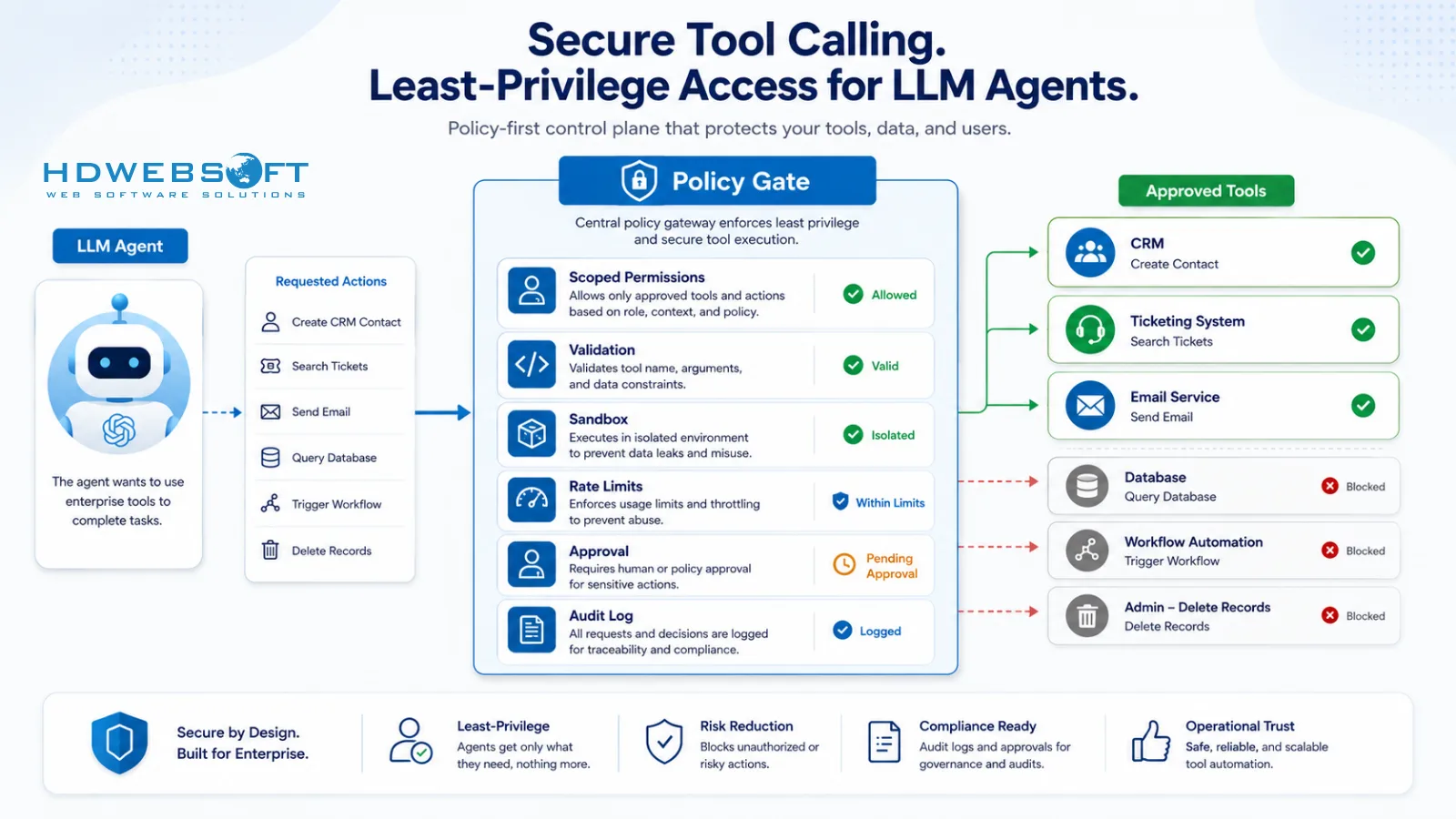
Least-privilege access for LLM agents
Least privilege means the agent should only have the permissions it needs for a specific task.
For example, an agent that drafts customer support responses may need read access to ticket history, but it may not need permission to issue refunds, delete accounts, or change billing records. If an action is high-risk, the agent should draft or recommend it, while a human approves it.
A practical least-privilege model should define:
- Which tools the agent can use
- Which operations are allowed
- Which data scopes are allowed
- Which users or roles can trigger the workflow
- Which actions require approval
- Which actions are blocked entirely
Each agent should have its own service identity where possible. Avoid giving an agent broad access through a shared admin credential.
Tool allowlists, scopes, and policy checks
Production agents should not choose from unlimited tools. Tool access should be allowlisted and scoped.
Useful controls include:
- Tool allowlists by agent type
- API scopes by workflow
- Rate limits per tool
- Policy checks before execution
- Environment separation between dev, staging, and production
- Approval checks for sensitive operations
- Deny-by-default behavior when context is unclear
A policy layer can decide whether a tool call is allowed before the action happens. This is especially useful for actions involving customer data, financial impact, legal impact, security impact, or external communication.
Argument validation and output validation
Tool calls should use structured schemas. The agent should not pass arbitrary free-form arguments into sensitive APIs.
For example:
- IDs should match expected formats.
- Amounts should be within approved limits.
- Email recipients should match allowed domains or verified contacts.
- File paths should stay within allowed locations.
- Tool calls should fail closed when required fields are missing.
Tool outputs should also be treated carefully. A tool response may contain untrusted text, malformed data, or injected instructions. The model should use tool output as data, not as a new authority source.
Sandboxing high-risk tools
Some tools need isolation. Examples include:
- Code execution
- Web browsing
- File processing
- Document ingestion
- Data transformation
- Workflow automation with external side effects
Sandboxing helps limit damage if the agent behaves unexpectedly. Depending on the use case, sandboxing may include network restrictions, file system limits, execution timeouts, memory limits, separate credentials, and restricted environments.
Secrets management for agent workflows
Secrets should not be placed in prompts, model context, or plain-text logs. Agents should access secrets only through secure backend services.
Good practices include:
- Store secrets in a secrets manager.
- Keep credentials out of prompt templates.
- Redact secrets from logs.
- Rotate credentials regularly.
- Use short-lived tokens where possible.
- Separate credentials by environment.
- Avoid exposing raw API keys to model outputs or tool responses.
The model should request an action, but the backend should enforce authorization and perform the secure operation.
Audit logging for tool calls
Every important tool call should be logged. Logs should help answer:
- Which user triggered the workflow?
- Which agent made the decision?
- Which tool was called?
- What action was requested?
- Was the action approved?
- What was the result?
- Was any sensitive data involved?
- Was the action blocked, retried, or rolled back?
For EU/US enterprise environments, auditability is often as important as prevention. If something goes wrong, the organization needs to reconstruct what happened.
Data Residency and Privacy for EU/US Deployments
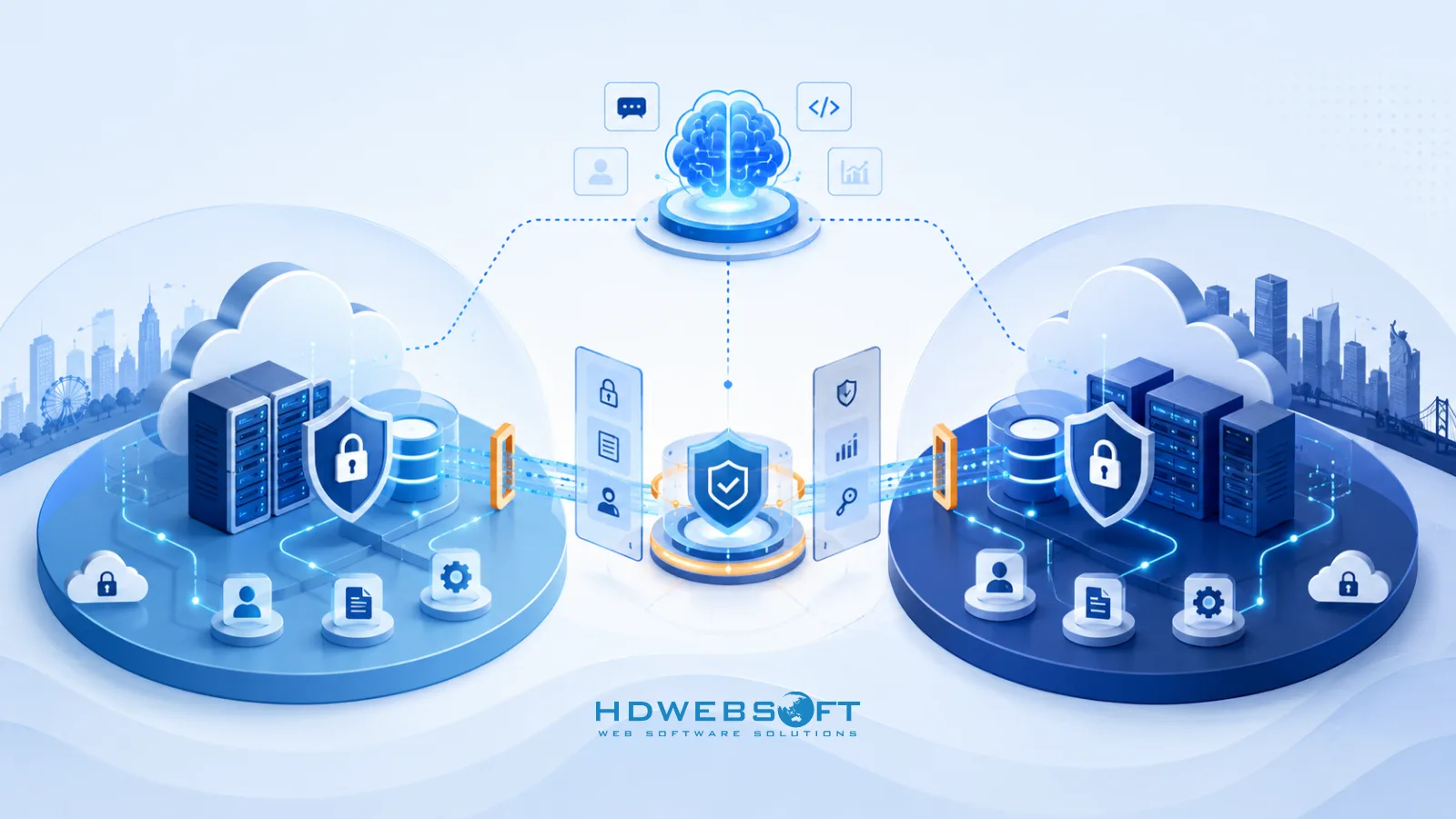
Start with a data map
Data residency starts with understanding the data flow. Before choosing a model provider or architecture, teams should map:
- What data enters the prompt
- What data is retrieved from internal systems
- What data is sent to model providers
- What data is embedded in a vector database
- What data is logged
- How long data is retained
- Which region processes or stores each component
- Which vendors or subprocessors are involved
Without a data map, security and compliance reviews become guesswork.
IBM also reported that 63% of breached organizations either lacked an AI governance policy or were still developing one. For EU/US deployments, that governance gap often shows up as unclear data flows, weak retention decisions, incomplete vendor review, or missing controls around shadow AI.
EU considerations
For EU deployments, teams commonly need to consider privacy principles such as data minimization, purpose limitation, access control, retention, and cross-border transfer review. Specific obligations depend on the organization, use case, data type, and legal basis.
Practical architecture questions include:
- Can sensitive data be minimized before prompt construction?
- Can inference be region-pinned?
- Are logs stored in the correct region?
- Are embeddings considered sensitive in this use case?
- Can customer data be excluded from provider training?
- Are deletion and retention settings configurable?
Legal interpretation should be reviewed by qualified counsel before publication or implementation decisions.
US considerations
US deployments may involve sector-specific expectations depending on the industry. Healthcare, finance, education, public sector, and enterprise SaaS environments often have stricter expectations around access controls, audit logs, retention, and vendor risk management.
Even when a regulation does not explicitly mention LLMs, buyers may expect security controls aligned with enterprise frameworks such as SOC 2 or ISO/IEC 27001.
Architecture patterns for residency-sensitive LLM systems
Common patterns include:
- Region-specific model endpoints
- Region-specific vector stores
- Private networking where available
- Customer-managed encryption keys
- Data masking before model calls
- PII detection before prompt construction
- Separate EU and US environments
- Short retention windows for prompts and outputs
- Logging tiers that separate operational metadata from sensitive content
- Access controls on embeddings and retrieved documents
The goal is to reduce unnecessary data movement and make unavoidable data movement visible, controlled, and documented.
Vendor due diligence checklist
Before using an LLM provider or AI infrastructure vendor, teams should ask:
- Where is data processed?
- Where is data stored?
- Is customer data used for training?
- What retention controls are available?
- Which subprocessors are involved?
- Are enterprise security controls supported?
- Are audit logs available?
- Can data be deleted on request?
- Are private networking or region-pinned options available?
- What happens during incident response?
Vendor settings can materially change the security posture of an LLM system. They should be reviewed before production use.
HITL Controls: Human Oversight Without Killing Velocity
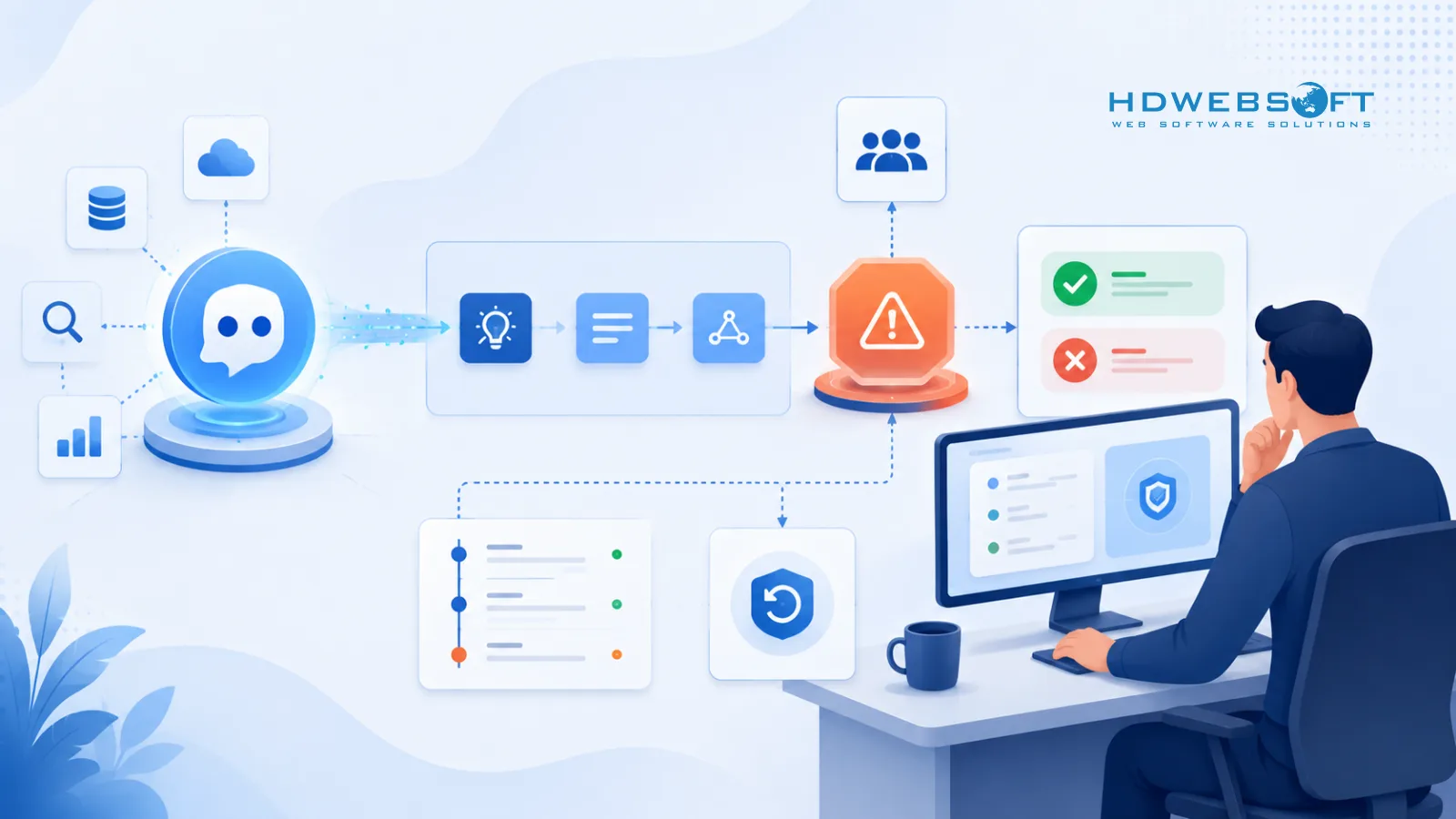
HITL should be risk-based
Human-in-the-loop does not mean every agent action needs manual approval. That would make most workflows too slow. It also does not mean every action should be automated.
The right approach is risk-based. Low-risk actions can be logged and monitored. Medium-risk actions may need sampling, rule-based checks, or approval under certain conditions. High-risk actions should require explicit human review.
Suggested risk tiers
| Risk tier | Example agent action | Suggested control |
|---|---|---|
| Low | Drafting an internal summary | Log only |
| Medium | Updating a non-critical CRM field | Rule-based validation or sampled review |
| High | Sending a customer-facing message | Human approval required |
| Critical | Payments, account deletion, legal/security-impacting actions | Human approval plus secondary control |
This structure lets teams preserve velocity while still controlling high-impact decisions.
Controls that make HITL audit-ready
A useful HITL workflow should capture:
- Reviewer identity
- Approval or rejection decision
- Reason for decision
- Original agent recommendation
- Final action taken
- Before/after state where relevant
- Timestamp
- Escalation path
- Rollback option
Without these records, HITL may help operationally but fail to support audit or incident review.
When to add a kill switch
A kill switch lets teams stop an agent or disable specific tool actions quickly.
Teams should consider kill switches for cases such as:
- Unexpected tool-call volume
- Repeated validation failures
- Suspicious injection attempts
- Sensitive data exposure
- Cost spikes
- Model/vendor outage
- Repeated low-confidence decisions
- Abnormal user complaints or support escalations
A kill switch should be tested before launch. It should not exist only as a theoretical control.
Testing and Monitoring LLM Agents Before Production
Traditional QA is not enough
Traditional QA assumes mostly deterministic behavior. LLM agents are different. Their outputs may vary, their reasoning paths may change, and their actions may depend on retrieved data, tool responses, user context, and model settings.
That means agent testing needs to include both functional and security evaluation. A workflow can pass a happy-path test and still fail under adversarial input, unusual documents, malformed tool responses, or permission boundary cases.
Core test types
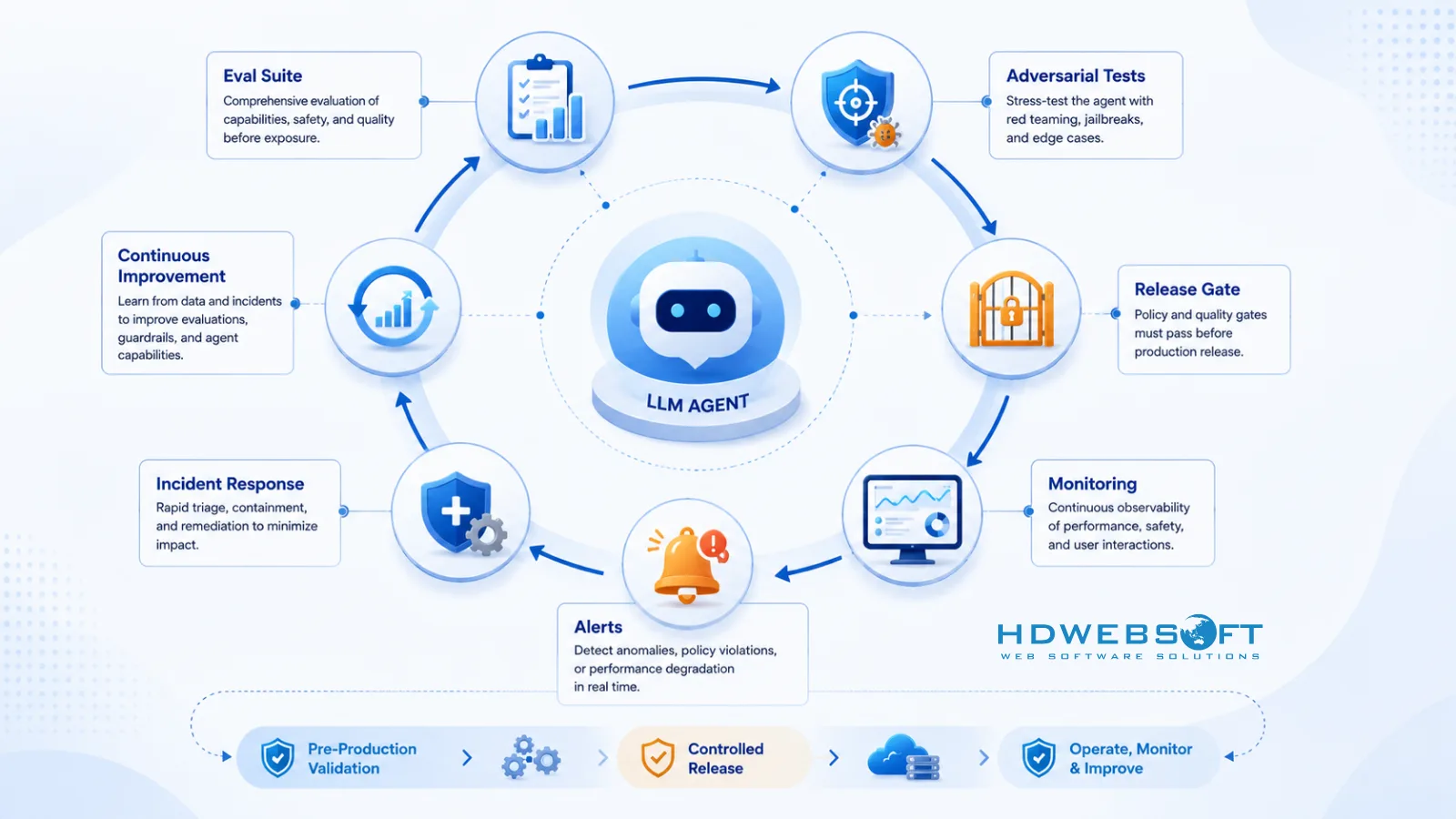
A production-ready test plan should include:
- Task success tests
- Prompt injection tests
- Indirect injection tests
- Tool permission tests
- Tool argument validation tests
- Data leakage tests
- RAG retrieval access tests
- HITL workflow tests
- Regression tests
- Cost and latency tests
- Failure-mode tests
- Rollback and kill-switch tests
Security tests should include realistic business workflows, not only artificial prompts.
Build an evaluation harness
An evaluation harness helps teams test agents consistently before release. It should include:
- A versioned set of test cases
- Expected outcomes or scoring criteria
- Adversarial examples
- Realistic user tasks
- Tool-use scenarios
- Policy violation checks
- Regression tracking across model or prompt changes
- Reports that can be reviewed by engineering, security, and product teams
The harness should run before major releases and whenever prompts, tools, models, retrieval logic, or policy rules change.
Monitoring signals to define before launch
Monitoring should be designed before the agent goes live. Useful signals include:
- Tool-call frequency
- Failed validations
- Blocked actions
- HITL approval and rejection rates
- Repeated retries
- Token and cost anomalies
- Latency spikes
- Sensitive data detections
- Suspicious prompt patterns
- Unexpected data access
- User complaints
- Policy violation attempts
These signals should feed alerts, dashboards, and incident response workflows.
Production monitoring after release
Testing does not end at launch. LLM agents can drift as data, tools, prompts, models, and user behavior change.
This lifecycle view aligns with the NIST AI Risk Management Framework, which organizes AI risk work around govern, map, measure, and manage. For LLM agents, that means teams should map risks before deployment, measure behavior through evaluations and monitoring, and manage failures through alerts, rollback paths, and incident response.
After release, teams should review:
- Whether the agent is still meeting task success goals
- Whether security blocks are increasing
- Whether HITL reviewers are overriding the agent often
- Whether cost patterns are stable
- Whether users are discovering new failure modes
- Whether any model or vendor changes affect behavior
Production monitoring turns LLM security from a one-time checklist into an ongoing operating practice.
LLM Security Checklist for Shipping Safely
Architecture controls
Before launch, confirm:
- Data flows are mapped.
- Sensitive data classes are identified.
- Tool permissions are documented.
- RAG access controls are tested.
- Model and vendor settings are reviewed.
- Region and retention settings are confirmed.
- Secrets are kept out of prompts and logs.
- Environments are separated.
Security controls
Confirm:
- Prompt injection defenses are tested.
- Indirect injection cases are included in evaluation.
- Tool allowlists are enforced.
- Tool arguments are validated server-side.
- Tool outputs are treated as untrusted data.
- Least-privilege access is applied.
- High-risk actions are gated.
- Audit logs are enabled.
- Rate limits and timeouts are configured.
Compliance controls
Confirm:
- Data retention is documented.
- Vendor/subprocessor review is completed.
- Human oversight policy is defined.
- High-risk workflows are auditable.
- Access controls are role-based.
- Incident response steps are documented.
- Deletion and data access processes are understood.
- Legal and compliance teams have reviewed relevant requirements.
Release controls
Confirm:
- Evaluation suite has passed.
- Regression tests are complete.
- Security test cases are reviewed.
- Monitoring alerts are configured.
- Rollback path is tested.
- Kill switch is tested.
- Post-release owner is assigned.
- Review cadence is scheduled.
A secure launch is not just a technical milestone. It is an operational commitment.
How HDWEBSOFT Helps Teams Secure LLM and Agentic AI Systems
Shipping LLM-powered agents safely requires both AI engineering and security thinking. Teams need to design workflows, integrate tools, protect data, test behavior, and monitor production systems without slowing delivery unnecessarily.
HDWEBSOFT helps teams plan, build, and secure AI systems with practical engineering support. If your organization is preparing an LLM or agentic AI rollout, our team can support architecture design, AI workflow implementation, tool integration, security review, and production readiness.
Explore our AI development services for secure AI implementation and our cybersecurity services for security assessment, risk review, and stronger production controls.
Conclusion
LLM security is not one prompt, one policy, or one checklist. For agentic AI, it must cover the full system: prompts, retrieved data, tools, permissions, logs, human approvals, testing, and production monitoring.
The teams that ship safely will be the ones that treat security as part of the architecture from the start. Prompt injection controls, least-privilege tool access, data residency planning, HITL workflows, and continuous evaluation all work together to reduce risk.
For EU/US production environments, the goal is not just to make the agent useful. The goal is to make it controlled, auditable, resilient, and safe enough to operate in real business workflows.
FAQ
What is LLM security?
LLM security is the practice of protecting LLM-powered systems from prompt injection, data leakage, unauthorized tool use, unsafe outputs, and compliance failures. For agentic AI, it also includes tool permissions, audit logs, HITL workflows, testing, and monitoring.
Why is LLM security harder for AI agents?
LLM security is harder for AI agents because agents can take actions. They may retrieve documents, call APIs, update systems, or trigger workflows. That means security must protect not only model outputs but also the tools and data connected to the agent.
How do you prevent prompt injection in LLM agents?
Prompt injection prevention requires layered controls. Teams should separate trusted instructions from untrusted content, validate tool calls, apply least-privilege access, treat retrieved content as data, add policy checks, monitor suspicious patterns, and test with adversarial cases.
What is indirect prompt injection?
Indirect prompt injection happens when malicious instructions are hidden inside content the agent reads, such as webpages, emails, documents, support tickets, PDFs, or RAG results. The agent may treat that content as an instruction unless the system is designed to isolate and validate it.
How do you secure tool calling for LLM agents?
Secure tool calling requires least-privilege access, scoped APIs, tool allowlists, structured schemas, server-side argument validation, output validation, rate limits, sandboxing for high-risk tools, secrets management, and audit logging for tool actions.
How does data residency affect LLM applications?
Data residency affects where prompts, retrieved documents, embeddings, outputs, and logs are processed and stored. EU/US deployments should map data flows, review vendor settings, configure retention, and choose architecture patterns that match privacy and compliance requirements.
What should teams test before deploying LLM agents?
Teams should test task success, prompt injection resistance, indirect injection scenarios, tool permissions, data leakage, RAG access controls, HITL approval flows, regression behavior, monitoring alerts, latency, cost behavior, rollback paths, and kill-switch behavior.