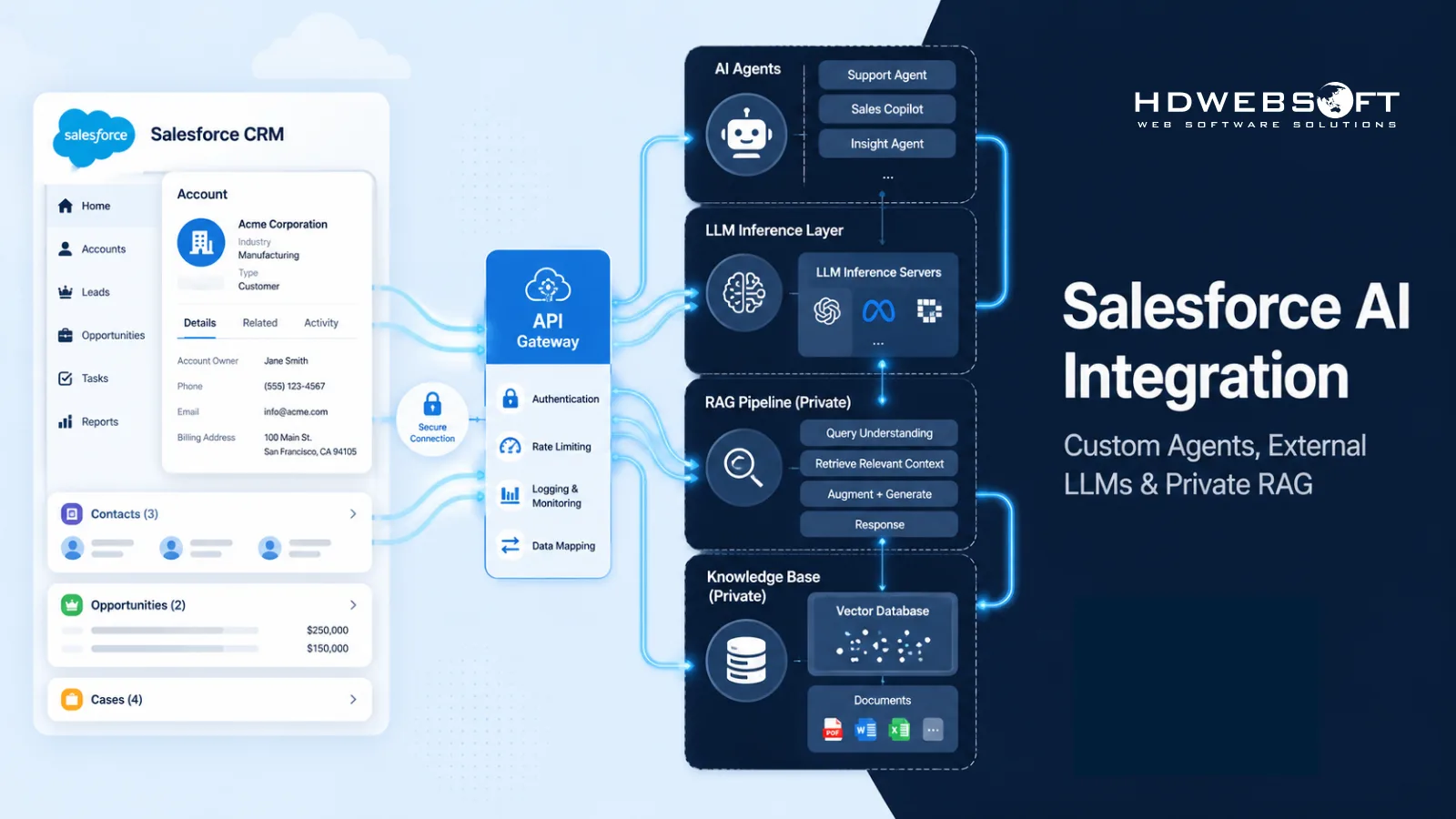
Salesforce has invested heavily in native AI. Agentforce, Einstein, and Data Cloud now cover a wide range of sales, service, and marketing use cases. But as AI workloads move from pilots to production, many enterprises hit the same wall: they need more control over model choice, infrastructure, data residency, specialized workflows, and AI economics than a platform-managed offering can give them.
Salesforce AI integration can connect Salesforce data and workflows with AI capabilities inside or outside the Salesforce ecosystem. This article focuses on the custom and hybrid side — extending the SFDC platform with external AI agents, open-weight or self-hosted LLMs, and private RAG pipelines running on AWS or GCP, while maintaining controlled, near-real-time synchronization of CRM data.
This is not a replacement for Agentforce. Agentforce supports bring-your-own models and fits many native use cases. A custom or hybrid architecture complements it when enterprises need private RAG, self-hosted inference, specialized workflows, or tighter control over infrastructure and costs. HDWEBSOFT’s Salesforce Certified Engineers and AI Engineers work together to design and implement these integrations end-to-end.
Key Takeaways
- Salesforce AI integration can use AI inside or outside the Salesforce ecosystem; this article focuses on custom and hybrid architectures with external agents, LLMs, and private RAG.
- Agentforce-first fits many native use cases; custom and hybrid complements it when enterprises need model flexibility, infrastructure control, data residency, or specialized workflows.
- A typical architecture routes Salesforce data through an API gateway or middleware to an external AI stack on AWS or GCP, with near-real-time CRM sync via Platform Events, Change Data Capture, and the Pub/Sub API.
- A private RAG architecture keeps CRM documents, embeddings, and retrieval infrastructure inside an enterprise-controlled environment; combined with self-hosted inference, it reduces the need to send sensitive context to third-party LLM APIs.
- HDWEBSOFT’s Salesforce Certified Engineers and AI Engineers design and implement the full stack — API architecture, data synchronization, LLM and RAG, cloud infrastructure, and security hardening.
What Is Salesforce AI Integration?
Salesforce AI integration connects Salesforce data and workflows with AI capabilities — either inside the Salesforce ecosystem (Agentforce, Einstein, Data Cloud) or outside it, through a custom or hybrid architecture with external AI agents, open-weight or self-hosted LLMs, and private RAG pipelines.
Native Salesforce AI is optimized for workflows that fit the platform’s data model. External AI integration is what enterprises reach for when a use case needs something the platform does not provide natively: a specific open-weight model, a private retrieval pipeline, inference inside a controlled region, or a specialized workflow spanning multiple systems.
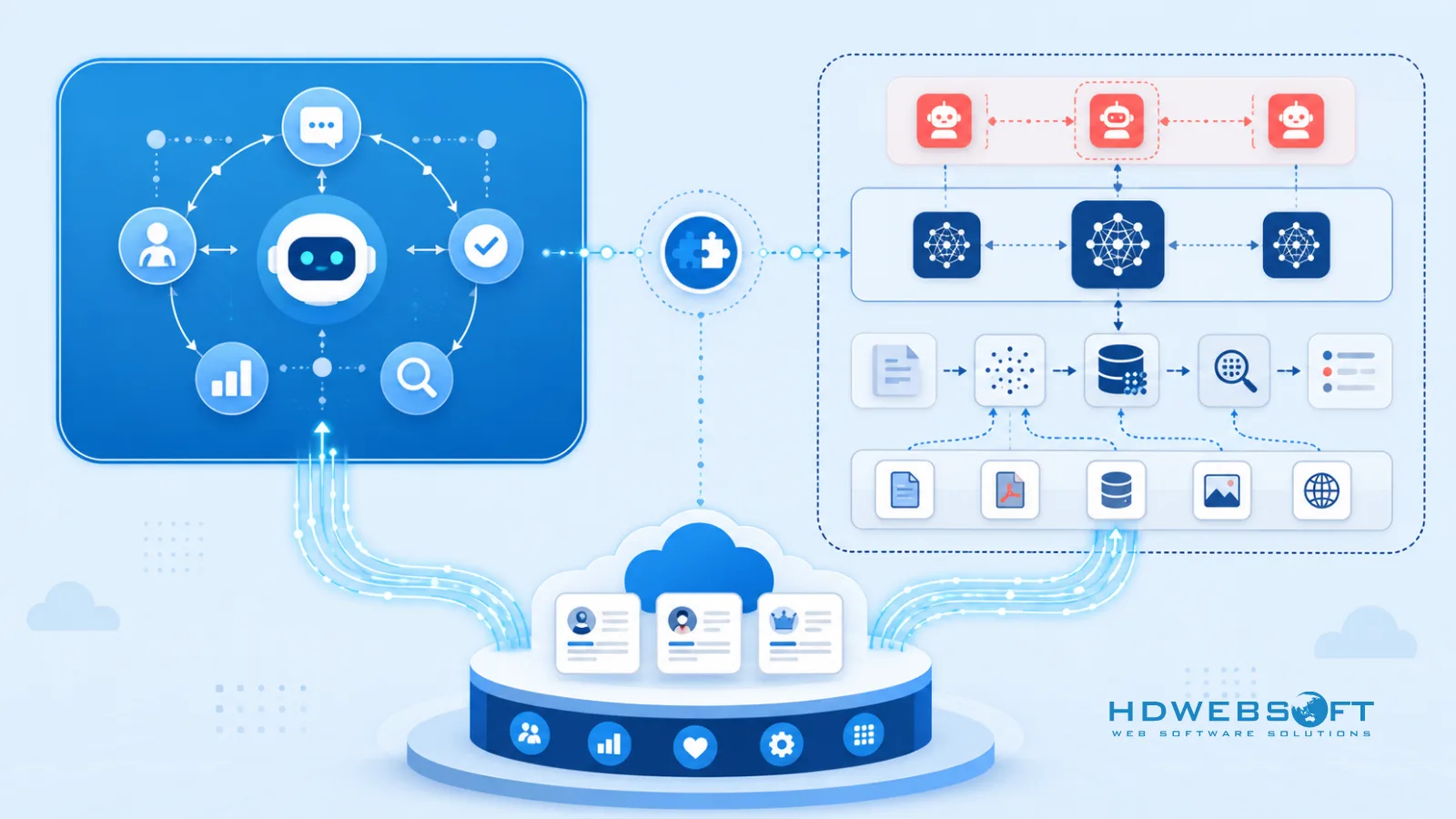
Custom AI agent integration is one common pattern — agents that call external LLMs, retrieve context from a private vector store, and write results back into Salesforce, while still surfacing inside Salesforce UI. The inference and retrieval happen in infrastructure the enterprise controls.
The key framing: native and custom are not mutually exclusive. Most mature enterprises run a hybrid model — Agentforce for native use cases, custom or hybrid architecture for workloads that need more control.
Agentforce-First vs Custom/Hybrid Salesforce AI: Where Each Fits
Agentforce is not a closed system. Salesforce supports bring-your-own models, and Agentforce can call external endpoints in certain configurations. The platform has also scaled fast: Agentforce ARR exceeded $1.5 billion in Q2 FY2027, growing more than 240% year over year. That momentum reflects real demand for native, platform-managed AI in sales and service.
The question is not “Agentforce or custom?” but “where does Agentforce-first fit, and where does a custom or hybrid architecture add value on top of it?” The two approaches complement each other in most mature enterprise stacks.
| Criterion | Agentforce-First | Custom / Hybrid |
|---|---|---|
| Setup speed | Fast, native wizard and low-code builder | Slower, requires architecture design and integration work |
| Salesforce-native workflow | Deeply integrated into Sales Cloud, Service Cloud, Data Cloud | Requires an integration layer to surface inside Salesforce UI |
| Model flexibility | Bring-your-own models supported, within platform constraints | Full choice of open-weight, self-hosted, or managed model services |
| Infrastructure control | Salesforce-managed | Enterprise-controlled on AWS, GCP, or private cloud |
| Data residency | Depends on Salesforce region and Data Cloud deployment | Controlled by enterprise to specific region, cloud, or on-prem |
| Customization depth | Bounded by platform capabilities and guardrails | No architectural limit; custom RAG, routing, and workflows |
| Cost model | Per-seat plus consumption (Agentic Work Units) | Infrastructure and inference cost, self-managed and optimized |
| Operational burden | Low, Salesforce operates the platform | Higher, requires DevOps, MLOps, and observability |
The pattern that works in practice: start with Agentforce-first where platform-managed AI is sufficient. Add a custom or hybrid architecture for workloads that hit a constraint — a model the platform does not support, a data residency rule it cannot satisfy, a retrieval pipeline that must stay private, or a cost profile that platform consumption pricing does not fit.
Core Architecture: Connecting Salesforce to External AI
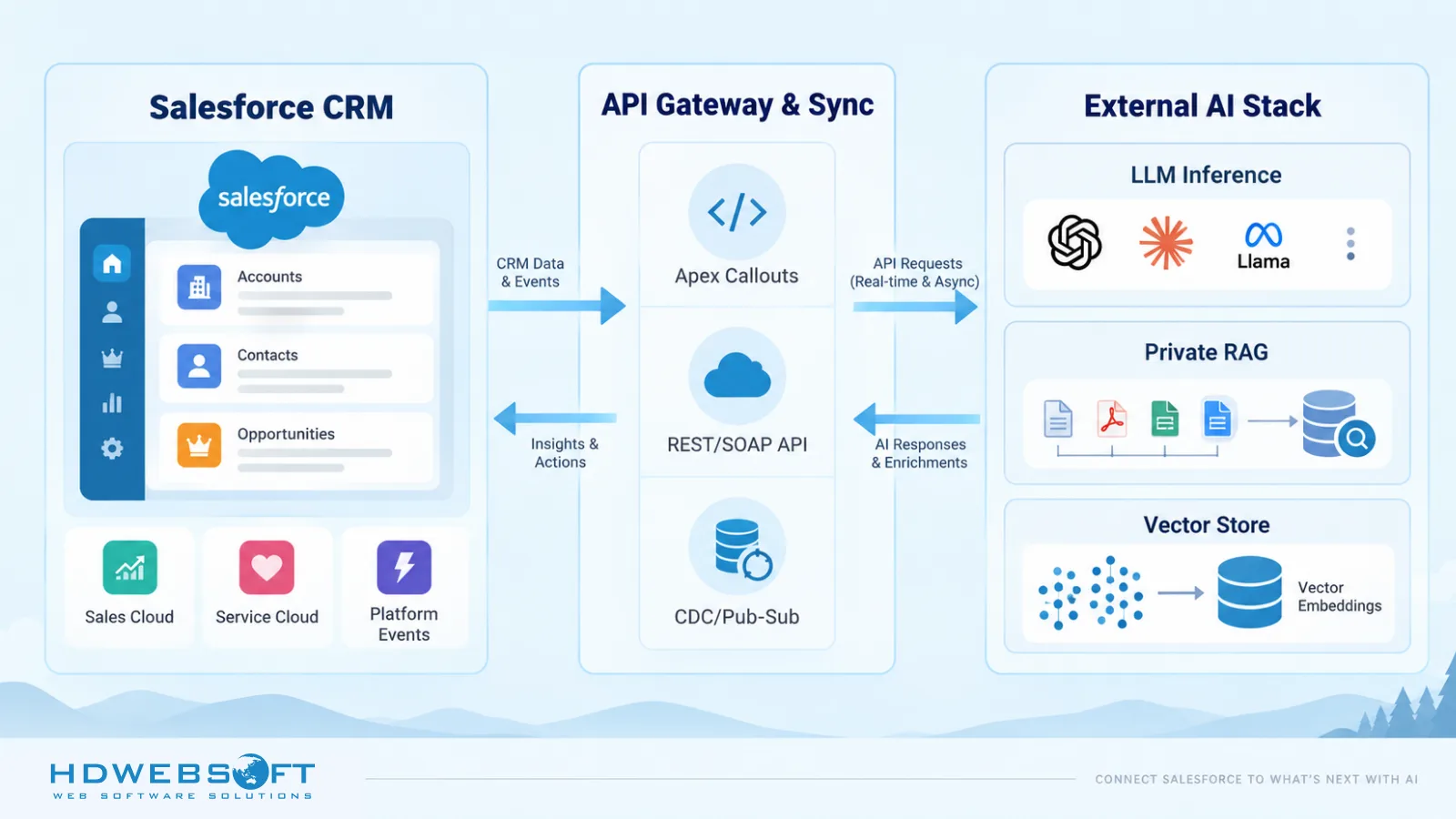
A custom or hybrid Salesforce AI integration has three layers: an API and integration layer, a CRM data synchronization layer, and an external AI stack where inference and retrieval happen.
API and Integration Layer
Salesforce exposes several integration mechanisms:
- Apex callouts with Named or External Credentials — synchronous outbound calls from Salesforce to an external AI endpoint. External Credentials are the modern replacement for legacy Named Credentials and handle secrets outside Apex code.
- REST and SOAP APIs — for external systems reading from or writing back into Salesforce, typically when an AI agent updates a record, creates a task, or pulls context.
- Platform Events, Change Data Capture, and the Pub/Sub API — event-driven, near-real-time synchronization. Salesforce publishes events when records change; subscribers receive them and act.
- Salesforce Connect — external data virtualization, letting Salesforce surface data outside the platform without copying it in. Useful for lookups, but not a primary AI API mechanism.
For AWS-based pipelines, Salesforce integration can use Salesforce Event Relay to stream Platform Events directly into Amazon EventBridge, which routes them to Lambda, SQS, or other AWS services without custom polling.
A common production pattern puts an API gateway — AWS API Gateway, Apigee, or similar — between Salesforce and the external AI stack, handling authentication, rate limiting, validation, and logging so the AI services behind it stay protected and observable.
CRM Data Synchronization
The external AI stack needs current CRM data. Near-real-time synchronization is the goal, but precision matters.
Change Data Capture and Platform Events do not push data directly into S3, BigQuery, or Snowflake. They publish events to a subscriber. A middleware or stream processor — on AWS Lambda, EventBridge, Kafka, or similar — consumes those events and updates the external data store. The AI stack reads from that store, not from Salesforce directly.
Two patterns cover most use cases:
- Near-real-time event sync — Platform Events or CDC publish changes, a stream processor updates the external store within seconds. Fits agent-assist and service workflows where freshness matters.
- Batch sync — scheduled jobs pull larger datasets for RAG ingestion, embedding regeneration, or fine-tuning. Fits use cases where periodic refresh is sufficient.
Before any sync runs, data quality matters. Applying Salesforce data management best practices — clean fields, consistent naming, deduplication, clear ownership — prevents garbage from degrading retrieval and inference quality.
External AI Stack on AWS or GCP
The external AI stack is where model choice and infrastructure control become real. Enterprises typically deploy:
- Open-weight or self-hosted LLMs — Llama, Mistral, or Qwen on Amazon SageMaker, Google Vertex AI, Kubernetes, or dedicated inference infrastructure. Self-hosting gives control over the model, region, and inference pipeline, but carries operational cost and GPU capacity planning.
- Managed model services — Amazon Bedrock and Vertex AI offer managed access to a range of models without self-hosting. These are managed services, not self-hosted infrastructure.
- Multi-model routing — a gateway in front of the models that routes each request to the right model based on task, cost, latency, or quality.
The choice between self-hosted and managed is not always about cost. Self-hosting is not automatically cheaper than an API — GPU utilization, engineering overhead, and operational burden can erase raw per-token savings. The real reasons to self-host are infrastructure control, compliance, private deployment, and specialized fine-tuned models that managed services do not offer.
Private RAG Architecture
A private RAG architecture keeps CRM documents, embeddings, and retrieval infrastructure inside an enterprise-controlled environment. Combined with private or self-hosted inference, it can further reduce the need to send sensitive context to third-party LLM APIs.
The typical components:
- Document ingestion — contracts, tickets, knowledge base articles, and CRM notes pulled into a processing pipeline.
- Embedding model — converts documents into vector representations, running inside the enterprise’s own infrastructure.
- Vector store — for private infrastructure, OpenSearch, pgvector, or a self-managed vector database running inside the enterprise’s cloud account or on-prem.
- Retrieval and generation — at query time, the system retrieves context from the vector store and passes it to the LLM. If the LLM is also self-hosted, the full path stays inside enterprise control.
The value is not just privacy. A private RAG architecture also gives control over retrieval quality — tuning chunking, embeddings, and reranking without a platform-managed black box.
When Enterprises Need Custom Salesforce AI (Use Cases)
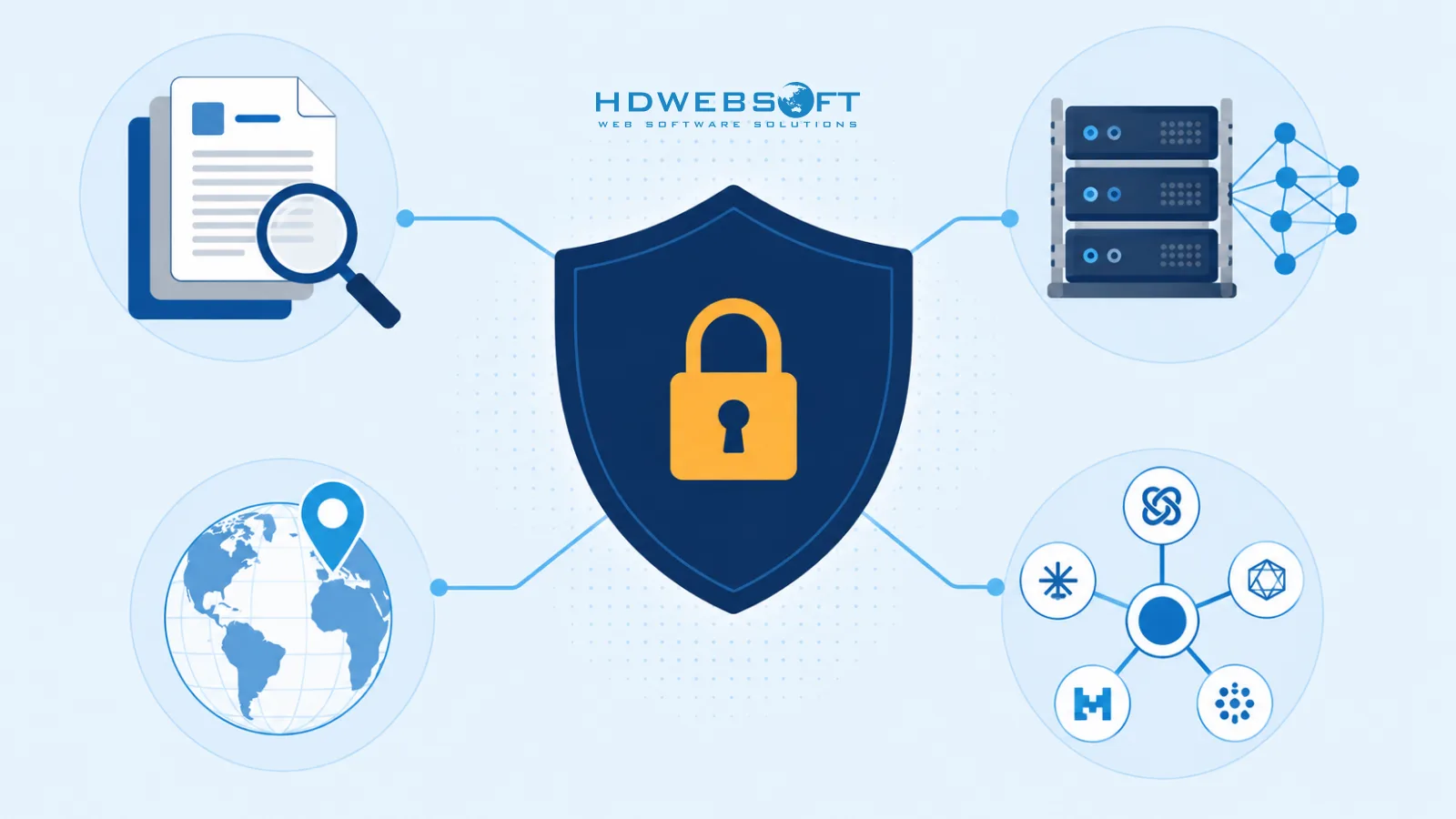
The use cases that push enterprises toward a custom or hybrid architecture:
- Private RAG over sensitive documents — contracts, legal correspondence, support tickets, and knowledge bases that should not leave an enterprise-controlled environment. A private RAG pipeline lets agents retrieve answers without sending raw documents to a third-party LLM API.
- Open-weight or self-hosted LLMs for infrastructure control, workload economics, compliance, or private deployment — when an enterprise needs a specific model in a specific region, a compliance requirement managed services cannot satisfy, or a fine-tuned model not available through any API. Self-hosting is a trade-off, not a default cost win.
- Specialized AI workflows — industry-specific pipelines in BFSI, healthcare, logistics, or real estate that combine retrieval, classification, and generation in ways the platform does not support natively.
- Data residency — inference and retrieval must happen inside a specific country or region. A custom architecture pins the entire AI stack to that region.
- Multi-model routing — combining several LLMs behind one gateway, routing each request to the model that best fits the task, cost, and latency profile.
- Complementing Agentforce — for workloads where Agentforce-first is not enough, a custom or hybrid layer extends Salesforce without a rip-and-replace of the native AI stack.
Security, Governance and Cost Considerations
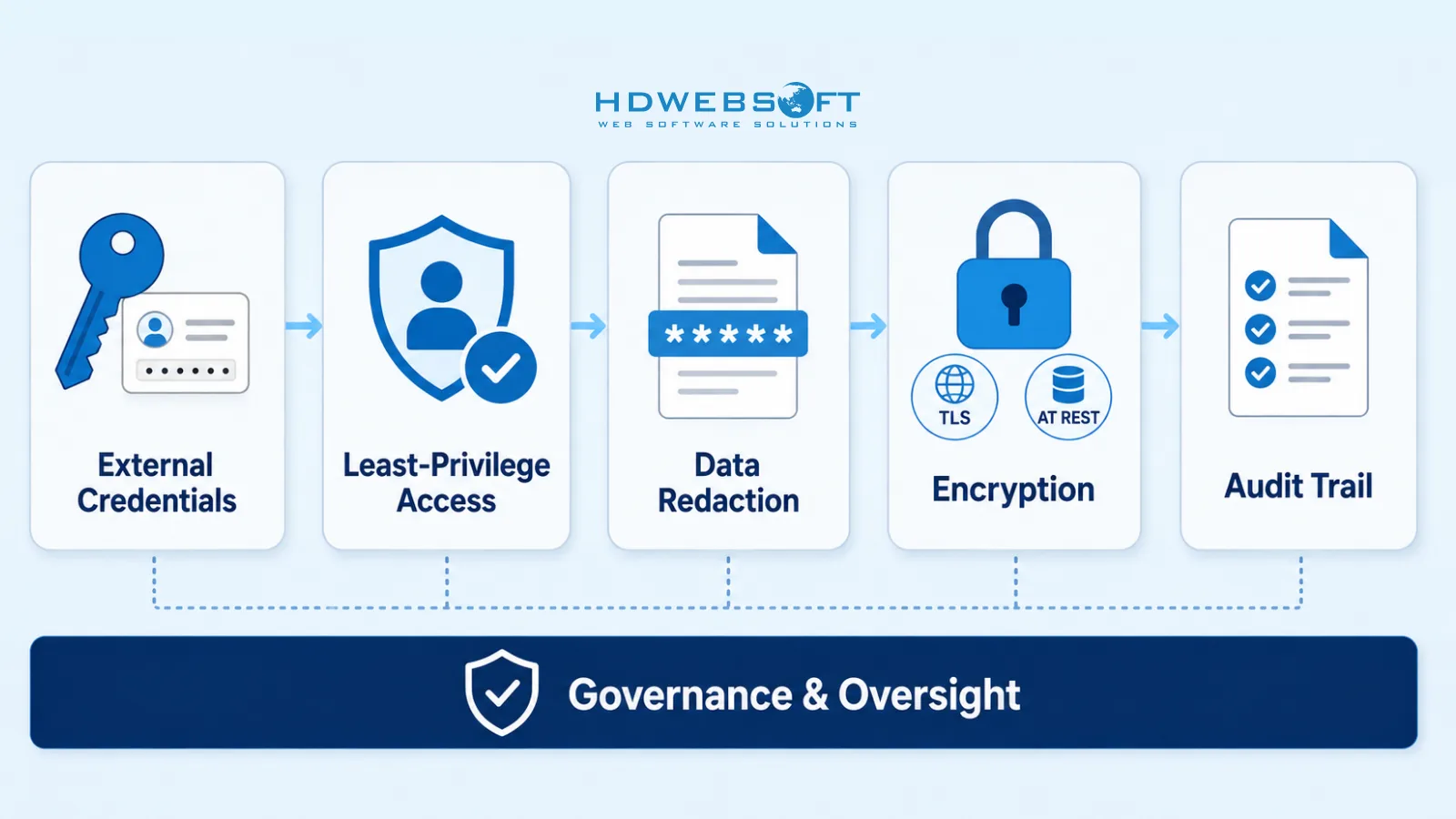
Custom Salesforce AI integration expands the attack surface and governance burden. The security model needs to cover every layer the data crosses.
On the Salesforce side:
- External Credentials — store authentication secrets outside Apex code, with named principals and permission sets controlling access to the external AI endpoint.
- Least-privilege access — integration users and service accounts get the minimum object and field permissions needed, nothing more.
- Field-level and object-level permissions — enforce at the integration layer so the external AI stack only receives the fields it needs.
- Data classification and redaction — classify fields by sensitivity and redact or mask PII before it leaves Salesforce.
- Encryption — in transit (TLS) and at rest, on both sides.
On the external AI stack side: encryption at rest for the vector store, access control on inference endpoints, and network isolation between the AI stack and other workloads. Applying LLM security for agentic AI practices — prompt injection defenses, output validation, tool-use guardrails — closes the loop on AI-specific risks.
Governance is where most enterprises are still catching up. According to Deloitte’s State of AI in the Enterprise 2026 report, only about one in five companies (21%) has a mature governance model for autonomous AI agents — roughly 80% lack mature governance. For a custom Salesforce AI integration, governance means defining where humans stay in control, how automated decisions are audited, which records are retained, and how escalations route back to a person.
Logging and audit trail are non-negotiable — every call, retrieval, inference, and write-back should be logged with enough context to reconstruct what happened and why.
On cost, a custom architecture gives enterprises the levers to optimize — token monitoring, semantic caching, model routing, right-sizing — but also means owning the bill for infrastructure, inference, and operations. The trade-off is control versus operational burden, made deliberately.
Building a Custom Salesforce AI Integration
HDWEBSOFT approaches Salesforce AI integration as a joint effort between Salesforce Certified Engineers and AI Engineers. The Salesforce side handles CRM data modeling, integration patterns, security, and platform-native workflows; the AI side handles the external LLM stack, RAG pipeline, and cloud infrastructure.
The typical engagement moves through:
- Discovery and architecture — map use cases, data flows, security and residency constraints, and decide where Agentforce-first fits and where a custom or hybrid layer is needed.
- API and integration layer — design Apex callouts, External Credentials, Platform Events or CDC streams, and the API gateway between Salesforce and the external AI stack.
- CRM data synchronization — build the stream processor and external data store updates, with data quality checks before sync runs.
- External LLM and RAG — stand up model serving, vector store, embedding pipeline, and retrieval logic on AWS or GCP.
- Cloud infrastructure and security — provision compute, networking, and storage with encryption, least-privilege, redaction, logging, and LLM-specific security controls baked in.
- Monitoring and operations — observability for inference, retrieval, cost, and governance, so the system stays healthy and auditable in production.
HDWEBSOFT’s AI integration services cover the full stack, and the team works as a long-term delivery partner rather than a one-off implementation vendor.
If you are evaluating whether to extend Salesforce beyond Agentforce, the most useful next step is a focused audit of your current CRM data, use cases, and constraints — mapping where native AI fits and where a custom or hybrid architecture adds real value.
Conclusion
Agentforce has made native AI inside Salesforce a strong default for many sales and service use cases. But enterprises that need private RAG, open-weight or self-hosted LLMs, specialized workflows, strict data residency, or tighter control over inference costs often need a custom or hybrid architecture on top of it.
The right approach is rarely either-or. Agentforce-first covers the native side; a custom or hybrid Salesforce AI integration extends the platform with external agents, LLMs, and private RAG on AWS or GCP, with near-real-time CRM synchronization and enterprise-controlled infrastructure. The engineering work is real — API architecture, data sync, security, governance, and operations all need to be done properly — but the control it gives back to the enterprise is the reason teams take that path.
If you want to explore how a custom Salesforce AI integration fits your stack, HDWEBSOFT’s Salesforce Certified Engineers and AI Engineers can help. Schedule a Salesforce AI Customization Audit to get started.
FAQ
What is Salesforce AI integration?
Salesforce AI integration is the practice of connecting Salesforce data and workflows with AI capabilities — either native to the Salesforce ecosystem, such as Agentforce and Einstein, or external, such as custom AI agents, open-weight or self-hosted LLMs, and private RAG pipelines running on AWS or GCP. A custom or hybrid architecture complements Agentforce when enterprises need greater control over model choice, infrastructure, data residency, specialized workflows, or AI economics.
Is custom Salesforce AI a replacement for Agentforce?
No. Custom or hybrid Salesforce AI is not a replacement for Agentforce. Agentforce supports bring-your-own models and fits many native sales and service use cases. Custom and hybrid architectures complement Agentforce by extending Salesforce with private RAG, open-weight or self-hosted LLMs, specialized AI workflows, and enterprise-controlled infrastructure when native capabilities are not sufficient.
How does Salesforce connect to external LLMs and RAG?
Salesforce connects to external LLMs and RAG through several mechanisms: Apex callouts with Named or External Credentials for synchronous outbound calls, REST and SOAP APIs for external systems accessing Salesforce, Platform Events and Change Data Capture with the Pub/Sub API for event-driven near-real-time synchronization, and Salesforce Event Relay to Amazon EventBridge for AWS-based pipelines. A middleware or stream processor layer then updates external data stores and routes requests to the external AI stack.
When should enterprises choose custom Salesforce AI over Agentforce?
Enterprises should consider a custom or hybrid Salesforce AI architecture when they need private RAG over sensitive documents, open-weight or self-hosted LLMs for infrastructure control or compliance, specialized industry-specific AI workflows, strict data residency requirements, multi-model routing, or tighter control over inference costs. Agentforce-first remains suitable for many native sales and service use cases where platform-managed AI is sufficient.
How much control does custom Salesforce AI integration give over data and costs?
A custom or hybrid architecture gives enterprises control over where CRM documents, embeddings, and retrieval infrastructure reside, which models run and where inference happens, how data is classified and redacted before reaching any AI component, and how inference costs are monitored and optimized through caching, routing, and model right-sizing. This control is the main reason enterprises adopt custom Salesforce AI alongside Agentforce rather than relying on platform-managed AI alone.