benchmark testing は software testing において重要な役割を持ちます。software system や component を predefined standards や benchmarks に対して評価するための手法です。baseline vs benchmark testing を考える際には、baseline testing が initial performance reference point を作る一方、benchmark testing は industry standards や predefined criteria と比較するという違いを理解することが重要です。
この targeted approach により、organizations は自社 application が expected performance criteria を満たし、anticipated load に耐えられるかを確認できます。
このブログでは、benchmarking の 4 phases、主要 metrics、そして結果をどう interpret して software performance を改善するかを見ていきます。
The Four Phases of Benchmark Testing
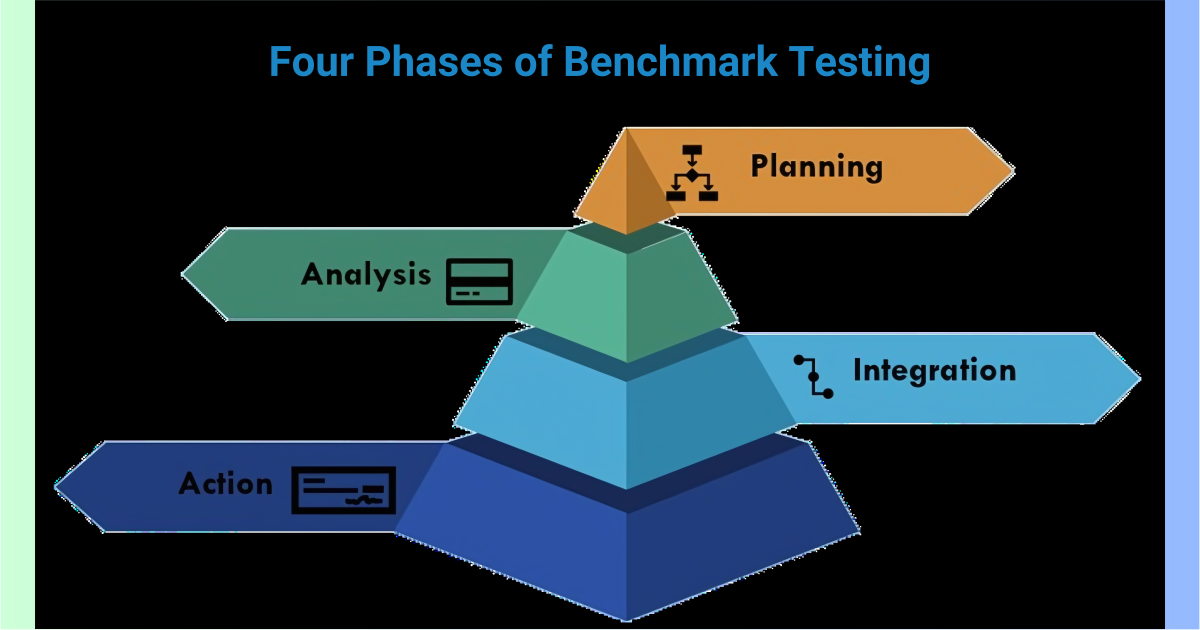
performance benchmarking for applications は、software system の performance と capabilities を評価する structured approach です。通常、planning、analysis、integration、action の 4 phases に分かれます。
Planning Phase
planning phase は benchmark testing process の土台です。この段階では objectives を明確にし、testing scope を決めます。
主な活動には、評価すべき metrics の決定、appropriate benchmarking tools の選定、そして benchmark や performance standards の設定が含まれます。組織の overall goals と aligned しているかを確認することも重要です。
Analysis Phase
planning が終わると analysis phase に移ります。この段階では、real-world user scenarios を模した benchmark tests を実行し、得られた data を分析して performance bottlenecks や inefficiencies を特定します。
さらに、statistical and comparative analysis techniques を使って raw data を解釈し、さまざまな workloads の中で system がどう振る舞うかを把握します。
Integration Phase
integration phase では、analysis から得た insights を software development と operations に組み込みます。performance improvements を code、system configurations、delivery process に反映させる段階です。
同時に、変更が software の他の側面へ悪影響を与えないようにする必要があります。continuous integration practices を用いれば、こうした改善の自動適用と再検証がしやすくなります。
Action Phase
最後の action phase では、optimized software を production へ deploy し、regular performance reviews を通じて improvements の持続性を確保します。continuous monitoring により、新たな performance issues も早めに把握できます。
The Metrics of Benchmark Testing

benchmarking は、real-world usage を模倣して bottlenecks を見つけ、performance baseline を確立することで、performance と user experience を最適化します。ここでは system capabilities を理解するための主要 metrics を確認します。
Performance Metrics
Response Time
この metric は user request に system が応答するまでの時間を測ります。user experience へ直接影響するため非常に重要です。
Throughput
throughput は、一定時間内に system が処理できる transactions や operations の数を示します。高い throughput は、大量タスクを効率よく同時処理できることを意味します。
Latency
latency は request と response 開始の間の delay を測ります。online gaming や financial platforms のような real-time processing を必要とする application では特に重要です。
Scalability Metrics
Load Capacity
この metric は、performance が degrade し始める前に system が処理できる maximum load を評価します。
Peak Load
peak load は、system が効率よく処理できる highest level of activity を示します。sale events のような sudden spikes を想定する applications では特に重要です。
Elasticity
elasticity は、load の変化に応じて resources を up/down scale できる能力を測ります。cloud-based applications にとって重要です。
Reliability Metrics
Error Rate
error rate は、operations 中にどの程度 errors が起こるかを示します。low error rate は reliable system の証拠です。
Mean Time Between Failures (MTBF)
MTBF は system failures の間隔を平均で測る reliability indicator です。
Mean Time to Repair (MTTR)
MTTR は failure 後、system を正常状態へ戻すまでにかかる平均時間を示します。短い方が望ましいです。
Resource Utilization Metrics
CPU Usage
operations 中に使われた CPU capacity の割合です。高すぎると bottlenecks の兆候になります。
Memory Usage
system が使用する RAM 量を追跡します。memory-intensive applications において特に重要です。
Disk I/O
disk の read/write operations を測ります。heavy data processing がある applications では最適化が重要です。
Network Metrics
Bandwidth
network の data transfer capacity を測ります。data-intensive operations を円滑に処理するために重要です。
Packet Loss
packet loss は、transmission 中に失われた data packets を追跡します。low packet loss は reliable communication に不可欠です。
Network Latency
network latency は network 越しの transmission delay を測ります。video conferencing や online gaming に重要です。
sample benchmark network latency tests を見れば、ideal connection、network congestion、long-distance connection で結果がどう変わるかがわかります。
How to Interpret Benchmark Test Results

benchmark testing results を正しく interpret することは、performance improvement に活かすうえで鍵になります。
Data Collection and Monitoring
これは performance benchmarking for applications の基盤です。goals を定義し、benchmark tests を実行し、response times、throughput、resource utilization などの data を集めます。
Data Analysis Techniques
この段階では raw data から insight を引き出すためにさまざまな techniques を使います。
- Statistical Analysis: standard deviation などで pattern や outliers を見つける
- Trend Analysis: metrics の変化を時間軸で追う
- Comparative Analysis: benchmarks や competitor data と比較する
Visualization of Results
raw numbers だけに頼ってはいけません。charts や graphs による visualization は、trends、outliers、further investigation が必要な areas を見つけやすくします。
Optimization and Retesting
analysis と visualization に基づいて得られた insight を使い、次の actions を取ります。
- Identifying Bottlenecks
- Prioritizing Improvements
- Implementing Optimizations
- Retesting
Conclusion
benchmark testing は、software systems が performance standards を満たし、expected load を効率よく処理できるかを確認するための重要な practice です。key metrics に集中することで、organizations は software capabilities を包括的に理解できます。さらに、thorough data collection、analysis、visualization を通じて結果を interpret することが、効果的な optimizations につながります。
最終的に、consistent performance benchmarking for applications と analysis は、より高品質で信頼性が高く、より良い performance を持つ software systems へつながります。